

An SMS marketing business in India needs more than credits and a list of numbers. First, define the service and its first customer. Decide which messages you will support. Then assign owners for recipient data and the India sender requirements that apply. These choices show what must be ready before a campaign can use a messaging platform.
Follow a clear order. Choose the business model, set up permission and data controls, and prepare the required DLT assets. Next, build the project brief and arrange account setup. Run a small test before daily operations begin. SMSBoosting joins at the platform stage as an international SMS aggregator. It can open the account and prepare a suitable available setup. The customer then uses the agreed interface and reviews reports to improve the operation.
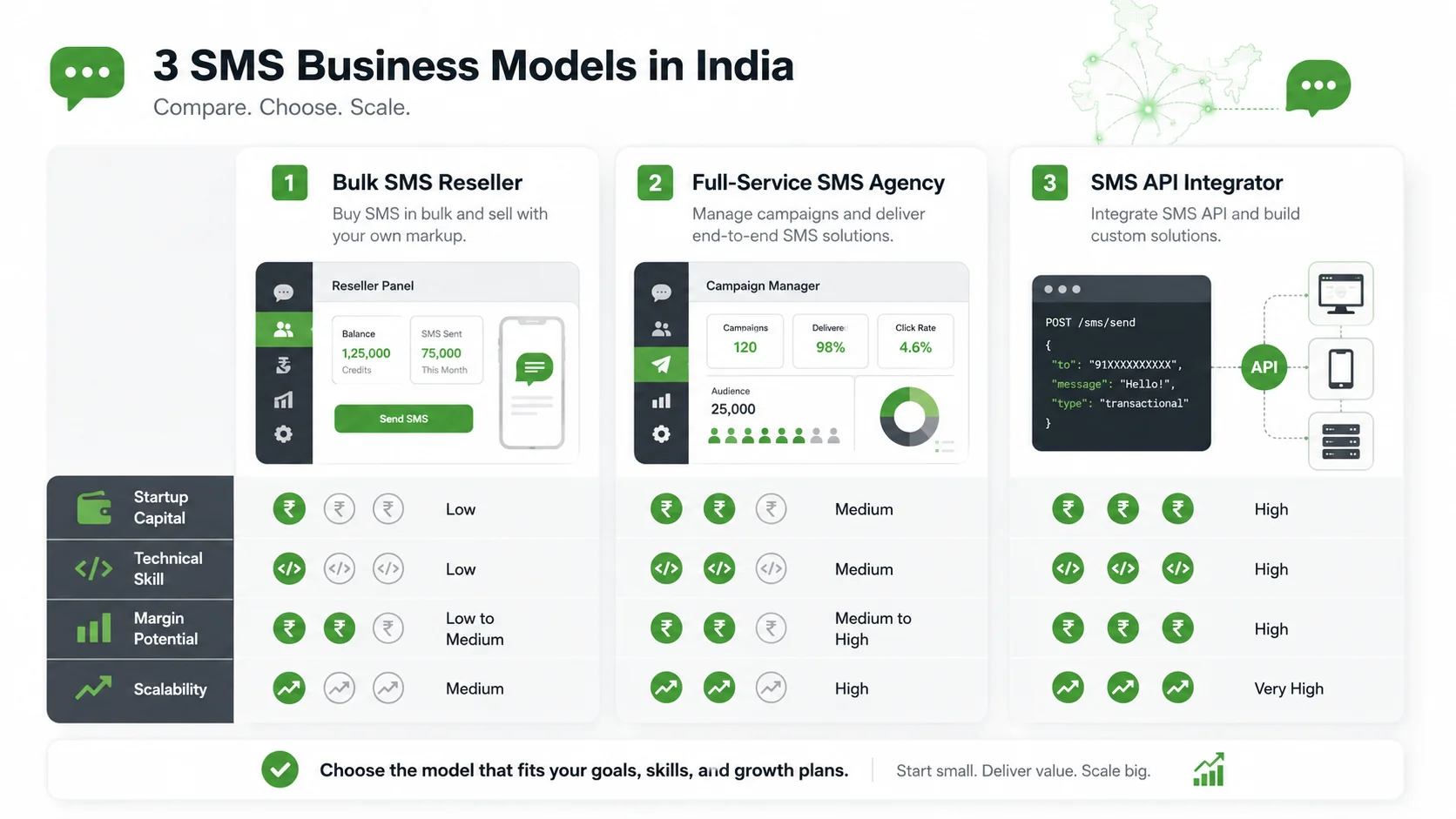
Choose one model, one customer profile, and one main message type first. Do this before you compare platforms or prepare a quote. A narrow offer is easier to run than a service that promises every type of SMS to every company.
| Model | First customer | Main work | Sender-asset owner | Proof before sale |
|---|---|---|---|---|
| Own-brand operation. | Your own business or product team. | Plan and run messages for your customers. | Your business or corresponding Principal Entity. | Confirm the use case, data basis, sender assets, workflow, and test owner. |
| Managed service or reseller. | A defined client type or sector. | Gather inputs, coordinate campaigns, report results, and support issues. | The applicable client or Principal Entity always owns its sender assets. The contract assigns coordination, campaign execution, and support work. | Record duties, readiness, campaign inputs, and support scope. |
| Integration-led service. | A client with app-based messages or an existing SMS system. | Connect events to HTTP API or SMPP and handle reports. | The applicable sender or client owns and supplies campaign and sender assets. | Assign an owner for tests, errors, and reports. |
Pick one first customer profile
Name the customer in useful terms. “Retailers with planned promotions” is clearer than “all Indian businesses.” “SaaS products that send login codes and account alerts” is clearer than “technology firms.” A clear profile shows which data, samples, tools, support, and DLT status the customer must provide.
This choice also helps you define a realistic service boundary. An own-brand team may control both the audience and the application that triggers a message. A managed-service team may receive campaign inputs from a client but still needs a clear owner for every sender asset. An integration-led business may spend more time on request handling and reports than on campaign planning.
Define supported message categories
Keep marketing campaigns separate from service notices, transaction messages, and login codes. Purpose affects the audience, content, sender assets, tests, and applicable readiness and review. If you support several categories, give each one its own workflow instead of treating every SMS as interchangeable.
Use the model table before quoting
The table controls promises. It does not forecast revenue. Confirm who prepares the assets, approves the data and text, handles the integration, and supports the client. This keeps the platform fee separate from the full cost of your service.
Build consent and recipient-data controls before a campaign
Recipient controls should exist before the first platform send. A phone number does not explain why the person is in the audience, what purpose applies, or whether the record should be suppressed. Build an operating trail for every list, including client-supplied data.
Record source, purpose, owner, and suppression state
Record where the numbers came from, the intended purpose, the business or client responsible for the data, and the current eligibility or suppression state. Where consent-template registration and consumer consent apply, record the responsible Principal Entity’s status or obtain a clear client attestation. Do not assume one consent process covers every message type.
Use five stages:
- Capture the data source and stated purpose.
- Record applicable consent or client-attestation status.
- Check eligibility and suppression information.
- Send only the approved audience and content pairing.
- Feed changes, opt-outs, and exceptions into the next audience cycle.
This control gives the campaign owner a reason to stop when the audience basis is unclear. It does not replace current professional or regulatory guidance. It also makes client handoffs easier to review because the data owner, campaign owner, and service team can see the same status.
Keep content tied to the approved purpose and audience
Do not reuse a list merely because the numbers are available. Match each campaign to its purpose, content, sender assets, and audience. A changed offer, template, or recipient source creates a new review point. This keeps permission and suppression work in the campaign process instead of a one-time onboarding form.
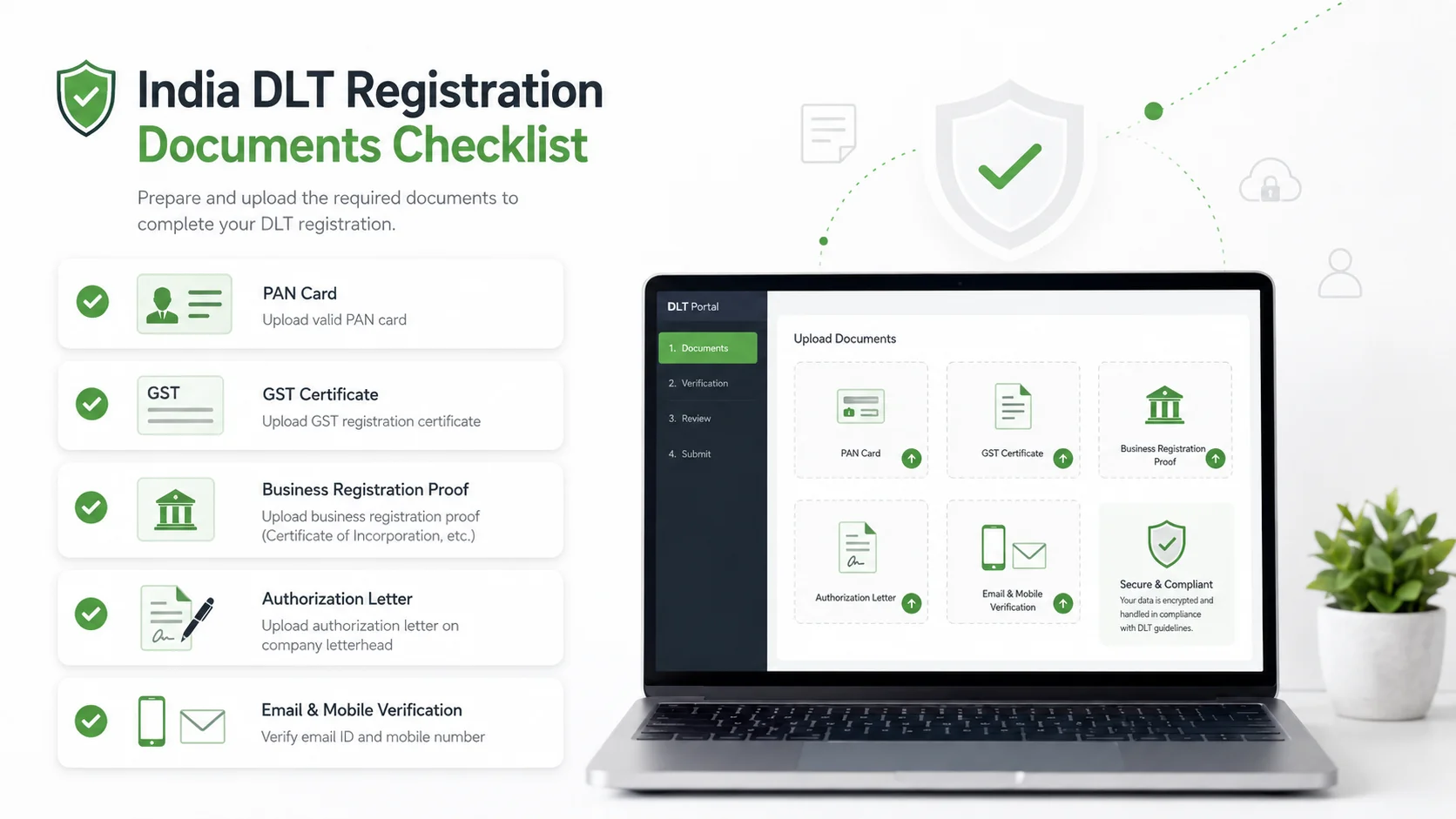
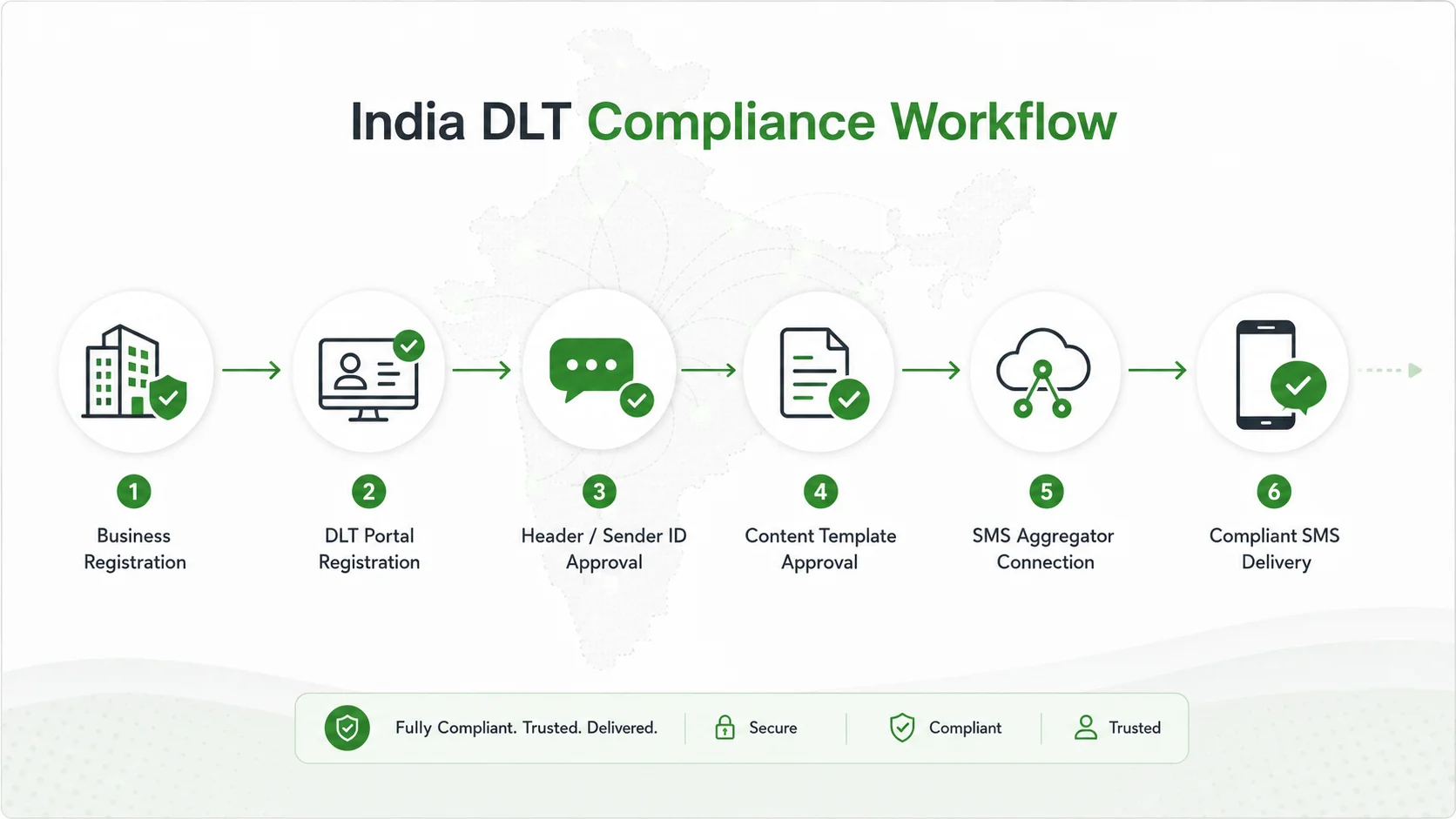
India treats the Sender or Principal Entity as a different role from the Telemarketer or Aggregator. Your operating plan should show that split. A business that sends for itself owns its sender work. In a managed service, the applicable client or Principal Entity keeps ownership of its sender assets. SMSBoosting handles account and platform setup in a later step.
Current TRAI guidance for senders lists several sender tasks. They include Principal Entity registration, header assignment, and content-template registration. They also include sending the relevant IDs. Consent-template registration and consumer consent apply where required. Use this frame to track readiness, then confirm current needs for the real campaign.
| Asset or control | Responsible side | Status to record | Stop condition |
|---|---|---|---|
| Principal Entity or entity status. | The business or the client’s Principal Entity. | Record the owner and current status. | No owner is clear. |
| Header. | The sender or Principal Entity. | Record its status and campaign use. | Ownership or fit is unclear. |
| Content template. | The sender or Principal Entity. | Record its status and covered sample. | The planned text does not match. |
| PE, header, and content IDs. | The sender provides them through the agreed process. | Tie the values to the campaign record. | A needed value is missing. |
| Consent template and consent. | The sender or Principal Entity where required. | Record whether they apply, plus owner and status. | Their use or status is unclear. |
| Audience and suppression. | The business or client that controls the list. | Record source, purpose, review, and exclusions. | Inclusion cannot be explained. |
| Platform account and setup. | SMSBoosting after it receives the brief. | Record the account and suitable available setup. | Inputs are too vague to test. |
Separate sender readiness from platform setup
An open platform account does not create customer sender assets. In the same way, ready sender assets do not configure a platform account. Keep both tracks visible and give each task an owner. In a managed service, the contract can assign coordination, campaign execution, reporting, and support. It does not shift the applicable client’s or Principal Entity’s ownership of sender assets to SMSBoosting or the service provider.
Stop when ownership or message alignment is unclear
Pause the launch if the entity, header, template, audience, or text match is unclear. Resolve the owner and current status first. Current portal and case requirements should be checked for the real campaign because the accepted responsibility framework does not create one fee, document set, or schedule for every business. SMSBoosting can use the readiness status to plan setup and tests, while the customer or corresponding Principal Entity completes its DLT work.
Turn the responsibility matrix into one implementation brief. Send status and representative examples, not an assumed universal document bundle. Remove personal data, live credentials, and unnecessary recipient details from samples.
Include these fields:
- Operating model and customer: State whether the operation is own-brand, managed/reseller, or integration-led, and define the first customer.
- India use case: Name each message category and what triggers it.
- Sample content: Provide representative text and identify variable fields.
- Sender readiness: Record the applicable Principal Entity or entity, header, content-template, and consent status. Mark unresolved items clearly.
- Traffic pattern: Estimate normal and peak volume, bursts, and the planned launch period.
- Interface: State whether you prefer the web platform, HTTP API, or SMPP, and explain how messages begin.
- Test plan: Name test owners, known recipients, cases, and records to review.
- Support and reporting: Assign people to data, content, integration, and platform exceptions.
Do not add a preferred Indian operator route. SMSBoosting uses the destination, use case, sender status, traffic, interface, timing, and current availability to assess a suitable setup. A complete brief makes the first test more useful because both sides can see what is ready, what is missing, and who owns the next action.
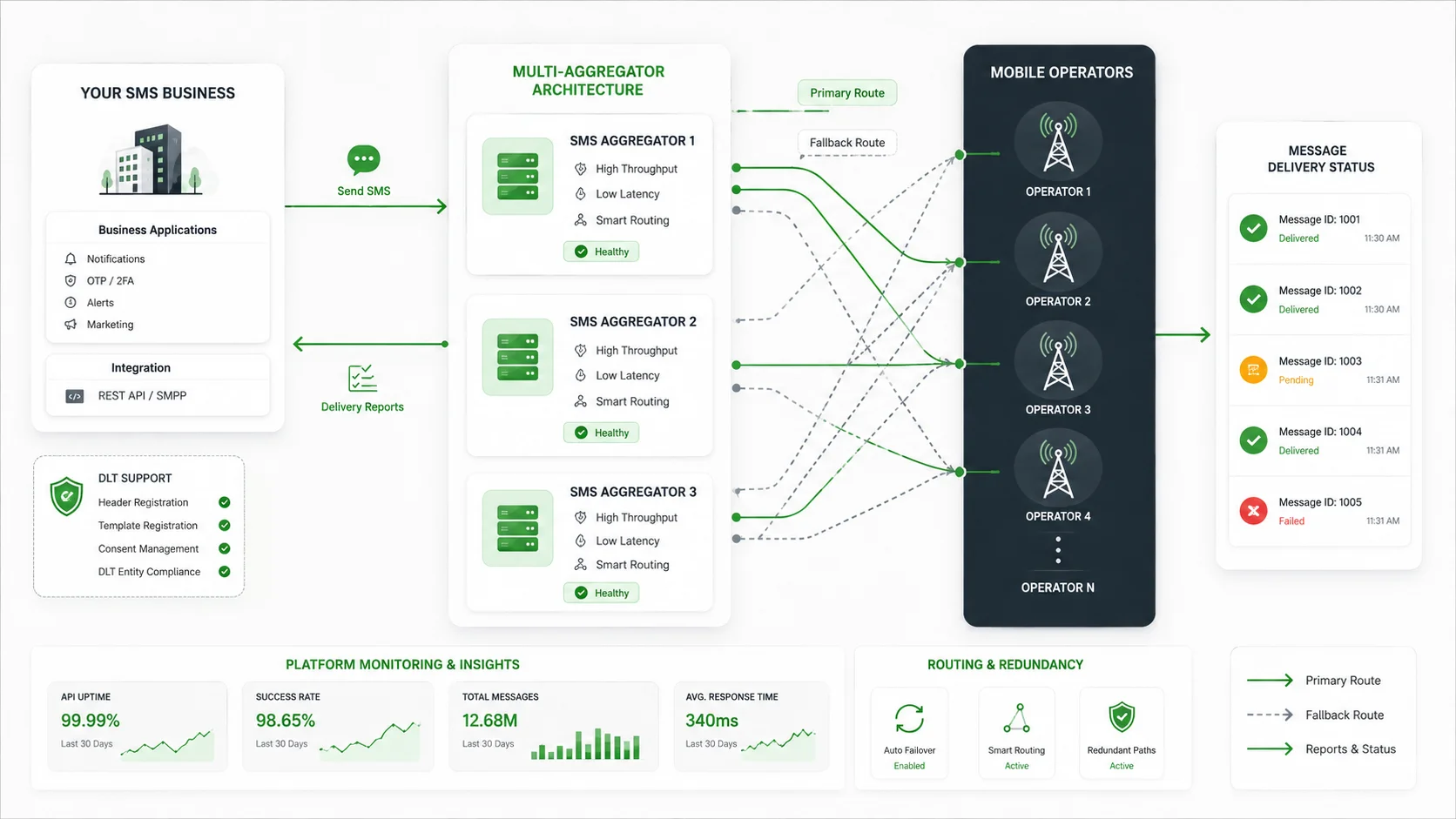
Once the approved brief and sender-side status are clear, the platform process follows one sequence.
- Submit the approved brief. Add only details that have changed since the readiness review.
- Open and configure the account. SMSBoosting opens the account and configures a suitable currently available setup for the agreed requirements.
- Sign in through the official website. The customer works in the account environment prepared for the project.
- Recharge before sending. The customer recharges the account as part of the confirmed customer flow.
- Send through the agreed interface. Use the web platform, HTTP API, or SMPP after the sender assets, configuration, and test case are ready.
- Review records and follow up. Share focused exceptions with SMSBoosting for setup follow-up, further testing, and operational improvement.
The customer or corresponding Principal Entity remains responsible for applicable DLT assets, content, recipient data, and campaign decisions. SMSBoosting is the international aggregator and platform provider for account opening and suitable messaging configuration.
Evaluate the configured setup against the agreed workflow, interface, test cases, reports, and support handoff. Confirm any project-specific service or performance requirements during account setup. This gives both sides a positive, practical basis for deciding whether the setup is ready for the controlled test.
Choose web, HTTP API, or SMPP and run a controlled test
Choose the interface by how a message starts and who runs the send. Also check which records the team must handle. The most useful choice is the one that fits the operating process and can be tested clearly.
| Interface | Best fit | First check |
|---|---|---|
| Web platform. | A team that creates and manages sends in the platform. | Check the campaign setup, sender context, task record, and reports. |
| HTTP API. | App-based OTPs, alerts, notices, or campaign requests. | Check fields, keys, submit IDs, errors, and reports. |
| SMPP. | An agreed link for an existing SMS system. | Check the link, submits, errors, and reports. |
Web for platform-led campaign work
Use the web platform when a team needs to create and manage sends in the account environment. For the first test, check the purpose, exact text, sender context, task name, and records shown after submission. Keep the same campaign inputs that were reviewed in the project brief.
HTTP API for application-triggered sending and reports
The current SMSBoosting API documentation covers send fields, responses, IDs, later queries, and pushed reports. Build from the current docs and account instructions. Keep keys out of logs and test data. Use the endpoint and credentials supplied for the actual account rather than copying an unrelated example.
SMPP for an agreed system connection
SMPP can fit an existing SMS system when the link is agreed during setup. Assign an integration owner. Test the connection, submit process, errors, and reports against the account terms. Record project-specific limits and service requirements during setup so the operating team knows what to monitor.
Capture evidence from a small controlled test
Record the purpose, sender-asset status, sample, known test number, interface, time, task or submit ID, report value, tester result, issue owner, and next action. Use a small set of known recipients. Keep different message types in separate cases.
IDs, progress, counts, queries, and pushed records show what the platform or API recorded. They help with checks and fault finding. Platform or API status, IDs, counts, and reports are not by themselves proof or a guarantee that a handset received the message. Read each record with the test observation and report context. If the result differs from the plan, compare the same fields, change one input, and run the case again.
Turn the test into a repeatable operating loop
A good small test starts the operating process. It does not end setup. Turn the test fields into a campaign record that another team member can review without relying on memory or chat history.
Before each send, confirm the campaign owner, list source, suppression check, purpose, DLT assets, exact text, sender context, interface, schedule, and report path. Keep the task or submit reference with the campaign record. This gives the team one place to compare the approved plan, platform records, and tester notes.
Assign four contacts, even if one person fills more than one role:
- Campaign owner: approves the purpose, text, timing, and client promise.
- Data owner: checks the list source, eligibility, suppression, and data quality.
- Integration owner: handles platform inputs, API requests, SMPP work, keys, and errors.
- Platform contact: takes account or setup questions to SMSBoosting.
During a send, use the labels shown by the platform. Task Management can show status, submit progress, planned time, and total, success, and fail counts. The API can return submit IDs and support report queries or pushed records. Record the real label and value, then compare it with the test case and observed result.
If a problem appears, first decide who owns it. The issue may involve data, content and sender assets, the integration, or account setup. Keep one repeatable case with the time, text, test number, task or request reference, returned record, and observed result. Change one input and test again.
At campaign close, record what changed and what remains open. Note what must be checked next time. This loop also shows the support work that belongs in your service package. Over several campaigns, those records give the business a better basis for staffing, client updates, and package design.
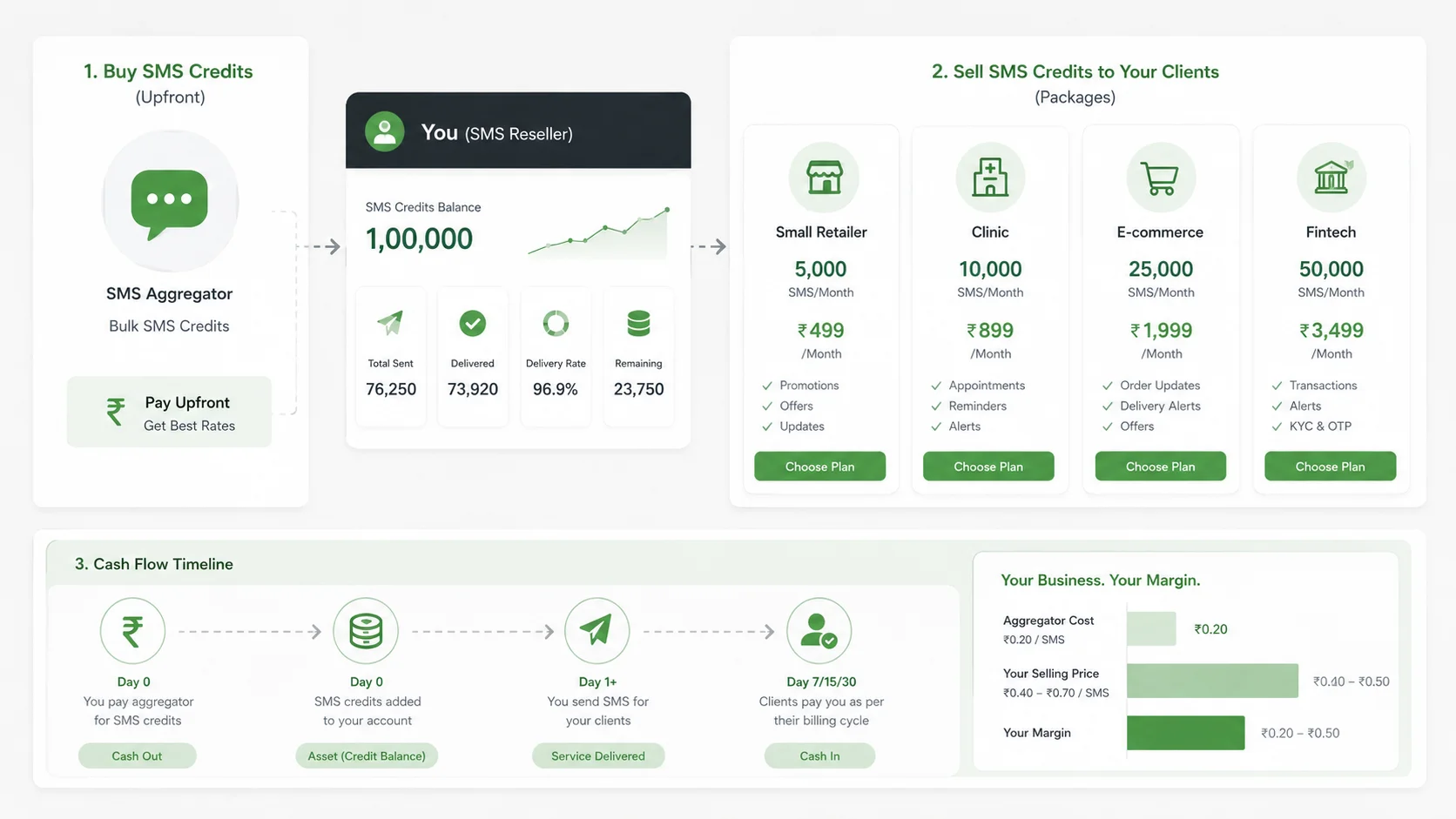
Keep messaging costs separate from the work your business sells. Your team may also handle client setup, campaign checks, data review, system links, tests, reports, errors, and support. Each task has an owner and takes time.
SMSBoosting’s owner-confirmed starting reference for India is about EUR 0.0045 per SMS. This SMSBoosting starting reference is not an India market benchmark or the final price for a project. Request a current quote based on the destination, use case, sender and DLT readiness, volume, available setup, interface, timing, testing, and support needs.
Use one sheet for each quote or package:
| Input | Record for comparison |
|---|---|
| Traffic. | Normal and peak volume, bursts, and launch period. |
| Campaign. | India destination, use case, message type, and sample. |
| Readiness. | Entity or PE, header, template, and consent status. |
| Setup. | Current availability and agreed setup basis. |
| Interface. | Web, HTTP API, or SMPP, plus integration work. |
| Test and reports. | Cases, records, owners, and follow-up. |
| Service scope. | Setup, campaign work, checks, reports, and support. |
| Quote basis. | Validity date, included work, and open conditions. |
Compare all offers on the same inputs. Add internal service costs from work the team can describe and measure. Keep supplier messaging terms, client service scope, and internal workload as separate lines. This makes a package easier to explain and update when volume, support, or project conditions change.
Send a launch-ready brief
Tell SMSBoosting your business model and use case. Name India as the destination. Include representative messages and the sender and DLT readiness. Add normal and peak volume, your chosen interface, and the planned launch timing. If you already have a full project brief, send it with any changes marked clearly.
SMSBoosting can then clarify the account-opening steps and a suitable available configuration. It can also clarify the test approach, report follow-up, and current quote. Your business, or the applicable client and Principal Entity, keeps ownership of the India sender assets and campaign inputs.