
If you are asking What Is an SMS API, the quick answer is this: it is the software link that lets your app, website, or business system send and receive text messages through mobile carrier networks by code instead of by hand. At SMSBoosting, this matters because the platform is built for business messaging across e-commerce, finance, payments, and logistics, with API support, OTP, notification, and marketing SMS under one service stack.
Welcome to our guide on What Is an SMS API. We are going to break down what it is, how it works, what makes it different from internet chat apps, and where businesses use it every day. We will also show you how a provider like SMSBoosting structures API requests, delivery reports, and OTP traffic so the topic feels practical, not abstract.
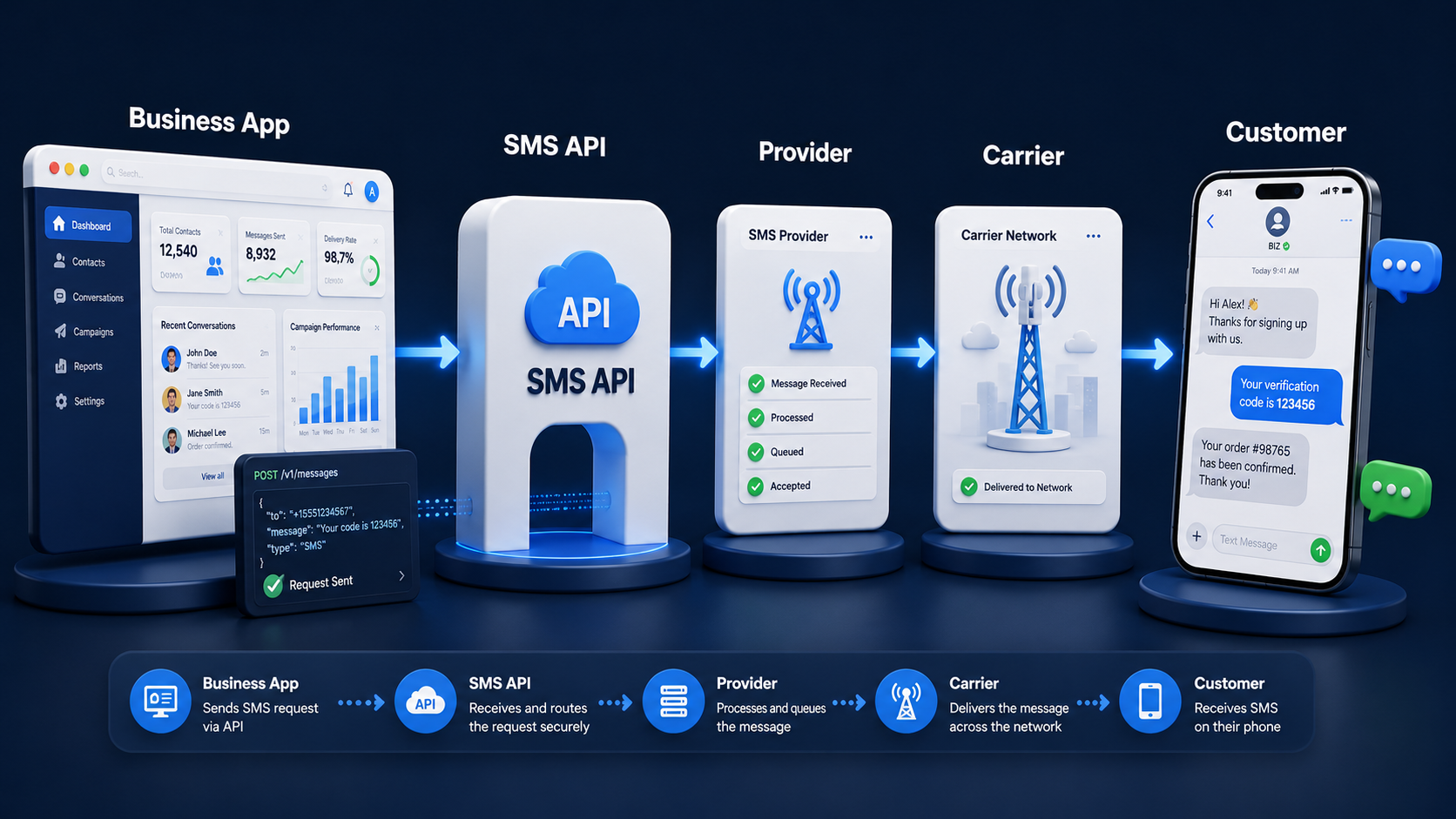
What Is an SMS API?
An SMS API is a tool that lets applications send and receive text messages through a software connection instead of doing it manually.
A Simple Definition of SMS API
An SMS API is a software interface that lets applications send and receive SMS messages programmatically through an SMS gateway or messaging platform. In plain words, your system makes a request, the provider handles the telecom side, and the message moves toward the recipient over carrier networks. That is why provider docs often describe an SMS API as the bridge between web software and mobile messaging infrastructure.
For a business, that means you do not need staff manually sending every login code, shipping alert, payment reminder, or campaign message one by one. Your checkout flow, banking app, CRM, booking tool, or logistics system can trigger those messages automatically through a sms api.
How SMS API Differs from Standard Internet Messaging
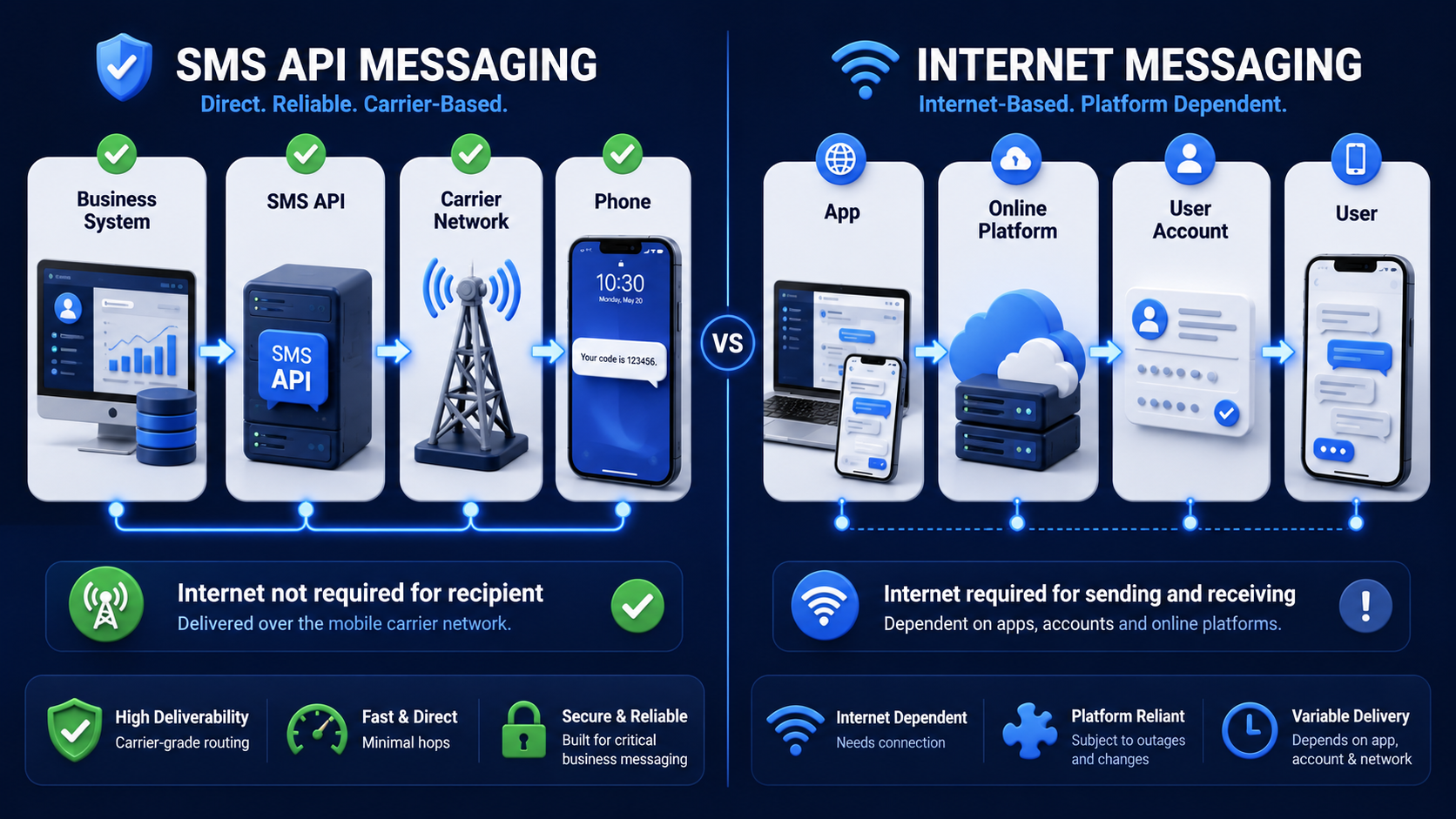
An SMS API differs from standard internet messaging because SMS goes through telecom carrier networks, while internet messaging depends on app-based internet delivery between users on the same or compatible platforms. In many cases, the recipient can receive SMS without an internet connection, while internet chat apps still need data or Wi-Fi plus the app account itself.
| Feature | SMS API Messaging | Standard Internet Messaging |
| Delivery path | App or business system → SMS provider → carrier network → handset | App or service → internet platform → user account or device |
| Recipient internet needed | Usually no | Yes |
| Sender identity | Phone number, shortcode, or alphanumeric sender ID depending on market | App profile, username, or account identity |
| Common business uses | OTP, alerts, reminders, order updates, promotions | Chat, support conversations, richer app-based messaging |
| Two-way support | Depends on sender type and country rules | Usually built into the app platform |
What Systems Can Use an SMS API?
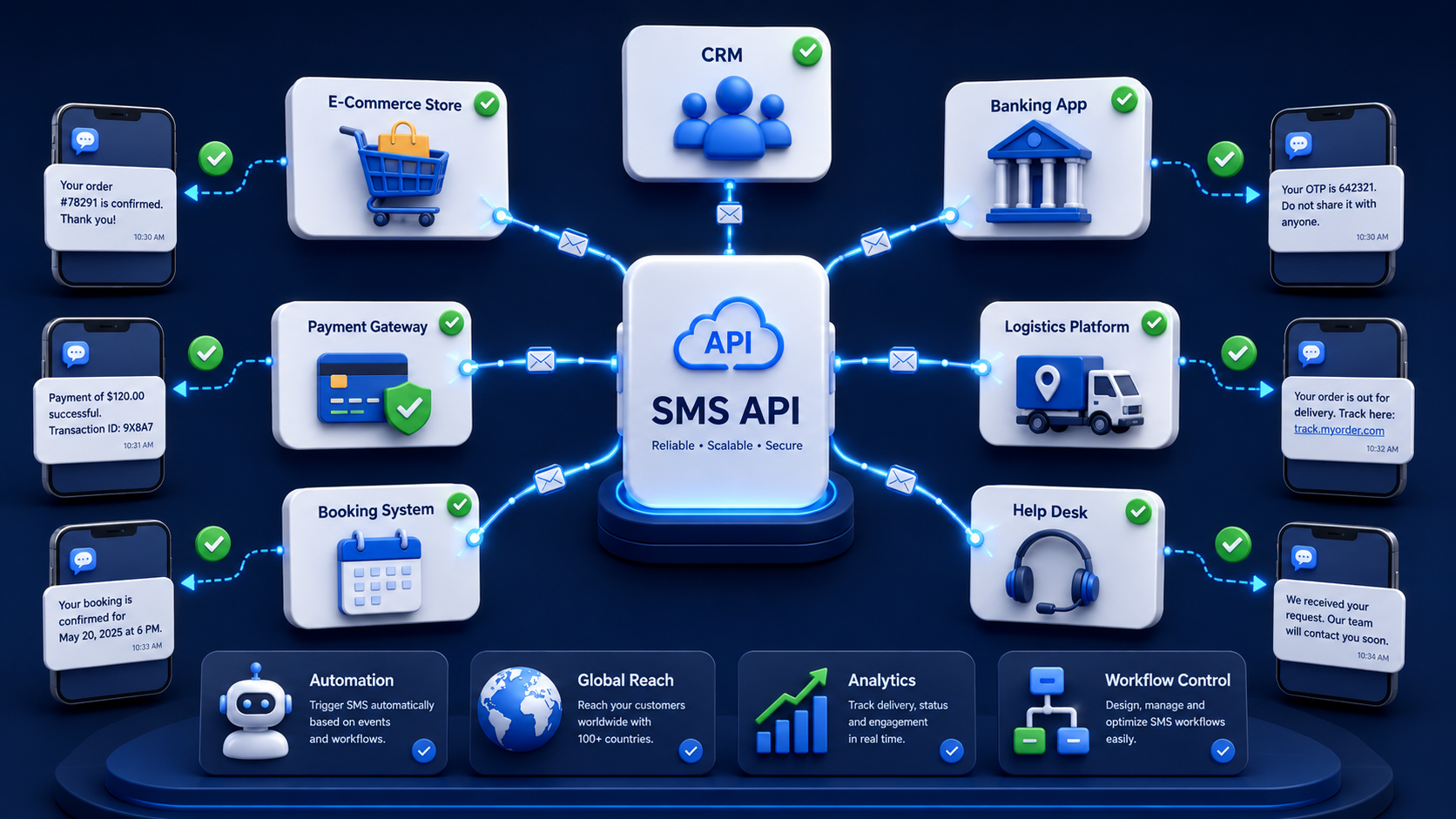
An SMS API can be used by almost any system that can make web requests. That includes websites, mobile apps, CRMs, e-commerce stores, payment flows, banking systems, ERP tools, booking systems, help desks, and internal business software.
Some of the most common business systems that use SMS APIs include:
- E-Commerce Platforms: Stores can send order confirmations, cart reminders, shipping updates, and flash sale messages automatically from checkout or CRM workflows.
- Finance And Payment Systems: Banks, fintech apps, and payment gateways can send verification codes, transaction alerts, and fraud checks in real time.
- Logistics Platforms: Delivery systems can send pickup notices, dispatch updates, ETA alerts, and failed delivery messages without manual work.
- Booking And Service Tools: Clinics, repair teams, and service businesses can send appointment reminders, service windows, and follow-up notices through automated triggers.
How Does an SMS API Work?
An SMS API works by connecting your app, website, or system to an SMS service provider so messages can be sent, received, and tracked automatically.
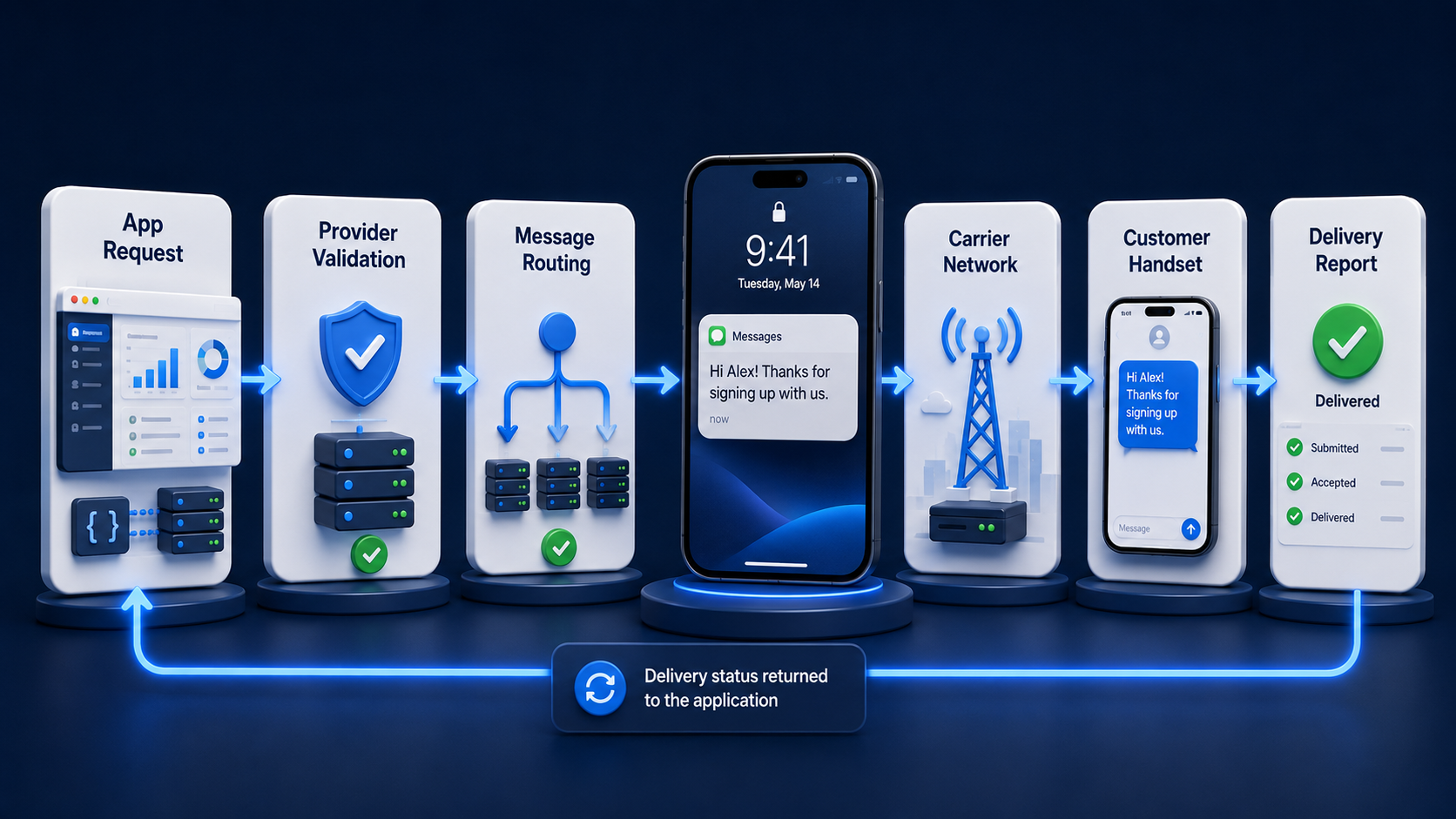
From API Request to Carrier Delivery
An SMS API works by taking your application request, validating it, routing it through the provider’s messaging layer, and then handing it off to carrier routes for delivery. The normal flow is simple at a high level: your app creates the message request, the provider checks the request details, the platform chooses a route, the message moves toward the carrier network, and later you receive status feedback.
That flow sounds easy, but one detail trips up a lot of teams: an API success response does not always mean the handset already received the message. In provider documentation, “accepted,” “queued,” or “sent” often means the platform accepted responsibility for processing the request. Delivery confirmation comes later through delivery reports when downstream networks return that signal.
HTTP Methods, JSON Requests, and API Responses
Most SMS APIs use standard HTTP requests, and many support JSON bodies for POST requests. In SMSBoosting’s API documentation, the API supports functions like get balance, send SMS, get report, get SMS, push URL, and send message. The docs also show both HTTP GET and HTTP POST options, with JSON payloads for POST requests. GET sending supports up to 100 numbers at a time, while POST can submit up to 10,000 numbers at once.
A provider request usually includes authentication data, recipient numbers, message content, sender information when supported, and optional timing fields. SMSBoosting’s examples include parameters like account, password, numbers, content, smstype, sender, and sendtime, which is a very typical shape for business SMS APIs.
A simple POST request pattern based on the site’s API structure would look like this:
POST /sendsms
Content-Type: application/json
{
“account”: “your_account”,
“password”: “your_password”,
“content”: “Your verification code is 752160”,
“smstype”: 0,
“numbers”: “6591234567”
}
Delivery Reports, Status Codes, and Error Handling
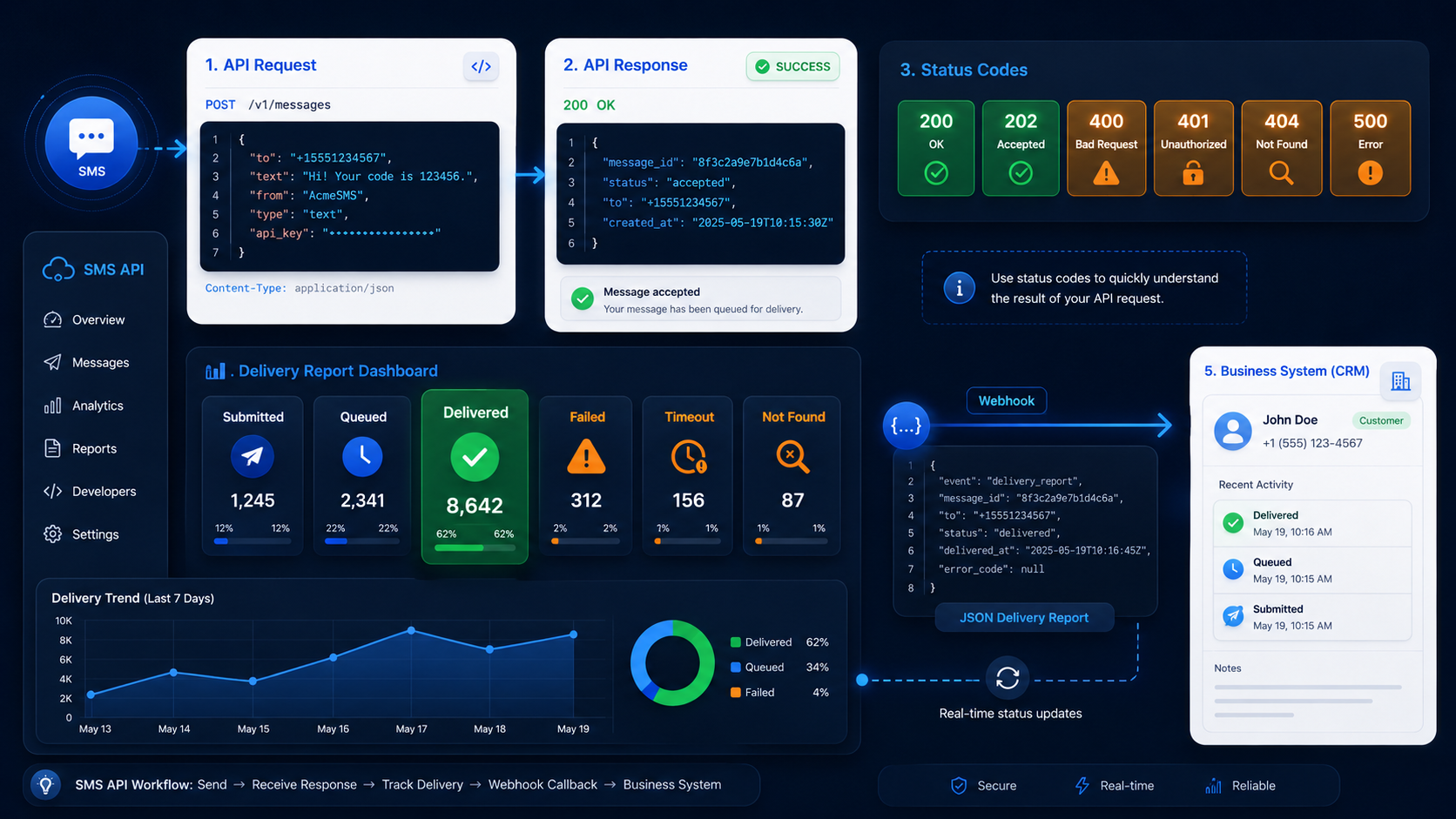
Delivery reports tell you what happened after submission, and they are a core part of using an SMS API well. SMSBoosting’s API docs show a getreport function that lets you query send results by message ID, with support for up to 200 IDs in one GET request. The report output includes counts for success, fail, unsent, sending, delivery success, delivery failure, delivery timeout, and not found.
The same documentation also lists submission and error states. Examples include 0 for success, -1 for authentication error, -3 for sensitive characters, -5 for overly long content, -8 for empty numbers, and -10 for insufficient channel balance. That kind of status handling matters because debugging API requests is only half the job. You also need to handle content problems, routing issues, timing errors, and downstream delivery outcomes.
Many providers also support push callbacks or webhooks. SMSBoosting’s API page describes a push URL option where the platform can send report data in JSON to a customer-specified URL, which gives your system a live way to track message outcomes without polling all the time.
What Are the Key Benefits of an SMS API?
The key benefits of an SMS API include faster automation, easier system integration, real-time message delivery, and better control over business communication workflows.
Automated Messaging Across Systems and Workflows
An SMS API helps you automate messaging across your business workflows. Once it is connected, your system can send the right message at the right moment without manual effort. That includes order updates, OTP codes, payment alerts, appointment reminders, onboarding messages, and campaign sends tied to user actions or schedules.
That automation is a big reason businesses use APIs instead of a manual dashboard for every message. It saves time, keeps communication consistent, and reduces the risk of staff missing time-sensitive events.
Easy Integration with Apps, Websites, and CRMs
An SMS API is easy to integrate compared with building direct telecom connections yourself because it uses familiar web methods like HTTPS, standard authentication, and structured request formats. Developer-facing docs commonly present messaging APIs as REST-style services that your application can call from backend logic, website forms, mobile apps, and CRM workflows.
That is why a sms api service is useful for business teams that already run web systems. Your developers work with web requests and response data, while the provider handles carrier connectivity, message routing, and reporting layers behind the scenes.
Scalable Delivery and Global Reach
An SMS API gives you a path to scale because providers can process high message volumes and manage cross-border delivery more efficiently than a business doing that work alone. SMSBoosting says it brings more than 10 years of experience in global messaging and works with 1,000+ global carrier and supplier partners. Its API docs also show batch handling for both smaller GET sends and much larger POST submissions.
Global reach does not mean every country behaves the same, though. SMSBoosting’s own guidance notes that sender options vary by market, and some countries support alphanumeric sender IDs better than others. In some places, two-way messaging is easy. In others, it is limited or tied to different sender rules.
Real-Time Delivery Tracking and Analytics
An SMS API improves visibility because it gives your system message IDs, status responses, delivery reports, and callback options you can log and analyze. SMSBoosting’s platform pages emphasize track-and-analyze capabilities, while the API docs show both query-based reporting and pushed JSON reports for ongoing monitoring.
This is useful for more than simple delivery counts. Once you log message outcomes, you can compare routes, measure OTP completion windows, spot failed numbers, review content issues, and see where business performance drops after the API accepted the request.
What Are the Most Common SMS API Use Cases?
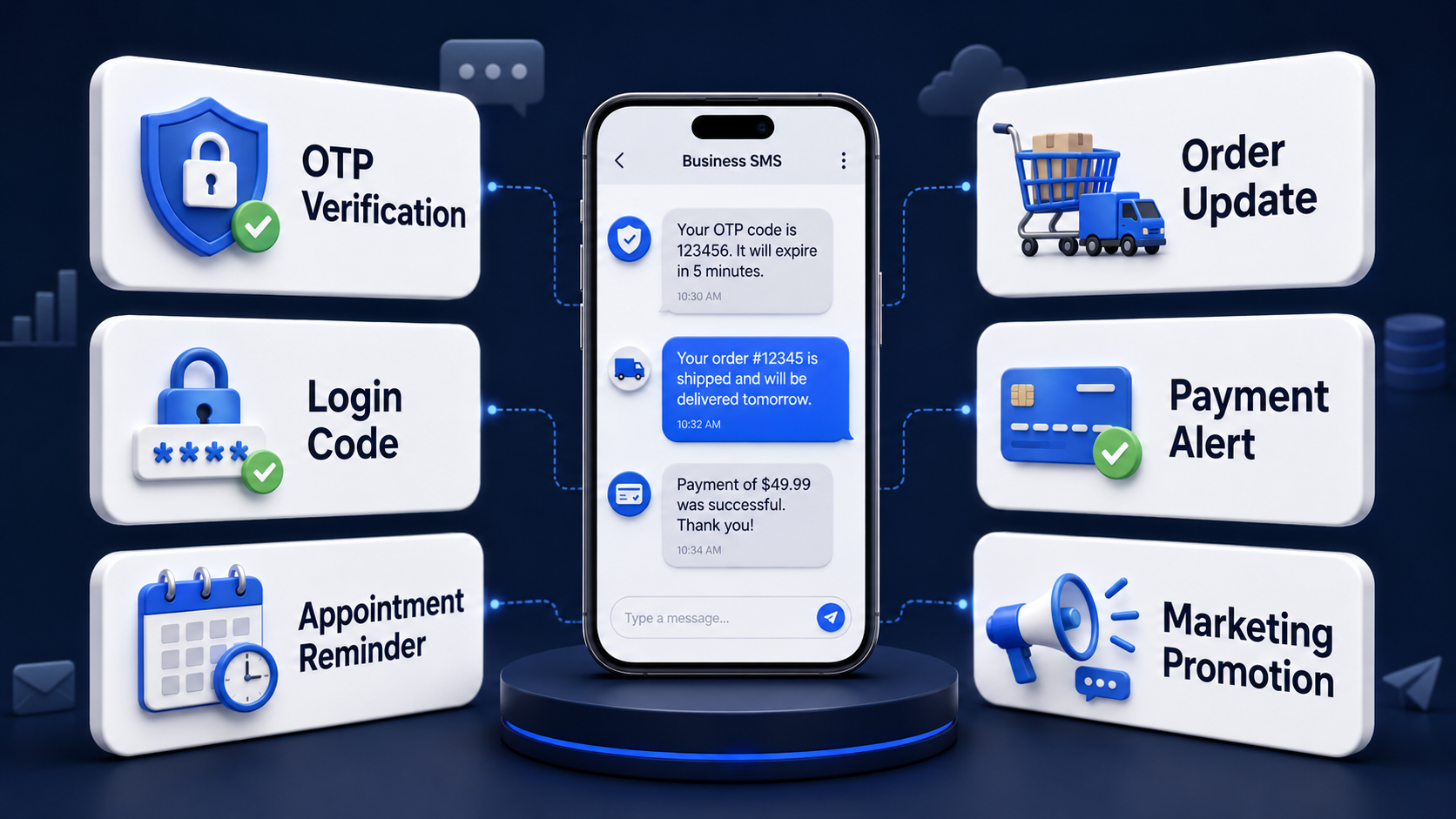
The most common SMS API use cases include OTP verification, order updates, appointment reminders, alerts, and automated marketing messages sent through business systems.
OTP, Login Verification, and Two-Factor Authentication
OTP and verification are some of the most common SMS API use cases because they are time-sensitive and easy to automate from login or payment flows. SMSBoosting’s OTP product is built around low-latency delivery, route stability, template and expiry controls, peak-traffic handling, and real-time delivery visibility for logins, registration, password reset, payment authorization, and other sensitive actions.
If your product needs otp sms for login codes or a larger otp sms service for onboarding spikes and payment checks, the API model fits well because your app can trigger each code instantly when the user reaches that step.
Marketing and Promotional Message Automation
Marketing and promotional messaging is another common use case because APIs let teams trigger campaigns from list segments, event rules, or customer behavior. Businesses use SMS APIs for coupons, sale alerts, launch announcements, feedback requests, and cart or browse reminders, all sent from connected systems instead of from separate manual workflows.
For B2B teams, this is helpful when marketing SMS needs to sit close to the rest of the stack. A store can connect campaign logic to CRM tags. A finance brand can segment by risk or lifecycle stage. A logistics business can mix service notices with regional promotions in the right market.
Transactional Notifications for Orders, Payments, and Updates
Transactional notifications are one of the strongest fits for an SMS API because the message is tied to a user action or a business event. Common examples include order confirmations, payment receipts, account changes, shipment milestones, fraud warnings, and service status notices.
These messages usually come from internal systems like checkout tools, payment gateways, ERP software, or customer portals. Since the API can accept structured request data, your app can pass the number, sender identity, message content, and tracking settings in the same workflow that generated the event.
Appointment Reminders, Alerts, and Service Messages
Appointment reminders, alerts, and service messages work well over SMS APIs because they are timely and easy to trigger from schedules. Businesses use them for clinic bookings, service visits, maintenance windows, tax reminders, pickup alerts, and delivery ETA notices. Provider docs also list appointment confirmations and reminders as common uses.
For many teams, SMS is useful here because the recipient does not need to install a specific app just to receive the update. That makes it a strong fit for one-off notices and operational communication where speed and visibility matter more than rich media or long conversations.
How Do You Get Started with an SMS API?
Getting started with an SMS API begins with choosing a provider, getting API access, and connecting it to your website, app, or business system.
Get Your API Credentials
You get started with an SMS API by opening a provider account, collecting your credentials, and reviewing the sending setup your use case needs. SMSBoosting’s API documentation is account-based and shows request authentication with fields like account and password, along with service functions for balance checks, sending, reports, received SMS, push reports, and scheduled send jobs.
Send Your First Message via HTTP POST
You send your first message by creating a POST request with your credentials, recipient number, message content, and message type. SMSBoosting’s docs show a POST flow to /sendsms using JSON in the request body, which is a clean starting point for most backend integrations.
Query Delivery Status and Monitor Results
You monitor results by saving the submission response and checking delivery reports after the send. SMSBoosting’s docs explain that successful submissions generate IDs, and those IDs are then used in report queries. The API also supports pushed JSON reports to a configured URL, which gives your system an automatic way to collect outcomes.
Final Thought
What Is an SMS API? It is the layer that lets your business software send text messages in a controlled, automated, and trackable way across carrier networks. If you run e-commerce checkouts, payment flows, logistics updates, or login verification, an API-based setup gives you more speed, cleaner automation, and better reporting than manual sending.
If you are ready to connect messaging into your product, start with the use case first, then match the sender setup, API flow, and reporting model to that need. For businesses that need global business messaging, verification traffic, or a production-ready sms api service, SMSBoosting’s API and OTP stack is built for exactly that kind of work.
Frequently Asked Questions About SMS API
What is the difference between an SMS API and an SMS gateway?
An SMS API is the interface your software uses to request messaging actions, while an SMS gateway is the transport layer that passes those messages toward carrier networks. In many real products, the two appear together.
Do I need a phone number, sender ID, or shortcode to use an SMS API?
You usually need some form of sender identity, but the right one depends on your country, volume, use case, and whether you need replies. Options can include long codes, short codes, toll-free numbers, and alphanumeric sender IDs.
How much does it cost to use an SMS API?
SMS API cost varies by destination country, sender type, carrier route, message type, and provider pricing model. Industry docs also show country-level and account-level pricing APIs, which is a reminder that rates are not one flat global number.
Can an SMS API handle international SMS delivery and local routing?
Yes, an SMS API can handle international delivery, but local routing rules, sender identity support, compliance needs, and delivery behavior vary from country to country. SMSBoosting presents itself as a global platform with direct carrier and supplier connections.



