

SMS messages are not delivered when a message enters the sending workflow but fails to pass one or more later checkpoints, such as sender setup, content review, filtering, routing, carrier handling, destination rules, or device availability. A submitted, accepted, queued, or sent status does not always mean the recipient’s phone received the message.
The useful question is not “Who failed?” yet. It is: which part of the delivery path should your team check first?
For business operations, technical support, growth teams, and customer support leads, that distinction matters. A delivery issue can look like one simple failure from the outside, but the cause may sit in sender setup, message content, consent signals, filtering behavior, routing conditions, destination number quality, or delayed status evidence.
This guide gives you a first-check path. It is not a full SMS filtering guide, not a delivery report deep dive, and not a complete SMS deliverability overview. If you need the broader concept first, start with the SMS deliverability guide. If your pattern points specifically to blocking or filtering, read the SMS filtering guide.
Why SMS Messages Are Not Delivered Even After They Are Accepted
SMS messages may not be delivered after acceptance because platform acceptance is only one checkpoint in the delivery path. It means the sending system received or accepted the message request. It does not always prove that the message passed every downstream step.
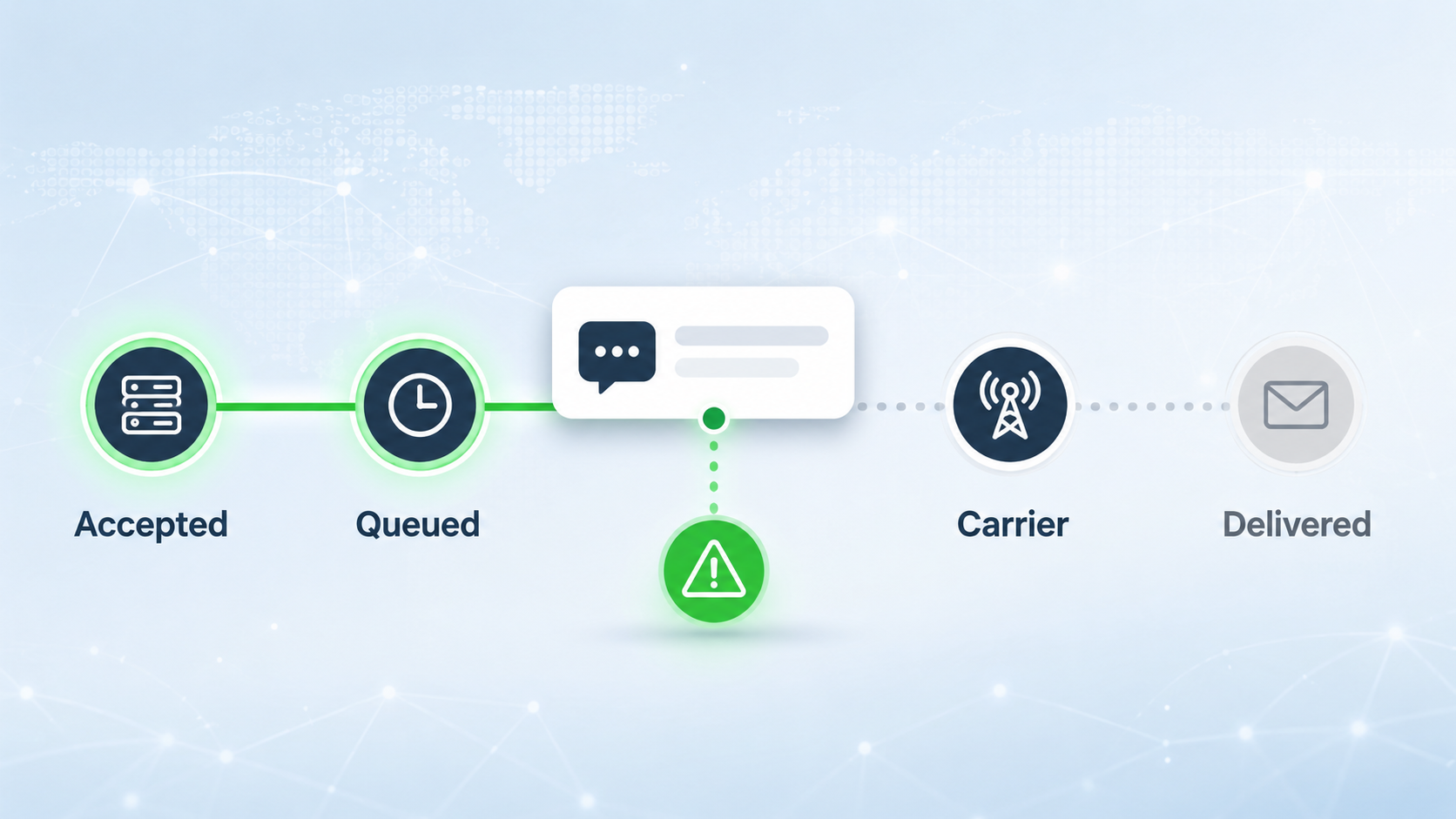
A business SMS may still need to move through:
| Checkpoint | What can go wrong |
|---|---|
| Sender setup | Sender ID, number type, registration, or campaign setup may be incomplete or mismatched. |
| Content and consent | The message may look risky, unexpected, promotional, or misaligned with consent. |
| Filtering | The message may be blocked, delayed, or flagged by platform, carrier, or firewall controls. |
| Routing | The selected route may be unstable, congested, unsuitable, or poorly visible. |
| Destination handling | Local rules, carrier conditions, number status, or device availability may affect delivery. |
| Evidence and reporting | Status data may be delayed, incomplete, or not enough to explain the issue alone. |
This is why teams should avoid jumping directly to one conclusion. A message that is not delivered is not automatically a provider failure, a carrier failure, a content problem, or a user-side issue. The first task is to narrow the problem with evidence.
First, Separate Accepted, Sent, Delivered, Failed, and Undelivered Status
Before changing routes, rewriting templates, or blaming the provider, separate the status terms you are seeing.
Common message status labels may include:
- Accepted
- Queued
- Sent
- Delivered
- Undelivered
- Failed
- Expired
- Rejected
These labels are useful, but they do not all mean the same thing.
An accepted or queued status usually means the message has entered the sending workflow. A sent status may mean the message has moved toward the next delivery stage. A delivered status may indicate confirmation from a downstream system or carrier path, depending on the reporting available. A failed, undelivered, expired, or rejected status usually requires closer investigation.
The first diagnostic question should be:
Did the message fail before sending, after platform acceptance, during routing, at the carrier or filtering layer, or near the destination side?
If your team does not know which stage the status belongs to, the issue can be misread. For example, an API success response may be treated as proof of delivery when it only confirms that the message request was accepted. A delayed delivery receipt may be treated as proof of message delay when the reporting event itself may be delayed.
Use status data as evidence, not as the whole explanation. If your team sends automated service messages through an API workflow, this distinction also connects to the broader transactional SMS API problem: request success should not be treated as final delivery proof.
What to Check First When SMS Messages Are Not Delivered
When SMS messages are not delivered, the first-check sequence should move from the easiest controlled areas to the harder downstream areas. Start with sender setup, review content and consent risk, then collect enough evidence to decide whether filtering, routing, destination handling, or device-level issues are involved.
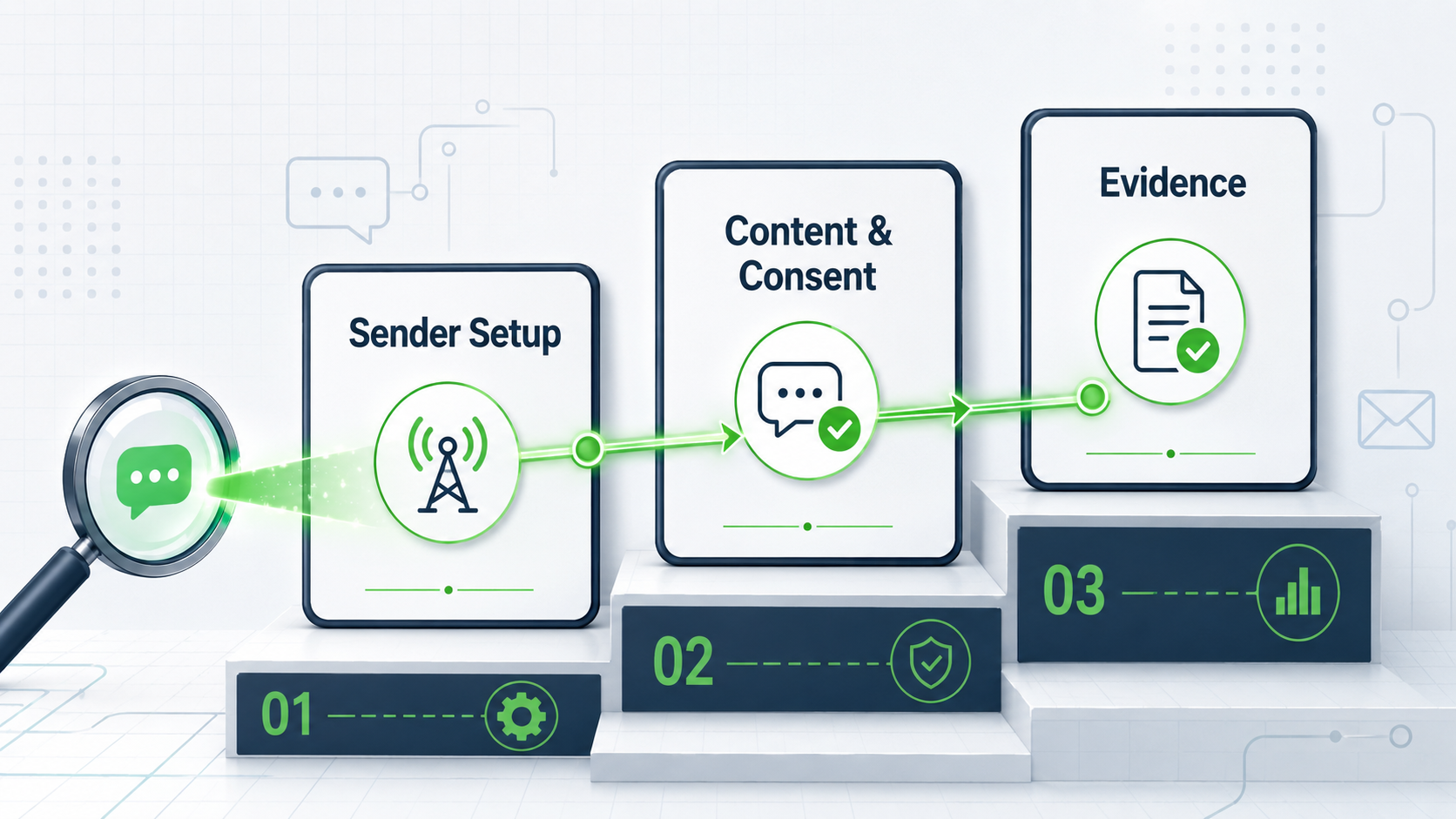
Check Sender Setup Before Blaming the Route
Sender setup is one of the first areas to check when SMS messages are not delivered. If the sender identity, number type, registration, or campaign setup does not match destination expectations, messages may fail, be filtered, or perform inconsistently.
Check these areas first:
- Is the sender ID or originating number valid for the destination?
- Is the sender registered where registration is required?
- Does the sender type match the message type?
- Is the traffic promotional, transactional, OTP, notification, or mixed?
- Has the sender recently changed?
- Did delivery problems begin after a sender or campaign update?
- Are opt-out and brand signals consistent with the sender?
Sender setup problems are especially common when businesses expand into new countries, increase volume, change use cases, or move from testing to production traffic.
For example, a sender that works for low-volume internal testing may become unstable when used for a larger promotional campaign. A sender that works in one destination may not be valid in another. A message that looks like a service notification may be treated differently from marketing traffic.
If the issue affects one sender but not another, sender setup should be reviewed before assuming that the whole SMS provider, route, or campaign is broken.
Check Content and Consent Risk Before Rewriting the Campaign
Content and consent should be checked early because they affect how messages are interpreted by users and by messaging controls. This does not mean every non-delivery issue is a content problem. It means content and consent are fast to review and often explain avoidable problems.
Start with these questions:
- Did the recipient clearly opt in to receive this type of SMS?
- Does the message match the user’s expectation?
- Is the sender clearly identifiable?
- Does the message contain suspicious or unfamiliar links?
- Is the content overly promotional, misleading, or urgent?
- Does the message use excessive capitalization or spam-like formatting?
- Does the campaign include opt-out language where required?
- Is the content aligned with the registered use case?
The goal is not to rewrite every message immediately. The goal is to identify whether the message creates risk signals.
For OTP messages, the content should be short, clear, and tied to the user’s current action. For service notifications, the message should clearly explain the service context. For marketing SMS, the sender, offer, and opt-out path should be easy to understand.
If only one template is affected, compare it with templates that are still delivering. Look at links, sender wording, opt-out language, punctuation, message length, and the relationship between content and consent. If many templates are affected across different message types, the issue may sit elsewhere in the delivery path.
SMS Filtering as One Layer in the Non-Delivery Diagnosis
Filtering may be involved when SMS messages are accepted by the sending platform but later show blocked, failed, undelivered, expired, or inconsistent delivery patterns. It is one possible cause of non-delivery, but it should not be assumed before checking sender setup, content risk, consent signals, destination rules, and delivery evidence.
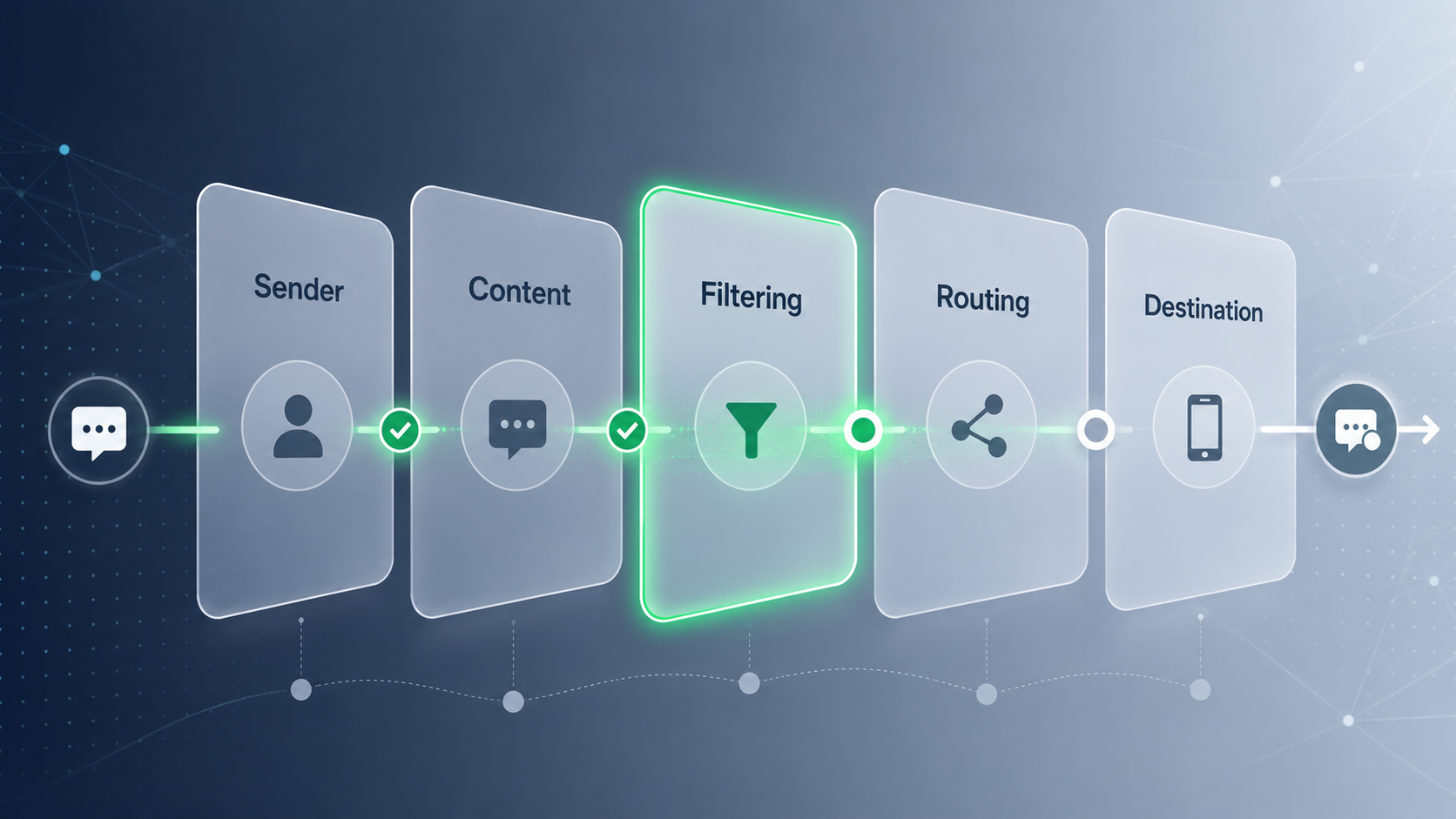
Signs that filtering may be involved include:
- Messages fail more often on specific carriers or destinations.
- Similar message templates are affected repeatedly.
- Messages with links fail more often than messages without links.
- Promotional traffic performs worse than transactional traffic.
- New sender IDs or unregistered senders show unstable results.
- Error codes or delivery receipts suggest blocking, filtering, or policy rejection.
- Complaint or opt-out patterns increase before delivery performance drops.
- Messages behave differently after a volume increase.
At this stage, the goal is not to fully diagnose the filtering system. The goal is to decide whether the pattern is strong enough to review filtering more deeply.
For example, if one promotional template with a shortened link fails repeatedly across a specific market, filtering may be part of the issue. If OTP messages and service notifications are also failing across several destinations at the same time, the issue may be broader than content filtering.
Use filtering as a diagnostic branch, not as an automatic conclusion. For a deeper explanation of filtering layers and why business messages get blocked, read the SMS filtering guide.
Check Routing, Destination, and Device-Level Signals
If sender setup, content, consent, and filtering signals do not fully explain the issue, review routing, destination, and device-level signals.
Routing issues can appear when delivery performance changes by:
- Country
- Carrier
- Sender type
- Message type
- Route
- Volume level
- Time window
- Campaign or workflow
A route may work well for one destination and perform poorly in another. A route may support low-volume testing but struggle during high-volume sends. A route may show weak visibility even when messages are moving through the path.
When failures vary by market, carrier, or traffic volume, use this framework to evaluate SMS route quality before problems scale.
Destination conditions can also affect delivery. Local rules, registration requirements, carrier filtering behavior, number portability, inactive numbers, blocked numbers, roaming, and temporary network issues may all shape the final result.
Device-level issues should be considered when only a small number of users are affected. A recipient’s phone may be turned off, out of coverage, blocked from receiving messages, full, roaming, or using a number that is no longer active. Device-level issues usually do not explain large-scale delivery drops, but they matter in individual support cases.
A useful way to separate these issues is to compare patterns:
| Pattern | Likely area to check |
|---|---|
| One user affected | Destination number or device condition |
| One carrier affected | Carrier handling, route, or filtering pattern |
| One country affected | Local rules, registration, route, or destination conditions |
| One sender affected | Sender setup or sender reputation |
| One template affected | Content, consent, link, or use-case mismatch |
| All traffic affected suddenly | Platform, route, configuration, or broader network issue |
This pattern-based approach keeps teams from making random changes. It helps identify whether the issue is local, sender-specific, content-specific, route-specific, or system-wide.
If Messages Arrive Too Late, Treat It as a Delivery Speed Issue
Sometimes the message is not truly undelivered. It arrives, but too late to support the user action.
This is common for:
- OTP codes
- Login verification
- Payment reminders
- Appointment alerts
- Delivery updates
- Fraud or security alerts
- Urgent service notifications
If a message arrives after the user has abandoned the action, the business result may look like a non-delivery problem. But operationally, the issue may be delivery speed, queueing, route latency, or delayed status visibility.
In this case, do not treat the issue as a simple delivery failure. Review timing separately:
- When was the message submitted?
- When was it accepted?
- When did it leave the sending platform?
- When was the first status update received?
- When did the user receive the message?
- Did the delay affect one country, one carrier, one route, or one message type?
For OTP and urgent notifications, a technically delivered message can still be commercially useless if it arrives outside the action window. That is why timing should be reviewed as its own issue when late delivery is the main symptom. For a deeper explanation of latency, queueing, and misleading speed expectations, see why SMS delivery speed is often misunderstood.
Status Evidence to Collect Before Escalating an SMS Delivery Issue
Before escalating an SMS non-delivery issue, collect delivery evidence instead of relying on one status label. A single accepted, sent, failed, or undelivered status may not explain the full delivery path. Delivery status is only one part of the evidence; this guide explains why an SMS delivery report may not be enough to identify the real cause.
Useful evidence includes:
- Message ID
- Timestamp
- Sender ID or originating number
- Destination country
- Destination carrier if available
- Recipient number sample
- Message type
- Message template or sample
- Delivery receipt or callback status
- Error code
- Route or channel if available
- Affected time window
- Volume affected
- Whether the issue repeats across users, carriers, or markets
- Whether the same template worked before
- Whether sender, content, volume, or route changed recently
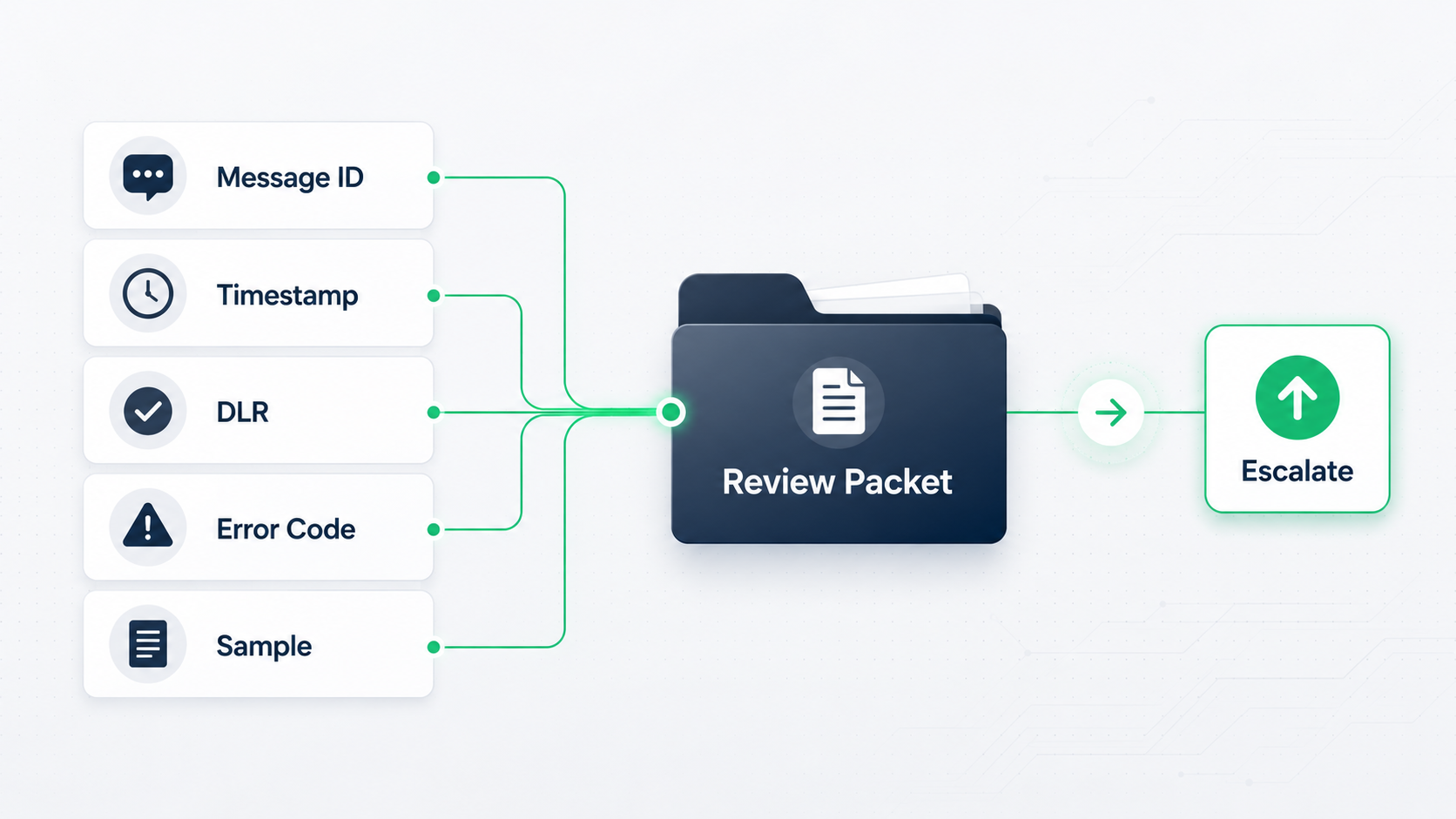
This evidence helps the support or technical team decide whether the issue is related to sender setup, content risk, filtering, routing, destination rules, or temporary network behavior.
A weak escalation says:
Some users did not receive SMS. Please check.
A stronger escalation says:
Between 10:00 and 10:30 UTC, OTP messages from Sender X to Carrier Y in Country Z showed a higher undelivered rate. The affected messages used the same template, and the error pattern repeated across multiple users. Here are message IDs, timestamps, status values, and sample content.
The second version gives the support team something to investigate.
When to Escalate an SMS Non-Delivery Issue
Escalate an SMS non-delivery issue when the pattern is repeatable, measurable, and cannot be explained by a simple setup or content issue.
You should escalate when:
- Multiple users are affected.
- The issue repeats across a clear time window.
- A specific carrier or market shows abnormal failure.
- Error codes suggest blocking, rejection, or route issues.
- OTP completion drops even though messages are being sent.
- Delivery performance changes after a sender, route, or campaign update.
- The same template fails repeatedly.
- Internal checks do not explain the issue.
Before escalating, complete a basic review:
- Confirm the sender setup.
- Check consent and content risk.
- Compare affected and unaffected templates.
- Review status and error codes.
- Look for market, carrier, route, or sender patterns.
- Collect message IDs and timestamps.
- Confirm whether the issue is non-delivery or late delivery.
This order prevents wasted effort. It keeps teams from rewriting templates when the real issue is routing, changing providers when the real issue is sender registration, or blaming the carrier when the message content or consent path is weak.
Common Causes of SMS Messages Not Being Delivered
SMS messages are not delivered for many reasons, but most causes can be grouped into a few practical categories.
| Cause category | What to check first |
|---|---|
| Sender setup problem | Sender ID, number type, registration, campaign setup |
| Consent or content risk | Opt-in source, message expectation, links, wording, opt-out language |
| Filtering involvement | Repeated blocks, carrier-specific failures, policy-related errors |
| Routing issue | Market-level performance, route changes, delivery feedback quality |
| Destination issue | Number status, carrier behavior, roaming, device availability |
| Timing issue | Queueing, dwell time, route latency, action-window failure |
| Reporting gap | Missing callbacks, delayed DLRs, unclear error codes |
The key is to avoid treating all failures as the same. A failed OTP in one market, a blocked promotional campaign, and a delayed delivery receipt may all require different next steps.
Final Takeaway
When SMS messages are not delivered, the best first step is not to guess the cause. The best first step is to separate the status trail, sender setup, content and consent risk, filtering signals, routing patterns, destination conditions, timing behavior, and delivery evidence.
That approach keeps diagnosis practical. It helps teams avoid treating every issue as a provider problem, every failure as a filtering problem, or every late message as a delivery failure.
If you need the broader concept behind delivery-path performance, start with the SMS deliverability guide. If your evidence points to blocked or filtered messages, continue with the SMS filtering guide.
Need help reviewing SMS delivery issues?
For businesses sending OTPs, service notifications, transactional updates, or marketing campaigns, SMSBoosting can help review sender setup, route visibility, delivery evidence, and practical A2P messaging fit before delivery issues become recurring performance problems.
Talk to an SMS expertFAQ About Why SMS Messages Are Not Delivered
Why are SMS messages not delivered even when the API request succeeds?
SMS messages may not be delivered even when the API request succeeds because API success usually means the message request was accepted by the sending platform. It does not always prove the message passed routing, filtering, carrier handling, destination conditions, and device availability.
Does an accepted status mean the SMS was delivered?
No. An accepted status usually means the message entered the sending workflow. It should not be treated as proof that the recipient received the message. Teams should review later delivery status, error codes, callbacks, timing, and destination patterns.
What should I check first when SMS messages are not delivered?
Start by checking the status trail, sender setup, message content, consent signals, destination market, and error patterns. If the issue repeats by carrier, country, sender, template, or time window, use that pattern to decide the next diagnostic step.
Can SMS filtering cause messages not to be delivered?
Yes. SMS filtering can cause messages to be blocked, delayed, or marked as undelivered when traffic appears risky, unwanted, unregistered, misleading, or inconsistent with expected behavior. However, filtering should be diagnosed with evidence and not assumed automatically.
Why do OTP SMS messages fail even when they are sent?
OTP SMS messages may fail because of sender setup, route delay, filtering, destination conditions, device issues, or late delivery. For OTP flows, the message must arrive inside the user action window. A message that arrives too late can still cause login, payment, or registration failure.
When should I escalate an SMS non-delivery issue?
Escalate when the issue affects multiple users, repeats across a clear pattern, shows abnormal errors, or cannot be explained by sender setup, content, consent, destination, or timing checks. Include message IDs, timestamps, sender details, destination, status values, error codes, and sample content.



