


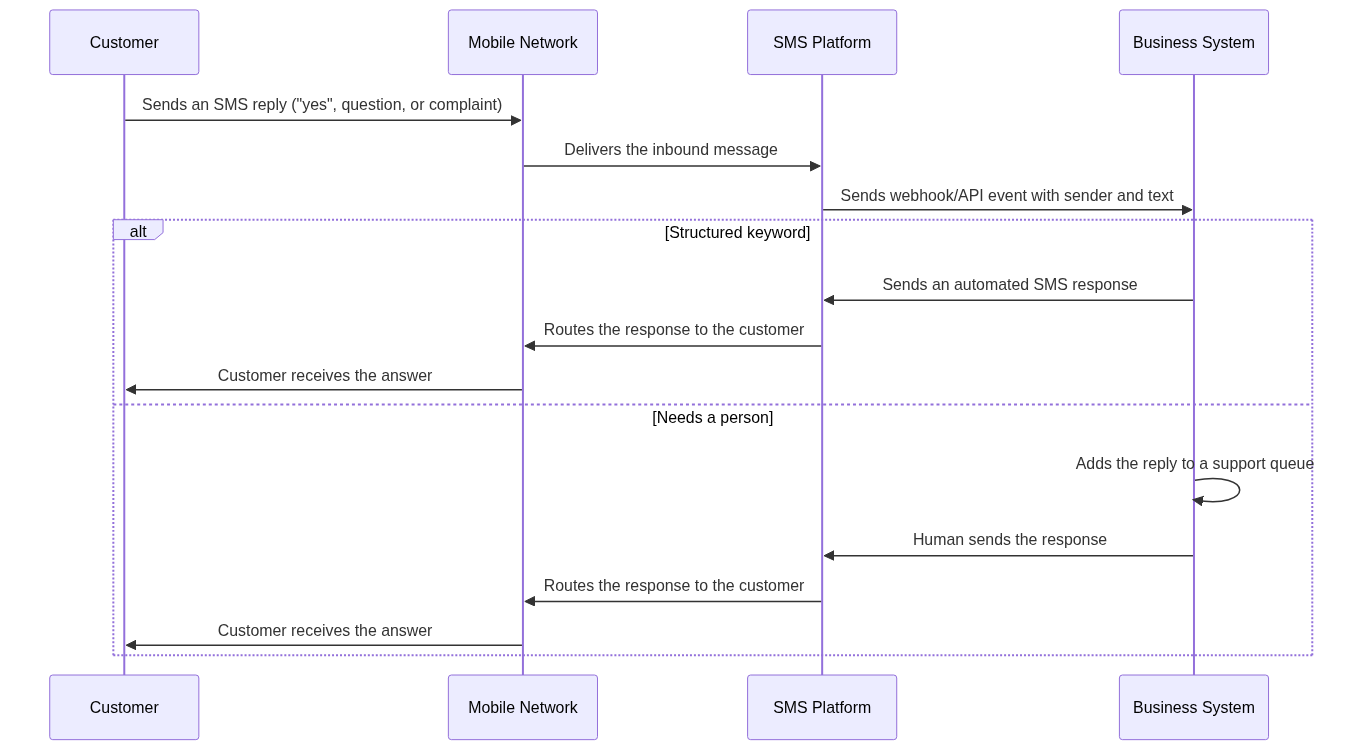
When a customer replies to a business text message, the exchange only becomes useful if the reply reaches a system that can do something with it. The SMS reply / SMS response loop is the mechanism behind that handoff: the customer’s message travels back over the network, the SMS platform captures it, and the business decides whether automation, a support queue, or a person should handle it. For teams running two-way messaging, the difference between a clean workflow and a chaotic inbox comes down to how replies are received, classified, and routed.
This article explains how customer replies enter the system, how businesses sort them, and which scenarios genuinely need a human. It also covers the routing mistakes that create the most trouble and a practical path for teams that want to manage the SMS reply / SMS response flow without overbuilding. The goal is to give you a clear decision framework before you switch on inbound messaging.
How Customer Replies Enter the System
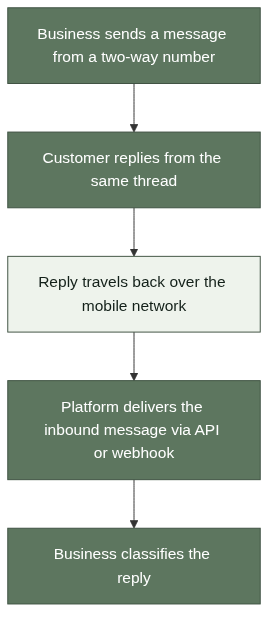
A customer reply only arrives where the business can read it if the original message was sent from a number configured for two-way messaging. When that setup is in place, the reply travels back over the mobile network to the same number or short code, and the messaging platform receives it as an inbound message. No app is required on the customer side, which is why this works across virtually any phone and network.
The Two-Way SMS Setup
Two-way SMS requires a dedicated number or short code that accepts replies and a platform that can receive inbound messages. The broader mechanics are covered in the Two Way SMS guide, which explains how replies travel back and how businesses receive them. The key point for this article is that the receiving side must exist before replies become useful; without it, customer messages sit in a phone inbox that nobody monitors.
Inbound Delivery Through API or Webhook
Most SMS platforms expose inbound messages through an API or a webhook, so the reply can be read by software the moment it arrives [1]. The platform typically delivers the message content, the sender’s number, and a timestamp, and the business decides what happens next [3]. That integration is the foundation of every reply workflow described below, and it is the first thing to confirm when evaluating a provider.
How Businesses Classify SMS Replies
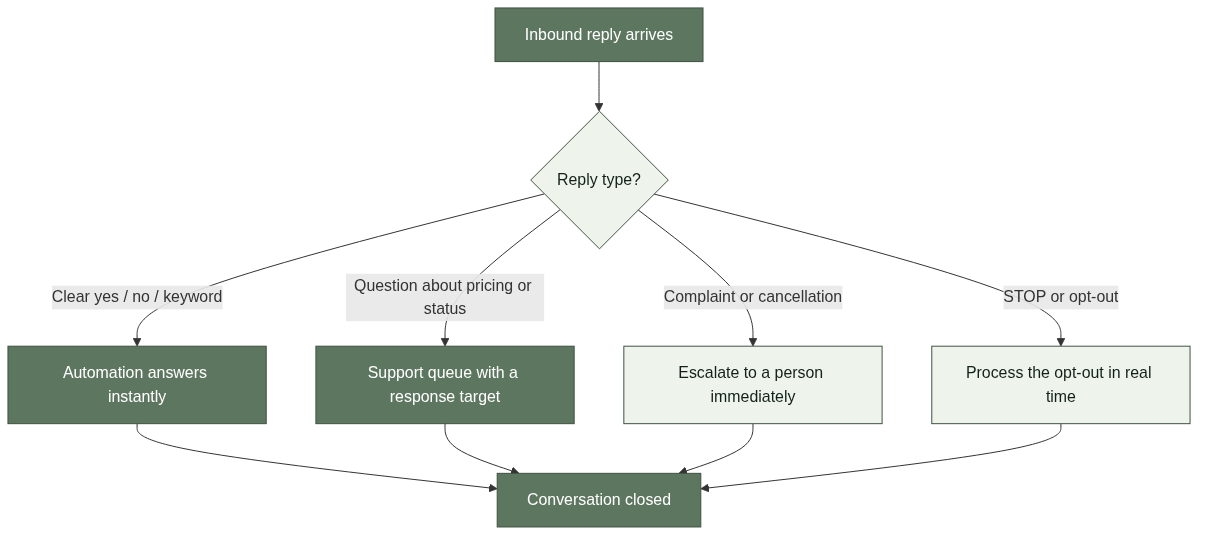
Not every reply deserves the same treatment. A clear “yes” is different from a pricing question, and a complaint is different from an opt-out request. Businesses typically define rules that classify inbound messages by content or keyword, then route each class to the right destination.
Confirmation and Keyword Patterns
Simple replies are the most common pattern in confirmation flows. “Yes”, “no”, and single keywords such as “STOP” or “RESCHEDULE” can be matched directly and handled by automation. The rule set can start small: match the few replies the business actually expects, route everything else to a fallback. Simpler rules mean fewer messages fall through the cracks.
Free-Text Questions and Requests
Customers also reply with real questions, such as “What time is my appointment?” or “Can you change my delivery date?” These cannot be matched to a keyword list reliably. They need natural-language handling or, more often, routing to a person who can read and answer them. Teams should expect free-text replies and plan a destination for them instead of assuming every reply is a keyword.
Routing Replies to Automation, Support, or People
Once a reply is classified, the routing decision determines whether the customer gets an instant answer, a queued response, or an escalation. The cleanest setups define three destinations: automation for structured replies, a support queue for questions, and direct escalation for urgent or sensitive messages.
What Automation Should Handle
Automation is a good fit for replies that are unambiguous. Confirmations, opt-ins, and structured keywords can be answered instantly with a template response, which keeps the customer engaged and the queue short. The boundary to watch is confidence: if the system cannot classify a reply confidently, the safe default is a human, not a guess.
When a Support Queue Is the Right Destination
Questions about pricing, availability, or order status fit a support queue with a response-time expectation. These replies need a person who can check the relevant system before answering. The queue works when ownership is clear and the team knows how fast it must respond; it fails when replies sit in a shared inbox that nobody treats as work.
Which Scenarios Require a Person
Complaints, cancellations, and requests that involve money or account changes should always reach a person. A customer who wants to cancel a service or dispute a charge will not accept a template reply, and an automated response in that context can make the situation worse. Escalation rules should route these messages to the team that can actually resolve them, with the original message and context preserved.
Common Routing Mistakes to Avoid
Most reply programs fail on the receiving side, not the sending side. The recurring mistakes are building the send flow first, treating every reply as automation-eligible, and forgetting that opt-out messages are the one reply type that must never be delayed.
Building the Send Side Before the Receive Side
The most common mistake is launching a two-way campaign without deciding who owns the replies. Once customers realize they can respond, inbound volume grows, and an unattended inbox becomes a reputational problem. Teams should define reply categories, response ownership, and escalation rules before the first message goes out.
Treating Every Reply as a Chatbot Opportunity
Two-way SMS is not a chatbot platform. Automating structured keywords and confirmations works; pretending the business has a full conversational agent tends to frustrate customers and creates expectations the team cannot meet. The honest setup is explicit about what is automated and what requires a person.
Delaying Opt-Out Handling
An opt-out reply such as “STOP” must be processed immediately and reflected everywhere, including future campaigns [2]. Delaying opt-out handling is not just a compliance risk; it is the fastest way to lose customer trust in the channel. Automated opt-out processing should be a non-negotiable part of any reply workflow.
Building a Reply Workflow That Scales
A practical reply workflow does not need to be complex. Start with one scenario, define three destinations, and expand only when the data shows a pattern worth automating.
Start with One Scenario and Three Destinations
Pick a single scenario, such as appointment confirmations, and map every likely reply to automation, a support queue, or a person. Track a metric tied to the business outcome, such as replies resolved within the response target, and use a few weeks of data as a baseline. That baseline tells you which reply types are common enough to automate next. The appointment reminder examples article shows a single-scenario confirmation flow built around this pattern.
Use a Platform That Supports Inbound Messaging
Reply workflows depend on the platform’s inbound capabilities. Check how inbound messages are delivered, whether reply routing works across regions, and whether opt-out handling is built in. For teams evaluating options, the SMS API pricing guide explains what to compare when selecting a provider, and the Notification SMS Service page describes related delivery capabilities.
FAQ
References
Twilio, “Two-Way SMS: Getting Started.” https://www.twilio.com/docs/messaging/services/two-way-messaging. Public platform documentation describing two-way messaging setup and inbound reply delivery.
Twilio, “What is two-way SMS?” https://www.twilio.com/docs/glossary/what-is-two-way-sms. Public platform documentation explaining reply handling and opt-out concepts.
AWS, “Two-way SMS messaging.” https://docs.aws.amazon.com/pinpoint/latest/developerguide/channels-sms-two-way.html. Public platform documentation describing inbound reply handling and routing.



