

Most business text messaging is still a broadcast: a message goes out, and the conversation stops there. Conversational SMS changes that pattern by treating a text message as the start of an exchange, so a customer can reply and the business can answer inside the same thread. For teams that already use SMS for order updates, appointment reminders, or service alerts, this small shift converts a notification channel into a channel where confirmations, questions, and quick decisions actually happen.
This article explains what conversational SMS is, how it differs from ordinary SMS notifications, and which customer interactions it genuinely improves. It also covers the setup teams need before switching on replies, where it adds little value, and how to avoid turning it into a hollow chat slogan. The goal is to help you decide where it fits your messaging mix and what to prepare before you enable it.
What Conversational SMS Is
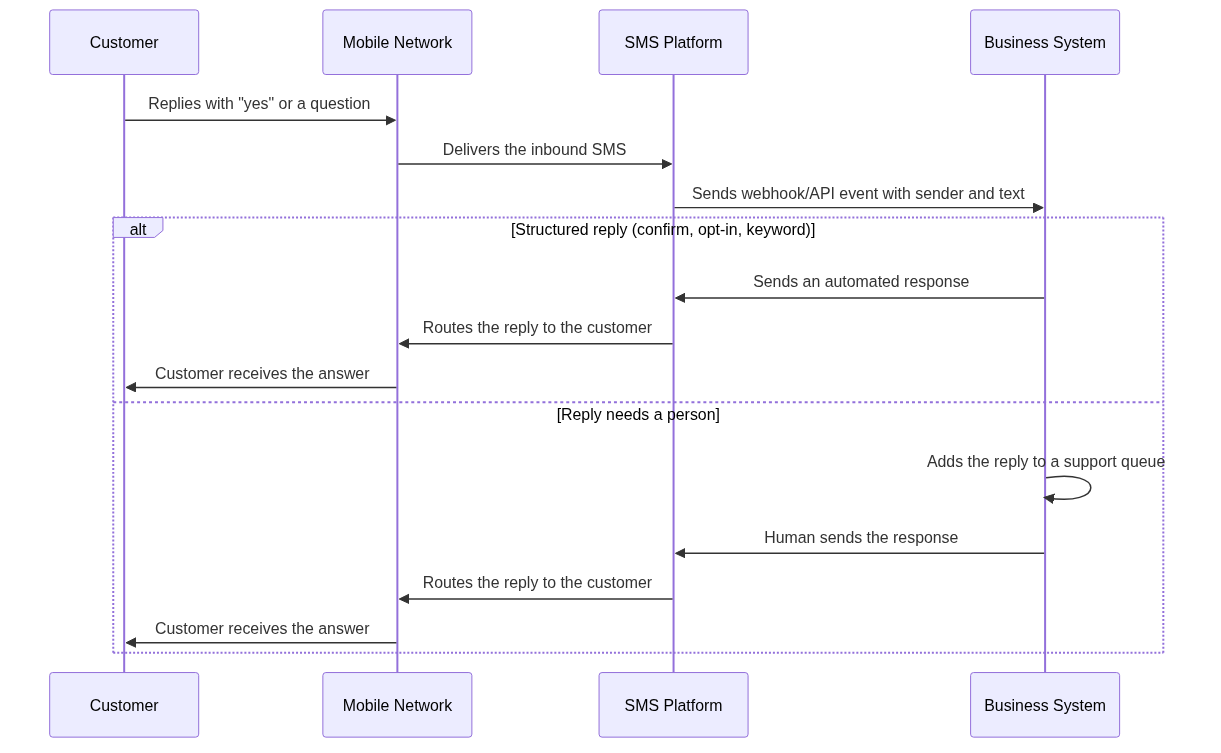
Conversational SMS is a two-way messaging setup in which a business sends text messages and customers can reply from their own phones, with both sides communicating through the same number or short code. The reply lands in a system the business controls, not in an unattended inbox. That distinction matters: it is not a chatbot layer, and it is not a separate app. It is the transport that lets a customer response come back to your business and lets your team or automation continue the exchange. For the broader mechanics of two-way messaging, the Two Way SMS guide explains how replies travel back and how businesses receive them.
Why It Matters for Customer Interaction
The value shows up in interactions where a single reply changes the outcome. An order confirmation becomes a delivery-window negotiation. An appointment reminder becomes a reschedule request. A payment alert becomes a support ticket before the customer ever calls. In each case, the customer was already reading the message, so the marginal effort to reply is low and the business gets a concrete signal instead of an assumption.
How It Differs from Standard SMS Notifications
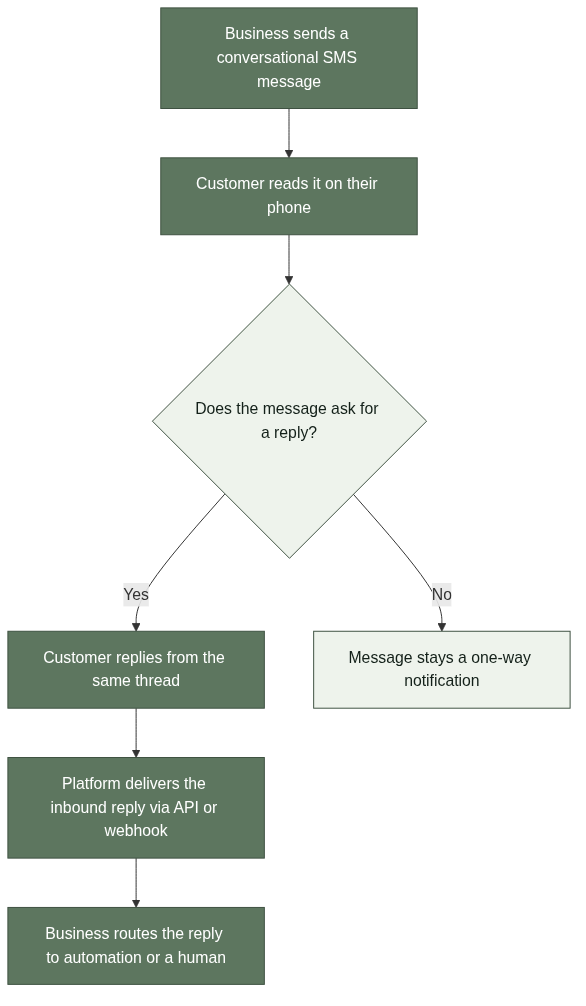
A standard SMS notification is complete by itself: the message states the fact and expects nothing back. Conversational SMS, by contrast, opens the door for a response and therefore carries an obligation to handle whatever comes back. The practical difference is operational. Sending notifications requires only sending infrastructure. Running a two-way conversation requires inbound message delivery, reply routing, response ownership, and opt-out handling on top of that.
One-Way vs. Two-Way in Practice
A delivery update, an OTP code, or a payment receipt is one-way by design. Asking a customer to reply “yes” to confirm an appointment or to choose a delivery window turns the same message into a two-way exchange. The same SMS channel supports both, but the business must know which mode each message is running in, because customers will reply even when the message did not ask for a response.
Customer Interactions Where Conversational SMS Works Well
Conversational SMS earns its keep in short, time-sensitive exchanges where a quick reply resolves the question. Confirmation flows, appointment and booking changes, support triage, and feedback requests all fit this pattern because each can finish in a few messages without a phone call or an app.
Confirmations and Rescheduling
Confirmation messages are the most natural starting point. A customer replies “yes” to confirm, “no” to decline, or asks a follow-up question, and the business reacts immediately. Appointment reminders and booking confirmations work the same way: the reply tells the team whether to hold the slot or open it up. For teams just starting out, one confirmation scenario is easier to run cleanly than a full reply program. The Appointment Reminder SMS guide shows a single-scenario flow built around exactly this pattern.
Support Triage and Feedback
When customers reply to a service alert or an order update, their message often contains the first signal of a problem. Routing those replies into a support queue gives the team a head start, and the customer gets a faster answer than a callback flow would provide. Feedback requests benefit too: a short reply is a lower-friction response than a survey link, though the replies need a defined owner and a response target to be useful.
What Teams Need to Set Up Conversational SMS
Receiving replies is only half the work; the other half is deciding what happens to each reply before the first message goes out. Teams should define reply categories, assign ownership, and confirm the platform can deliver inbound messages in the regions they send to.
Inbound Delivery and Routing
Running conversational SMS requires a platform that delivers inbound messages and exposes them through an API or webhook. Without that integration, replies sit in a phone inbox no one monitors, which turns a well-intentioned program into a customer complaint. When evaluating a provider, check how inbound messages are delivered, whether reply routing works across regions, and whether opt-out handling is included. SMSBoosting’s SMS Platform is designed for global delivery and supports two-way conversations as part of a broader messaging strategy; the Notification SMS Service page describes related delivery capabilities.
Reply Ownership and Response Targets
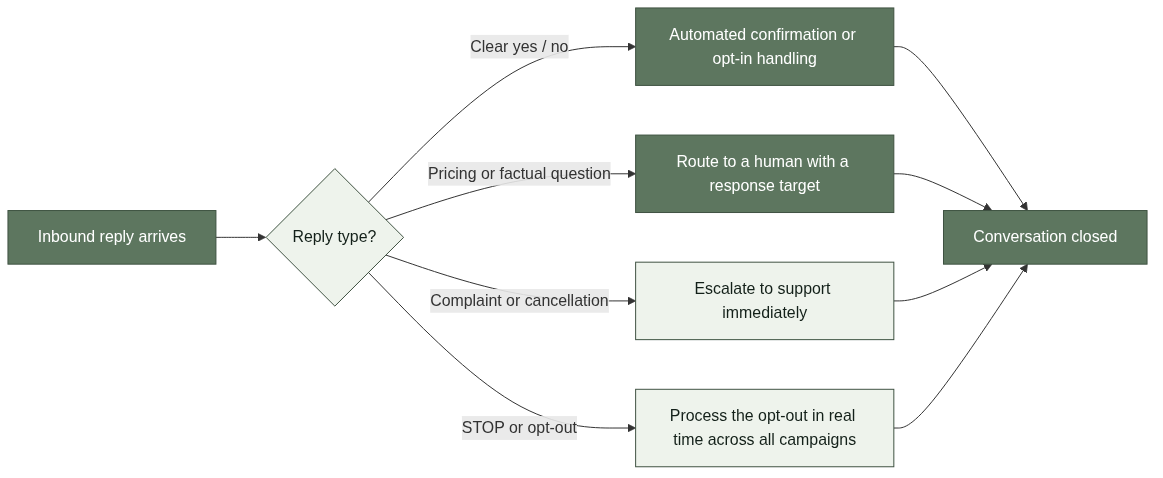
Every reply type needs a home. A clear “yes” or “no” can be handled by automation. A pricing question should route to a human. A complaint needs a queue with a response-time expectation. Teams that skip this step usually discover the gap after inbound volume grows, not before. Starting with simple categories keeps the rule set manageable and reduces the number of messages that fall through the cracks.
Where It Adds Little Value
Conversational SMS is not the right tool for every message. Long-form customer service, complex troubleshooting, and high-volume campaigns with no expected reply are better served by other channels. Treating every notification as a conversation creates an inbox nobody can staff, so the sensible approach is to make only the messages that benefit from a reply two-way.
When to Keep Messages One-Way
Transactional alerts that are complete by themselves, such as OTP codes and payment receipts, should stay one-way. The customer can still reply, but the business should not design workflows around it. Similarly, marketing campaigns that do not ask for a response do not need reply routing; a single opt-out instruction plus the ability to receive “STOP” messages is enough. For examples of campaigns that stay deliberately one-way, the ecommerce SMS use cases article separates promotional flows from reply-driven ones.
How to Avoid Turning It into a Hollow Chat Slogan
The most common failure is announcing conversational SMS without a receiving side. Customers reply, nothing happens, and the channel loses credibility. The fix is to invert the order: build the reply workflow before enabling replies, and be explicit about what is automated and what needs a person.
Start with One Scenario and Measure It
Pick one scenario, such as appointment confirmations, and run it cleanly before expanding. Track a metric tied to the business outcome, such as confirmation rate or replies resolved within the response target, and use a few weeks of data as a baseline. That baseline tells you whether the next scenario deserves the same treatment, and it keeps the program honest instead of chasing message volume.
Keep Automation Explicit
Conversational SMS automation handles structured keywords and confirmations well. Pretending the business has a full conversational agent usually frustrates customers and creates expectations the team cannot meet. The credible setup is one where customers know what is automated and when a person takes over, and where opt-out requests such as “STOP” are processed in real time across all future campaigns.
FAQ
References
Twilio, “Conversational Messaging.” https://www.twilio.com/docs/messaging/services/conversational-messaging. Public platform documentation describing two-way conversation mechanics and reply handling.
Vonage, “SMS API.” https://developer.vonage.com/en/messaging/sms/overview. Public platform documentation covering SMS sending and inbound reply delivery.
AWS, “Amazon Pinpoint SMS.” https://docs.aws.amazon.com/pinpoint/latest/developerguide/channels-sms.html. Public platform documentation covering two-way messaging and consent handling.



