

An SMS platform cannot fully control carrier filtering, country-specific sender rules, network congestion, or what users do on their phones after a message is delivered. What it _can_ do is reduce variance by managing the parts you control—identity setup, pacing, compliance hygiene, and reporting that helps you debug what changed.
If you’re new to telecom, this article is here to save you time: business texting is a shared system. Your platform matters—but it’s not the final decision-maker.
If you’re still learning the basics, our guide on what an SMS platform actually does explains how the platform layer manages sending operations.
Why an SMS Platform Is Not the Final Decision-Maker?
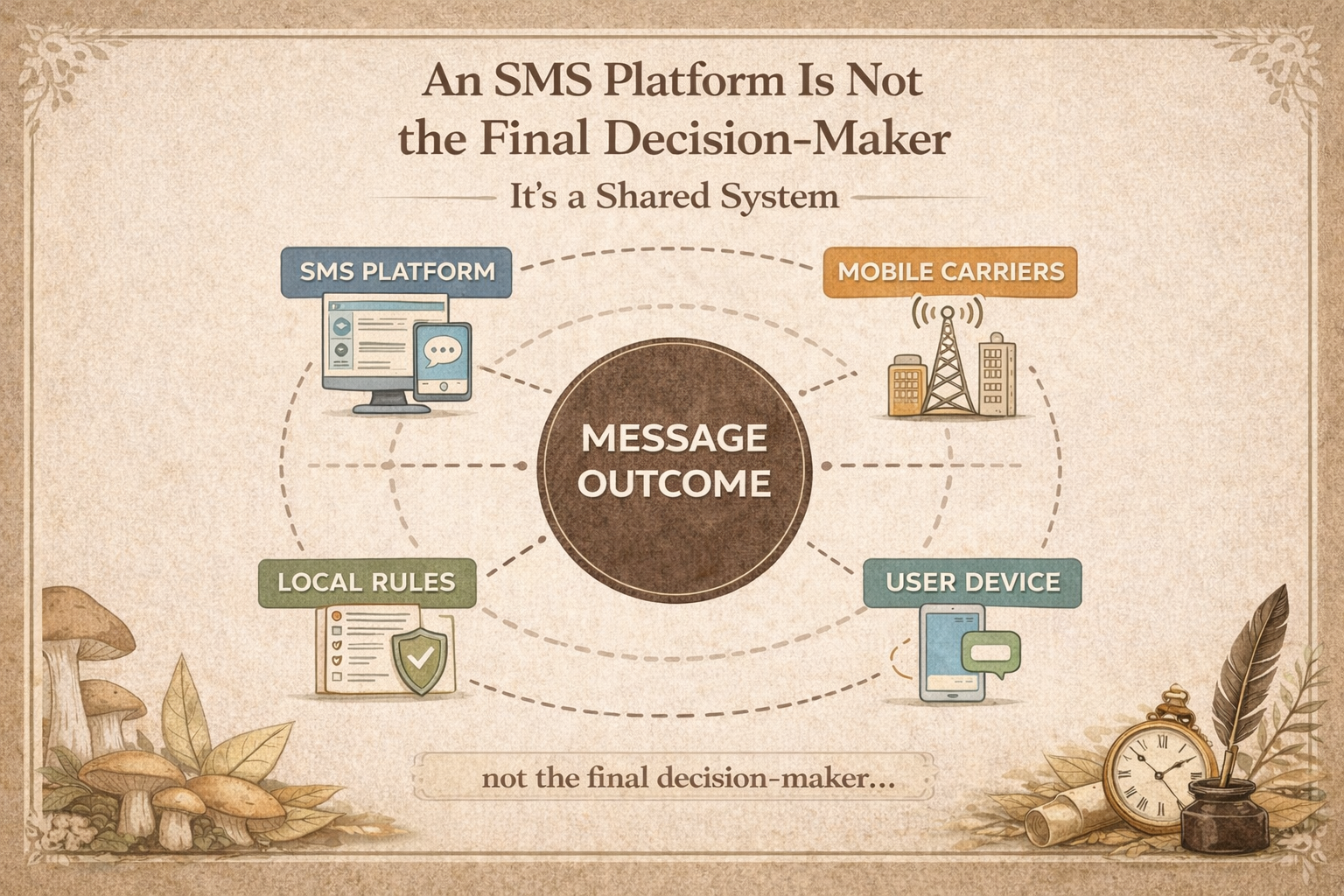
What an “API accepted” response actually confirms
When your SMS API returns “accepted” (or “queued”), it usually confirms one thing: your request was received by your provider.
It does not confirm that every downstream party will treat the message the same way.
Think of “accepted” as “the message entered the pipeline.” The rest of the journey depends on multiple layers that don’t belong to your platform UI.
What can still change after your system hands the message off
After your system hands off a message, several things can still change—without your code or copy changing at all:
- A carrier can filter, throttle, or delay traffic based on policy or congestion.
- A country can require a specific sender identity (and registration) before traffic is allowed.
- Delivery receipts (DLRs) can be missing, late, or inconsistent, even if messages land.
- A customer can ignore, block, mute, or never see the message (roaming, offline, device settings, spam folders).
That’s why a mature SMS program is less about “sending” and more about operating.
Many teams confuse platform responsibility with API behavior. If you’re comparing technical layers, our article on SMS platform vs SMS API explains the operational differences in detail.
Which Parts of SMS Delivery an SMS Platform Controls (and Which It Doesn’t)
The easiest way to stop blaming the wrong layer
When something goes wrong, most teams default to the only thing they can see: the dashboard.
But SMS outcomes are owned by different “layers.”
To understand where problems actually happen, it helps to map the different layers involved in SMS delivery. Here’s a beginner-friendly control map:
| Layer | What it mostly controls | What it can change without asking you |
| SMS platform | routing options, pacing controls, reporting, opt-out handling | route selection, traffic shaping, monitoring signals |
| Mobile carriers | acceptance, filtering, throttling, delivery behavior | policy thresholds, congestion handling, spam filters |
| Local rules & industry policies | consent requirements, sender registration, content constraints | enforcement changes, new registration steps |
| Customer’s phone & behavior | seeing, trusting, clicking, replying | device filtering, blocks, muted notifications |
A lot of frustration disappears when you name the layer first.
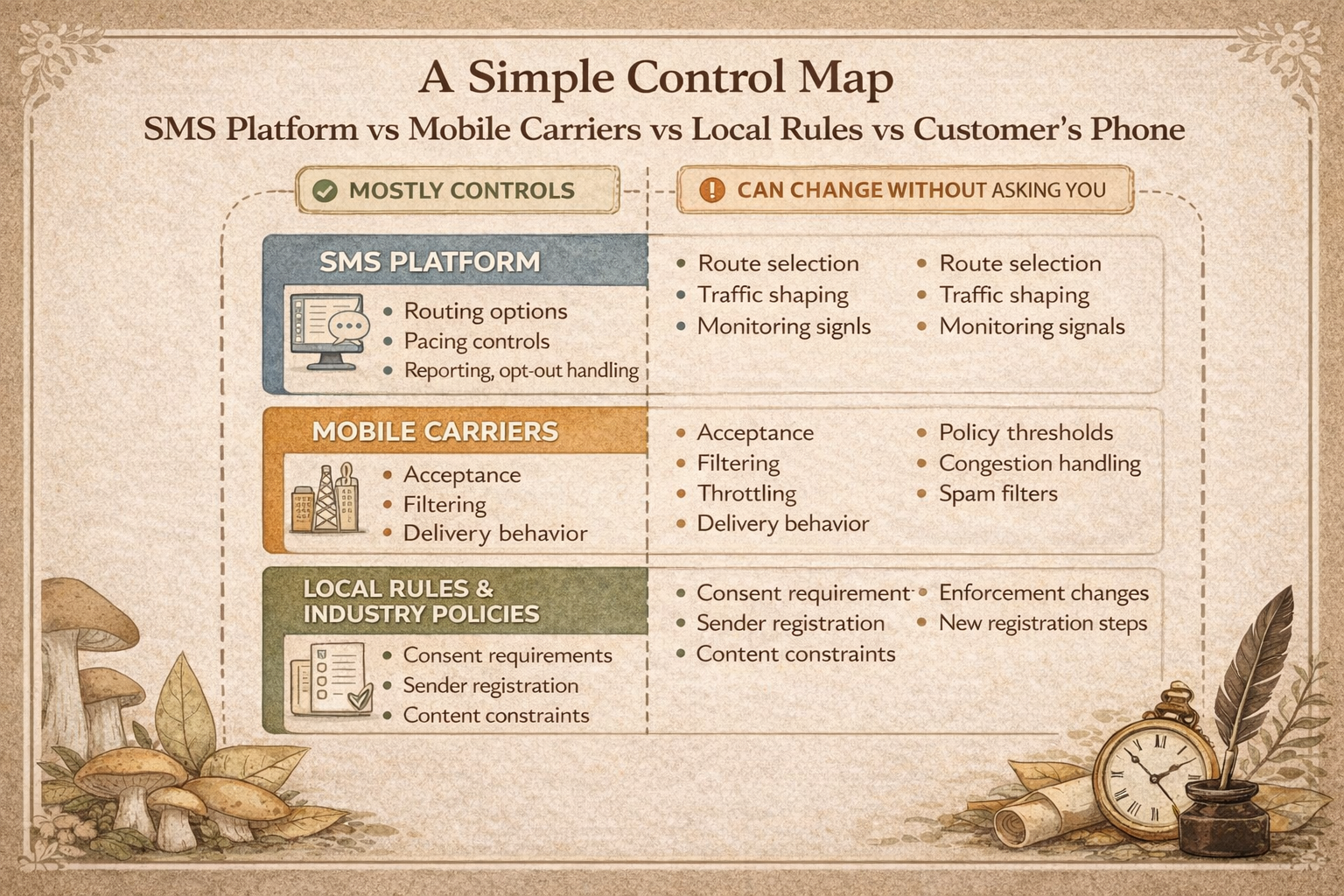
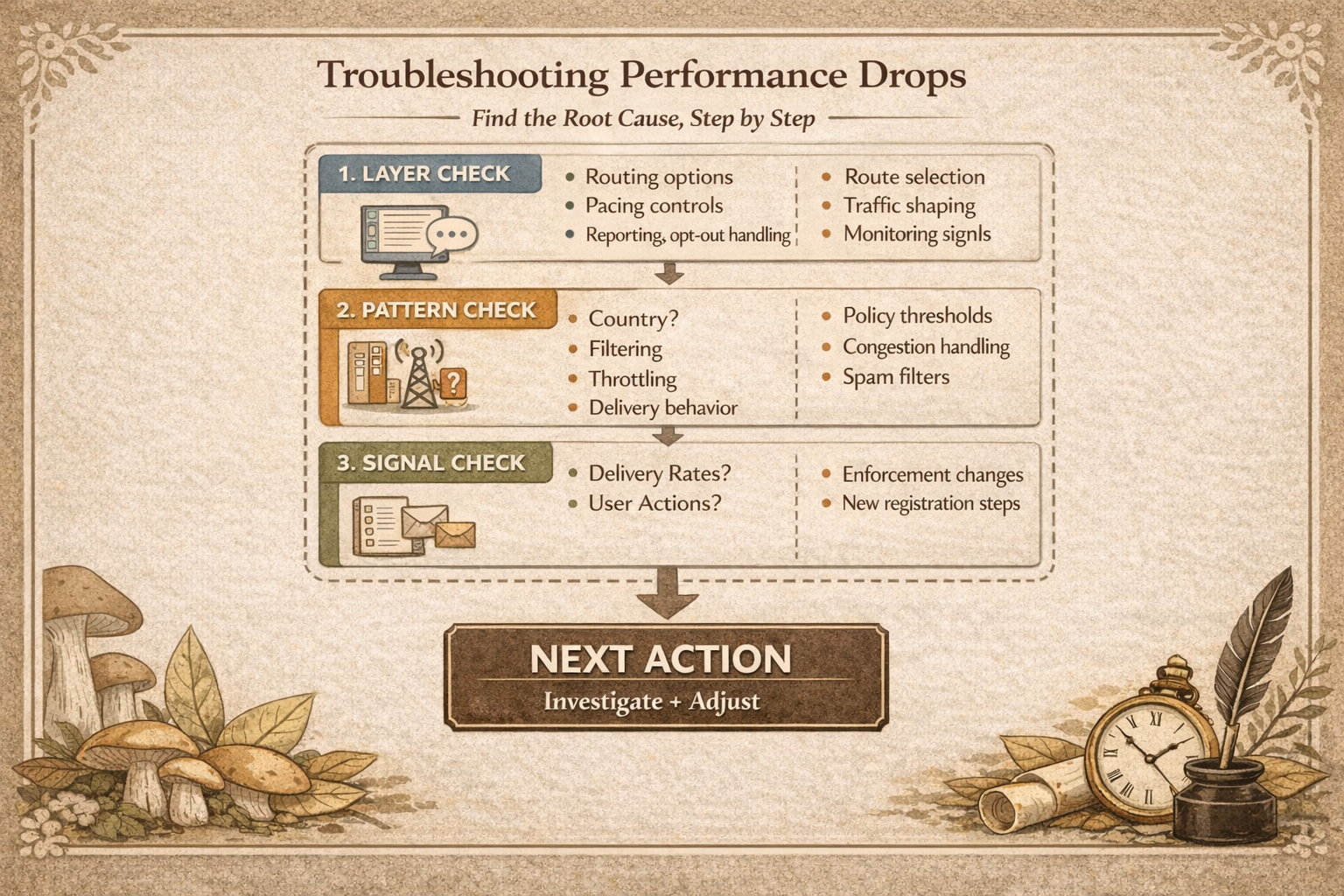
How to use the control map when performance shifts week to week
When results dip, don’t start with “our platform failed” or “our copy is bad.” Start with classification:
- Layer check: is this likely platform-controlled, carrier-controlled, rule-controlled, or user-controlled?
- Pattern check: is it country-specific, carrier-specific, or global?
- Signal check: are you seeing delivery changes, click/reply changes, or both?
A practical example: we’ve seen teams run 95%+ “delivered” for weeks, then drop to 60% without changing copy or code—because carrier routing, filtering thresholds, or local sender requirements shifted underneath the program.
If you’re preparing to scale across countries, a quick “country + sender identity + compliance readiness” review can prevent weeks of chasing the wrong root cause.
Can an SMS Platform Guarantee Delivery Across Carriers and Countries?
What a “guarantee” would require outside your platform
A true delivery guarantee would require control over things that no single SMS platform owns:
- uniform carrier policies across carriers and countries
- stable network conditions at all times
- identical sender identity requirements everywhere
- perfect and consistent delivery receipts
- predictable end-user device behavior
Those conditions simply don’t exist in global telecom.
What a new business SMS program can realistically commit to internally
Instead of guaranteeing delivery, a realistic commitment sounds like:
- “We will meet local requirements before launch.”
- “We will pace traffic responsibly and monitor change.”
- “We will track deliverability + outcomes and investigate dips with a defined process.”
- “We will treat SMS as an operational channel, not a ‘fire-and-forget’ button.”
That’s what strong teams do: they commit to **process**, not magic.
Why Carriers Filter or Throttle Business SMS?
The carrier-side triggers you cannot toggle off
Carriers filter because they’re protecting networks and subscribers. The exact logic is not fully transparent, and it changes over time.
Common triggers include:
- high complaint rates or unsubscribe spikes
- sudden volume increases (“bursting” traffic), which often happens during promotional campaigns or large-scale SMS marketing programs
- unregistered or mismatched sender identity
- suspicious link patterns (shorteners, redirects, newly-seen domains)
- repetitive templates that resemble spam campaigns
- traffic that looks inconsistent with your prior sending behavior
Important: you may not get a clean error message. Filtering can look like “delayed,” “not delivered,” or “delivered but not performing.”
Congestion and traffic spikes that create variance without warning
Even legitimate programs can be affected by congestion:
- holidays, sales events, and major news cycles increase traffic
- some routes perform differently at peak hours
- throughput limits differ by sender type (and by country)
One practical mental model: congestion isn’t “a bug.” It’s the network doing traffic management.
Why Sender Identity Requirements Change by Country
Why “the same sender ID” is not the same product everywhere
“Sender ID” isn’t just a label in a dashboard—it’s a permission model that varies by market.
Depending on the country and use case, you may need:
- short codes (often higher throughput, higher trust, stricter governance 调整为 often used for high-volume authentication or OTP SMS verification flows)
- long codes (more common for basic programs, often lower throughput)
- toll-free (in some markets, requires verification and specific use-case rules)
- alphanumeric sender IDs (allowed in some places, restricted or one-way in others)
In the US, for example, short codes are often described as a “gold standard” for scale: some references cite short codes at roughly ~400 messages per second (MPS), while long codes can be far lower (commonly ~30–75 MPS). The exact numbers vary by provider and program, but the direction is consistent: identity type impacts scale.
What registration timelines mean for launch plans and KPIs
Many sender types require:
- documentation, brand or campaign registration
- template or use-case review
- approval windows that take days or weeks (not minutes)
This is why “we’ll launch tomorrow” can become “we’ll launch next month” if identity planning is ignored. A platform cannot compress a regulatory or carrier approval process into instant availability.
Why Delivery Receipts Are Not a Perfect Source of Truth
When delivery receipts are helpful signals
Delivery receipts (DLRs) can be very useful for detecting change:
- “Delivered rate dropped for Country A only.”
- “Carrier X is slower than usual today.”
- “One route is consistently worse at peak hours.”
Used this way, DLRs are an operational signal—like a heartbeat monitor.
Why “delivered” cannot prove “seen” or “acted on”
DLRs are not a universal, perfect truth because:
- not every carrier returns the same receipt behavior
- receipts can be delayed or missing
- “delivered” typically means “delivered to the handset,” not “seen”
- user actions happen after delivery (trust, attention, timing)
If you want business clarity, pair delivery metrics with outcomes: clicks, replies, conversions, and opt-outs.
If you want a clearer explanation of why “delivered” still does not guarantee a reliable user experience, see SMS reliability vs delivery rate, which breaks down timing, variance, and destination-level differences in more detail.
Can an SMS Platform Prevent SMSSpoofing and Scams
What an SMS platform can do to reduce risk
Spoofing and scams are ecosystem problems. A platform can help you reduce risk by:
- guiding you toward appropriate sender identity options per country
- supporting consent and opt-out handling (reducing complaint signals)
- monitoring anomalies (sudden spikes, unusual destinations, suspicious patterns)
- educating teams on trust-safe messaging (clear brand identification, consistent patterns)
What no SMS platform can fully stop across the ecosystem
Spoofing succeeds by exploiting trust, not by “beating your API.” That’s why no single vendor can “turn it off” everywhere.
Even with strong controls, bad actors can impersonate brands through other routes and systems. Your job is to reduce exposure, build recognizable patterns, and keep your own traffic clean so carriers and customers trust it.
What Beginners Should Control First in an SMS Program?
Consent and list hygiene that reduce complaints and filtering risk
This is the least glamorous part—and the most powerful.
A beginner-friendly baseline:
- collect clear opt-in (and document it)
- keep list sources clean (avoid scraped lists or third-party “guaranteed leads”)
- make opt-out easy and immediate
- segment by intent (customers vs prospects vs reactivation)
If you want stable outcomes, treat consent like infrastructure—because reputation systems reward clean permission trails.
Send pacing and frequency habits that keep programs stable
Many SMS problems are self-inflicted by pacing. This is especially important for systems such as delivery alerts or appointment reminders that operate as an SMS notification service.
- ramp volume gradually instead of jumping from 0 to 1,000,000
- keep frequency predictable (don’t oscillate wildly week to week)
- respect local time zones and “quiet hours” norms
- keep message length and link behavior consistent
Stability makes you easier to “classify” as legitimate traffic.
Monitoring basics that make variance debuggable
Start simple. You don’t need an enterprise analytics stack to be operational:
- track delivery + outcomes by country and carrier (when available)
- watch opt-out and complaint proxies (unsubscribe rate is an early warning)
- alert on sudden changes (drops, spikes, delays)
- keep a change log (routes, sender, templates, volume ramps)
Most “mystery dips” stop being mysterious when you can answer: what changed, where, and when?
What Metrics Matter More Than Delivery Rate?
SMS deliverability vs delivery rate vs business outcomes
For beginners, these distinctions matter:
- Delivery rate: what portion got a “delivered” receipt (imperfect but useful)
- Deliverability: the real-world ability to consistently reach inboxes across conditions
- Outcomes: clicks, replies, conversions, retention, support deflection
A program can have high delivery rate but weak outcomes if timing, relevance, or trust is poor.
Also, many reports cite SMS as a high-attention channel (often quoting ~98% open rates). Treat that as a directional signal, not a promise. Attention depends on your consent quality, message value, and the market you operate in.
Unsubscribes and complaints as early-warning signals
Delivery can look “fine” while your reputation degrades.
If you want a simple early-warning dashboard, start with:
opt-out rate by segment
- complaint signals (where available)
- reply sentiment (support/anger vs engagement)
- spike detection: sudden increases in opt-outs after a campaign
These are the signals that predict future filtering.
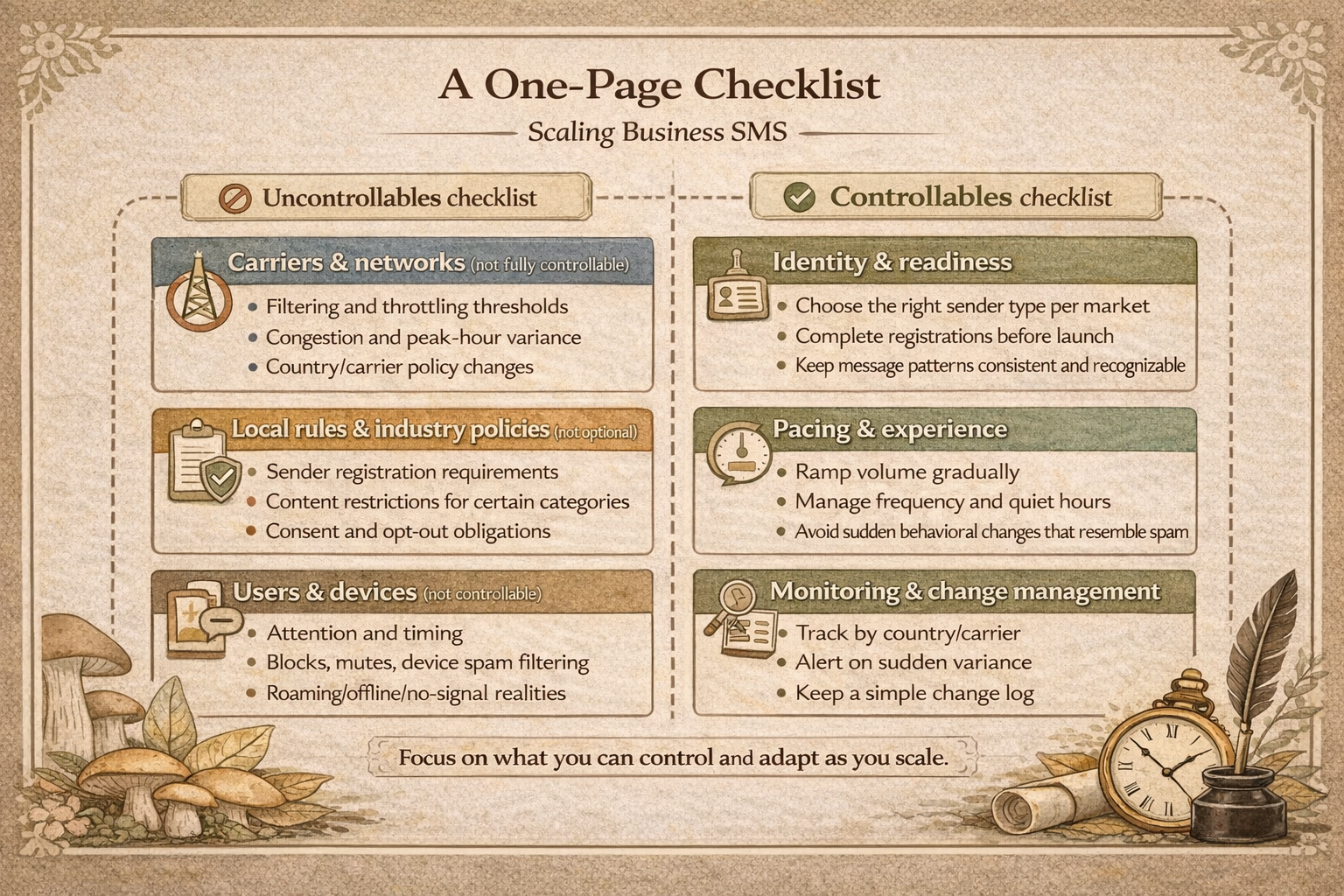
Checklist: What You Control vs What You Don’t in Business SMS
Uncontrollables checklist: carriers, rules, users
Carriers & networks (not fully controllable):
- filtering and throttling thresholds
- congestion and peak-hour variance
- country/carrier policy changes
Local rules & industry policies (not optional):
- sender registration requirements
- content restrictions for certain categories
- consent and opt-out obligations
Users & devices (not controllable):
- attention and timing
- blocks, mutes, device spam filtering
- roaming/offline/no-signal realities
Controllables checklist: identity, pacing, segmentation, monitoring
Most stable SMS programs focus on four controllable areas:
Identity & readiness:
- choose the right sender type per market
- complete registrations before launch
- keep message patterns consistent and recognizable
Pacing & experience:
- ramp volume gradually
- manage frequency and quiet hours
- avoid sudden behavioral changes that resemble spam
Segmentation & value:
- match content to intent
- reduce volume for low-intent audiences
- measure outcomes, not just delivery
Monitoring & change management:
- track by country/carrier
- alert on sudden variance
- keep a simple change log
If you’re evaluating messaging infrastructure, the SMS Boosting team can help review your program and identify potential delivery risks before scaling.
FAQs
Should teams retry a failed SMS automatically or wait?
Retrying blindly can make problems worse—especially if the failure is policy-related.
Use conditional retries: retry transient errors, but pause and investigate when failures cluster by country, carrier, or sender type.
Why did performance drop even though the message content stayed the same?
Because performance can shift due to carrier thresholds, congestion, sender identity enforcement, or list quality drift.
When nothing in your copy changed, start with the control map: where did the drop happen, and which layer can change without you?
How long do sender registrations usually take and why is it not instant?
Registration timelines vary by market and sender type, and they can take days to weeks.
It’s not instant because it’s an approval process across external parties (carriers, registries, policy frameworks), not a switch inside your platform.
Why are some messages delayed but eventually delivered?
Delays can come from network congestion, throttling, queueing, or temporary filtering behavior.
A delay is often a sign of traffic management rather than a software bug.
What should a beginner monitor weekly to catch problems early?
At minimum: delivery (by market), click/reply rate, opt-out rate, and any sudden variance.
If you only add one operational habit, add a weekly “what changed?” review.
What information a provider needs to assess a delivery dip quickly?
Country list, sender type, use case (marketing/transactional/OTP), recent volume changes, message samples, timestamps, and metrics by segment.
The more specific your “where and when,” the faster you get to root cause.



