An API response such as “accepted” or “success” usually means the SMS platform received the request and created a message record. It does not mean the text has already reached the recipient’s phone. The message still has to move through the sending platform, the selected route, the destination carrier, and finally the recipient’s network and device.
That is why a login code, payment notice, order update, or security alert can arrive later than expected even though your API call succeeded immediately. The delay may be brief, or it may end with a failure or timeout. The later message status is what tells you more.
API Accepted Does Not Mean SMS Delivered
An accepted response confirms one specific thing: the platform accepted the request at its API edge. It normally means the request had the required fields and the platform could create a record for it. It does not confirm that the platform has handed the message to a carrier, that the carrier has accepted it, or that the phone has received it.
This distinction is easy to miss because many systems return a success response within milliseconds. That speed describes the API transaction, not the complete SMS journey. A message can be accepted quickly and then wait behind later checks or handoffs.
For a transactional message, think of acceptance as “the platform has the message” rather than “the customer has the message.” The causes below explain what can happen after that point.
Platform Queue Delays
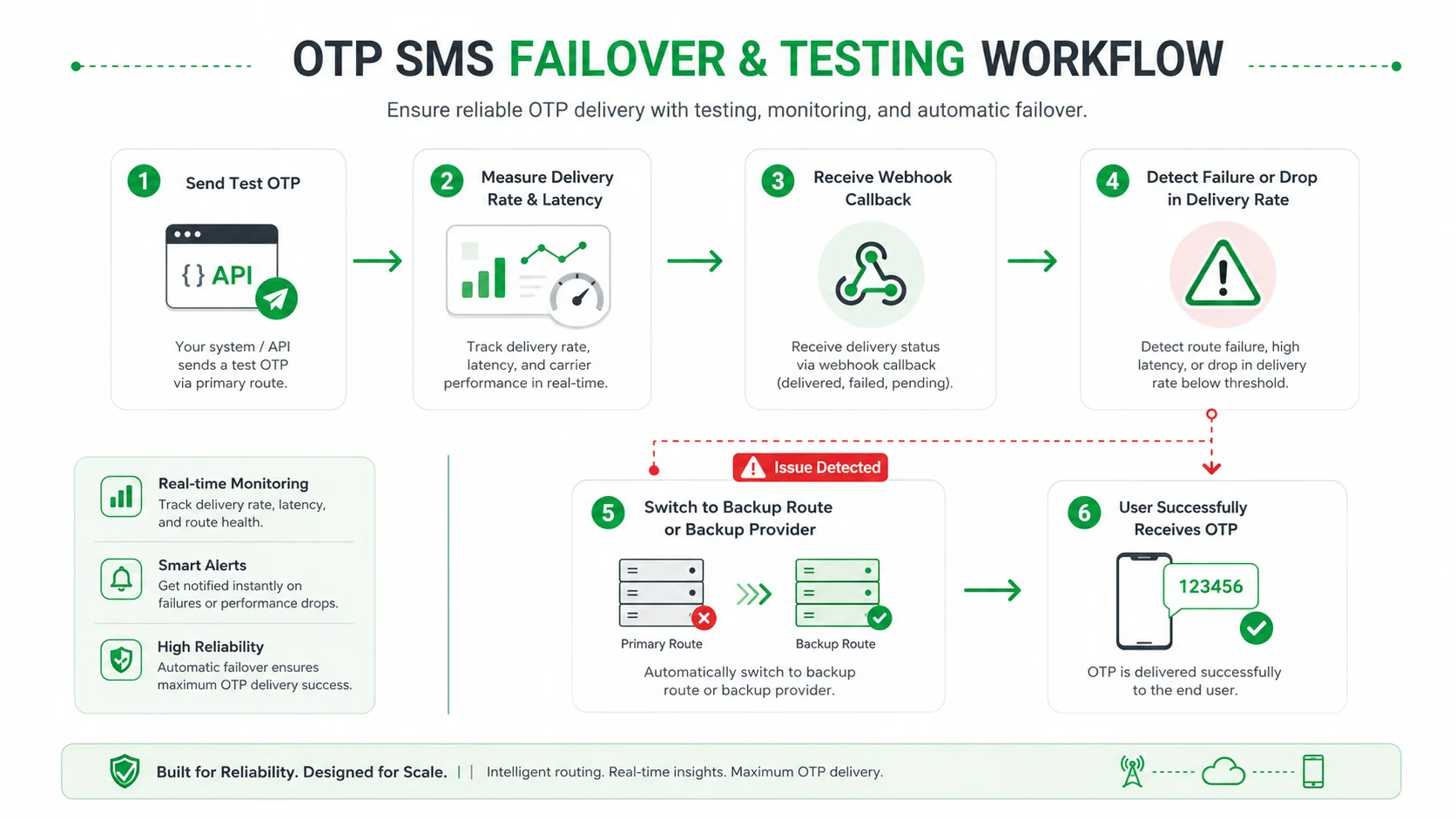
After accepting an API request, a platform may need to prepare the message for sending. It can group messages into a task, apply the selected sending configuration, and place work in an internal queue before it passes the message onward. The exact process varies by platform, but the important point is simple: acceptance and outbound sending are separate steps.
This is more noticeable when a business submits many messages at once, schedules a send, or sends during a busy period. A platform does not necessarily submit every accepted message to the next network at the exact instant the API returns. The message may show as unsent, pending, or sending while this work is still happening.
A single delayed message does not automatically mean there is a platform problem. But if a large group of messages stays in the same early status, especially in the same task or time window, the delay is likely occurring before the carrier stage. Check the message ID, task status, and submission progress before assuming the recipient’s phone is the cause.
Sender ID, Content, and Number Checks
An SMS can be accepted at the API level and still encounter checks later in the sending path. Depending on the destination and route, the sender identity, message content, number format, template requirement, account setting, or destination rule may affect whether the message can continue.
For example, a sender name that works in one country may not be accepted on the same basis in another. A message that uses a local language, a long dynamic value, or a special character may be treated differently from a short test message. A recipient number can also pass basic formatting but later be rejected because the route cannot use it as submitted.
These are not all “delays” in the same sense. Some checks produce a clear failure result. Others may leave the message in a non-final state while the sending path is being decided. The useful step is to read the returned status code or reason rather than treating every problem as a handset issue.
SMS Routing Delays
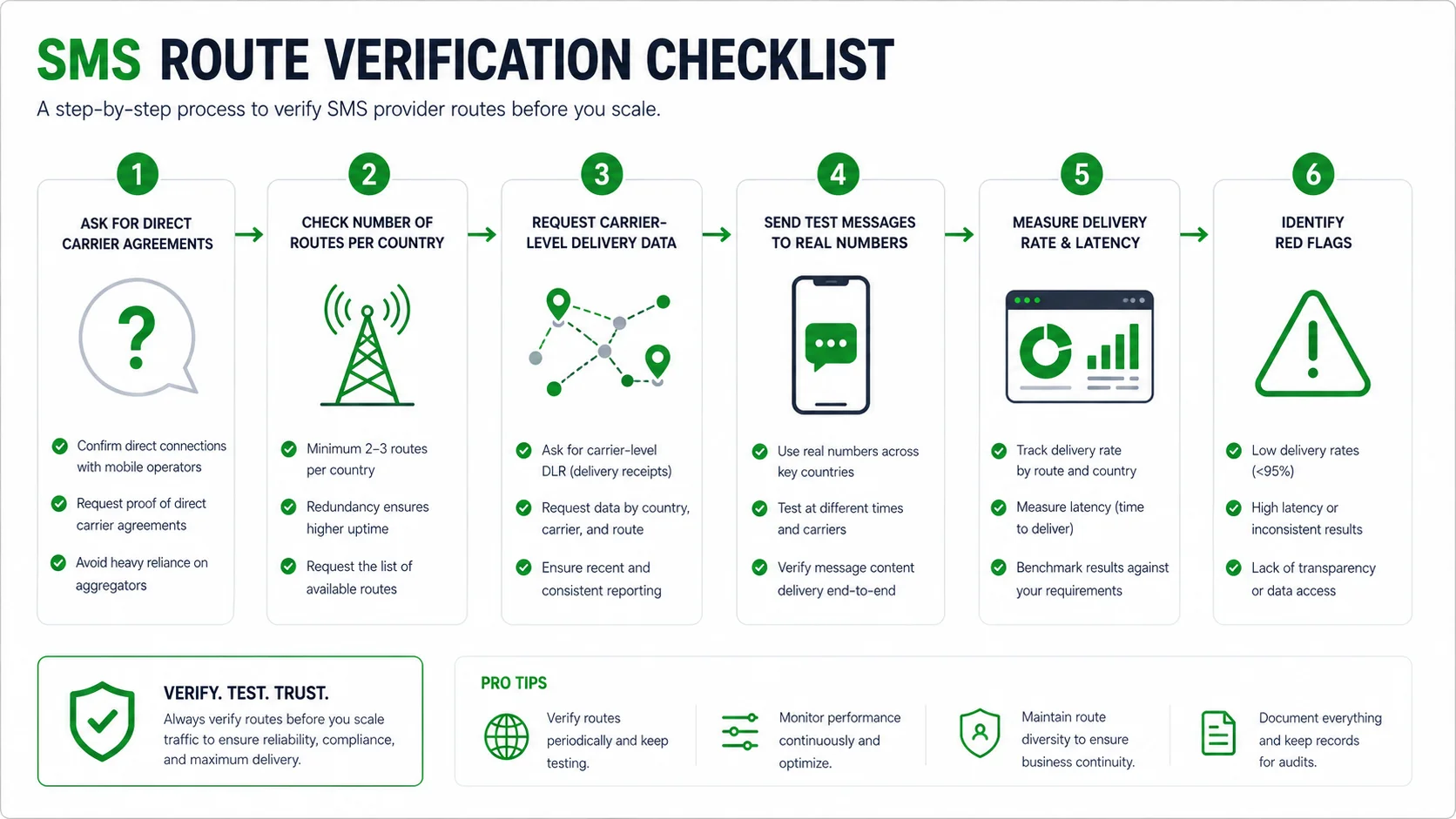
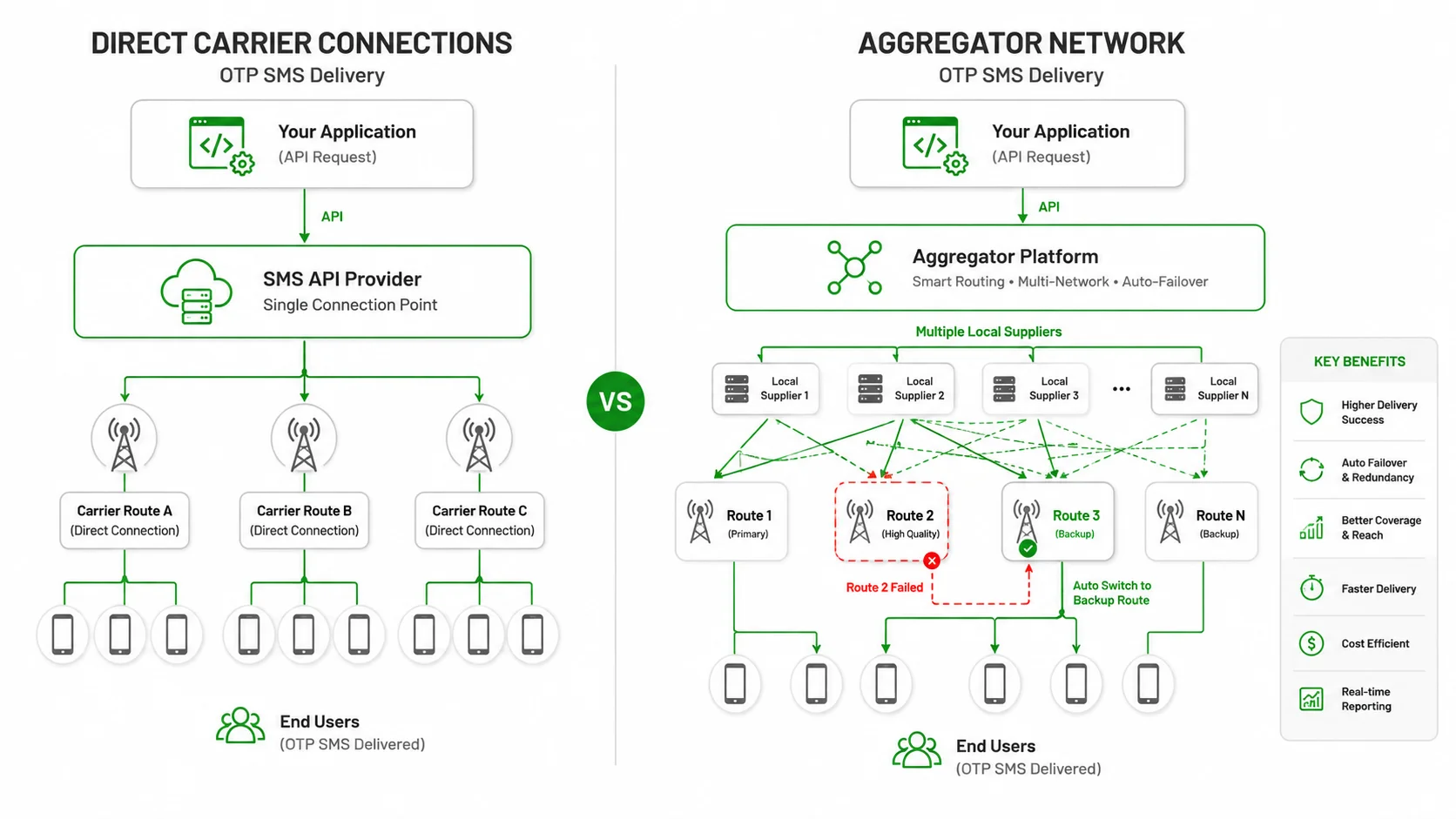
The platform does not usually send straight from your API request to every phone. It uses a route to pass the message toward the destination network. That route can include a connection to another messaging provider before the message reaches the destination carrier.
Each handoff adds another system that must accept and process the message. A route may also behave differently by country, network, sender type, and message type. A message that moves quickly in one market can take longer in another even when your application sends both requests in the same way.
Route-related delay often appears as a pattern rather than an isolated event. Several messages to the same destination country, carrier, or sender may remain pending while other traffic continues. When that happens, compare a few delayed message IDs with a few successful messages sent at the same time. This gives the provider a much clearer starting point than a general report that texts are slow.
Carrier and Network Delays
Once the message reaches the destination carrier, the carrier still has to process it through its own SMS infrastructure. It may accept the message for delivery, hold it while attempting delivery, reject it, or return no final confirmation within the reporting window.
Carrier processing is one reason a message can look successful at the sending end but still arrive later. The sending platform can confirm that it submitted the message to the next step, but it cannot create a delivery receipt before the destination network sends one back.
Network congestion can also matter. Traffic levels vary by carrier and time of day, especially during large events, holidays, or local disruptions. Messages that cross between networks or countries can involve more processing before delivery. No provider can set one delivery time that applies to every carrier and country. For a time-sensitive SMS, measure the behaviour of the exact destination and message setup you use instead of relying on a general speed claim.
Phone and Signal Delays
The final part of the journey depends on the recipient’s connection to the mobile network. A phone may be switched off, out of coverage, roaming, temporarily unable to receive, or affected by a network condition. In those cases, the carrier may keep trying for a period, return a timeout, or report another outcome according to its own rules.
This is why it is risky to diagnose a delayed SMS from the API response alone. A successful submission does not tell you whether the phone was reachable. Equally, a pending message does not prove that the customer blocked the text or that the handset is at fault. Use the status returned by the sending path and the carrier before making that conclusion.
For login codes, this difference has a direct customer impact: a late code can arrive after the code is no longer useful. Code lifetime, resend behaviour, and another way for the customer to continue are product decisions for your own application. They should not depend on an assumption that every SMS will arrive at the same speed.
SMS Statuses and Delivery Receipts
Status names differ between providers, but the broad meaning is usually similar:
| Status type | What it normally means |
| Accepted or submitted | The platform accepted the API request. Delivery is still unknown. |
| Unsent, pending, or sending | The message is still being processed or no final delivery result has returned. |
| Delivered | A delivery receipt was returned. This is stronger than API acceptance, but it does not prove the recipient read the SMS. |
| Failed or rejected | A known problem stopped the message. Check the returned code or reason. |
| Timeout | No final delivery result arrived within the relevant reporting window. It does not identify one specific cause by itself. |
The status is more useful when you look at it with the message ID, destination country, sender, and request time. Those few details show whether the delay is isolated or part of a larger pattern.
A delivery receipt can also arrive later than the SMS itself. Mobile networks may prioritise message traffic ahead of status updates during busy periods. A late delivery receipt is therefore not always proof that the recipient received the SMS late. Read the receipt as the time your platform received the update, unless the carrier report gives a separate delivery time.

When to Contact Your SMS Provider
Do not use one global “late after X minutes” rule. A delivery update for a password reset has a different business impact from an appointment reminder sent a day in advance. Instead, use the message’s purpose and the latest status.
Wait and keep checking if the message has a valid submission ID and is still moving through a non-final state. Check your own request path first if the API call timed out or there is no message ID, because a retry could create a duplicate send.
Ask the provider to check the route when a group of messages shares the same country, carrier, sender, or time window; when a final failure or timeout appears; or when the message is no longer useful and there is still no final result. Include the message IDs, request and status times in UTC, destination country, sender, message type, and returned status code. Do not share API credentials, full recipient data, or live one-time codes.
Checking Delayed SMS in SMSBoosting
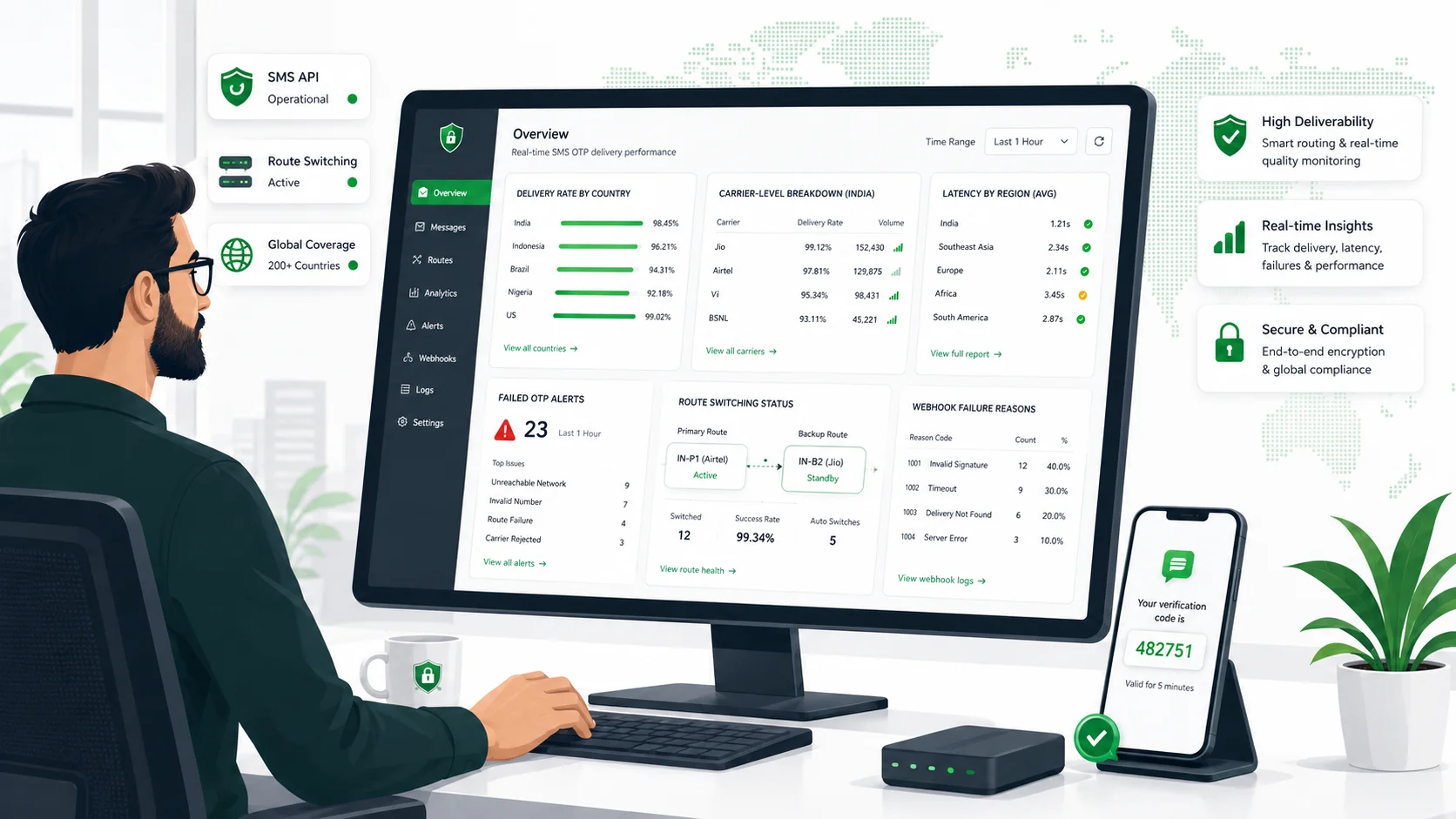
For SMSBoosting API sends, a successful submission returns a query ID. Use that ID in the SMS API report query to check the later result. The report includes states such as unsent, sending, delivery success, delivery failure, delivery timeout, and not found.
The SMSBoosting task-management view also shows task status, submission progress, total send count, success count, and failure count. You can filter tasks by time, status, application name, and task ID. These views help you see whether the message is still on the platform side or whether you need to ask about the destination route.
API Acceptance Is Only the First Step
An accepted API response is good news, but it only confirms the first stage. The SMS can still be delayed by platform processing, sender or destination checks, route handoffs, destination-carrier processing, or the recipient’s network state.
When you check the message ID and later status, the delay becomes easier to understand. If you need help reviewing delayed SMS traffic through SMSBoosting, contact the SMSBoosting team with a few message IDs, the destination country, and the current status.