

A single SMS rarely finishes the job. The customer reads the first message, and the outcome depends on what happens next: a confirmation that arrives without a reply, an abandoned cart that needs a nudge, or a quote that goes silent after one send. SMS follow-up messages are the second touch that continues the conversation, and they work only when the timing, frequency, and consent rules are right. Get them right and a follow-up feels helpful; get them wrong and it feels like spam.
This article explains which scenarios deserve an SMS follow-up, when to send it, how often, and how to keep the message within the customer’s permission. It also shows how follow-ups differ from reminders, so teams can pick the right message type instead of firing off a template. The goal is to help you build a follow-up flow that customers appreciate rather than tolerate.
What SMS Follow-Up Messages Are
An SMS follow-up message is a second text sent after an earlier interaction to move the conversation forward. The earlier interaction can be a promotional message, an inquiry, a support exchange, or a checkout that stalled. The follow-up either asks for a decision, answers an unasked question, or reopens a thread that went quiet.
How Follow-Ups Differ from Reminders
Reminders tell the customer something they already know is coming, such as an appointment time or a payment due date. Follow-ups, by contrast, respond to a state: no reply, no purchase, no confirmation. The distinction matters because reminders can be scheduled deterministically, while follow-ups depend on a trigger and should respect the customer’s behavior after the first message.
When a Follow-Up Is the Right Tool
Follow-ups earn their keep in conversations with an obvious next step. A customer who asked a pricing question, started a checkout, or booked a consultation all have a natural continuation. If the first message was complete by itself and the customer did not ask for more, a follow-up adds noise rather than value.
Scenarios Where SMS Follow-Up Messages Work Well
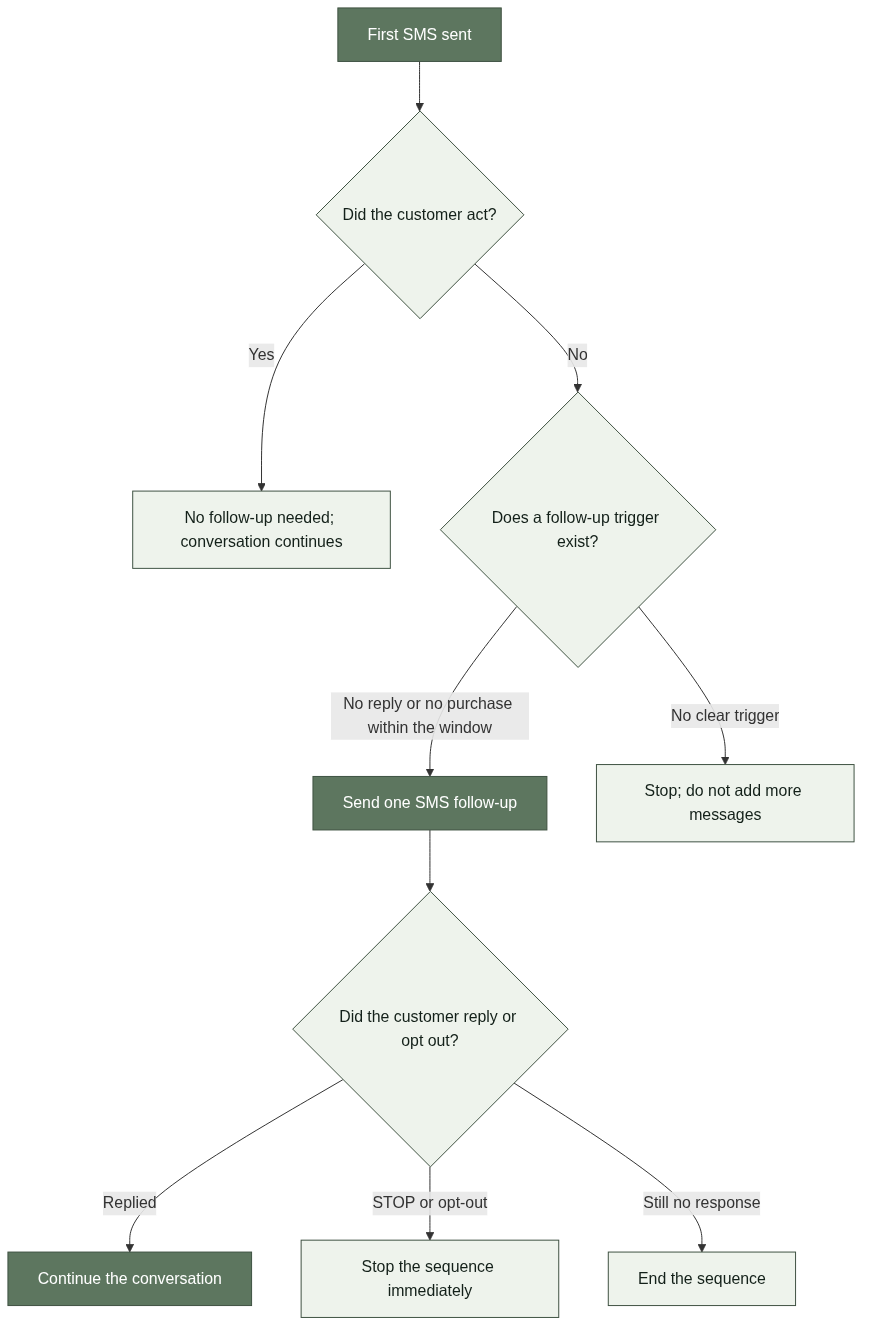
The best follow-up scenarios share three properties: a clear trigger, a meaningful next step, and a reasonable window. Abandoned carts, quote follow-ups, event registration, and post-support check-ins all fit because each has an event the business can react to.
Abandoned Carts and Checkout Recovery
A customer who leaves items in a cart has already shown intent. A follow-up message that confirms the items are still available and offers help, rather than pressure, can restart the decision. The window matters: a follow-up sent days later has less context than one sent within hours, and a customer who already completed the purchase should never receive the message.
Quote and Inquiry Follow-Ups
When a customer asks for pricing or a service detail, the ball is in the business’s court until it replies. A follow-up after a quoted offer checks whether the customer has questions and keeps the conversation alive. The message should be specific to the inquiry, not a generic “just checking in” text.
Event Registration and Post-Support Check-Ins
Registration flows benefit from a follow-up when a customer started but did not finish. Post-support check-ins work when a ticket was closed and a quick confirmation would catch an unresolved issue. Both rely on a narrow window and a clear reason; without either, the follow-up reads as noise.
Timing and Frequency of SMS Follow-Up Messages
Timing is the difference between a helpful nudge and an interruption. The right timing depends on the scenario, the customer’s time zone, and the urgency of the decision. A single, well-timed follow-up outperforms several generic ones, and most flows do not need more than one or two.
Choosing the Send Window
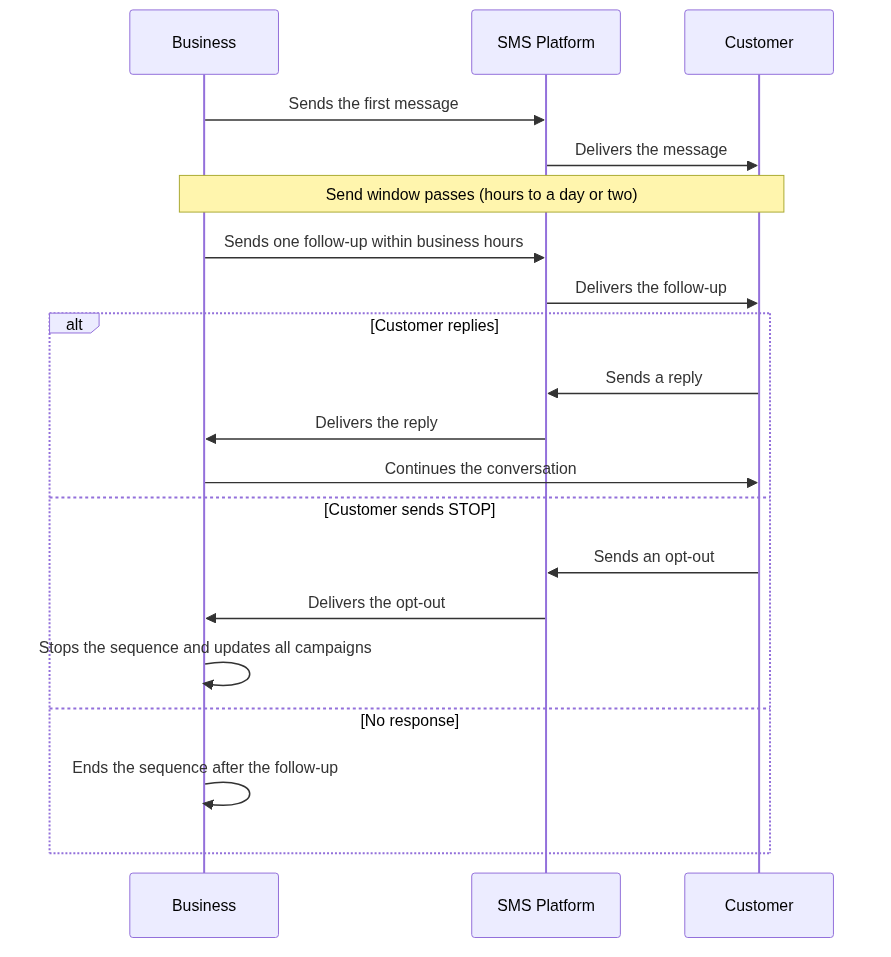
Send follow-ups during normal business hours in the customer’s local time zone, and give the customer enough time to act on the first message before adding a second one. For an abandoned cart, a window of a few hours makes sense; for a quote, a day or two is more realistic. The principle is simple: the follow-up should arrive when the first message is still relevant but no longer fresh enough to stand alone.
Keeping Frequency Low and Purposeful
Message frequency is where follow-up programs fail most often. A customer who has not replied is not necessarily a customer who wants more texts. Keep the sequence short, make each message purposeful, and stop after the first follow-up unless the customer engages. Consent rules require customers to have agreed to receive messages in the first place, and each additional message is a test of that agreement [1].
Respecting Opt-Outs and Consent
An opt-out such as “STOP” ends the conversation immediately, and the customer must not receive further follow-ups [2]; message flow controls should also stop the sequence at that point [3]. Consent is not a one-time checkbox: it covers the original program, and follow-up messages remain within that permission only while they serve the same purpose. When in doubt, one message is safer than two.
Avoiding the Over-Messaging Trap
The most common follow-up failure is treating silence as permission to keep sending. A customer who ignores the first message has not asked for more contact, and a second follow-up should only fire when a specific trigger justifies it. If no trigger exists, the sequence should end.
Distinguishing Follow-Up from Reminder Sequences
Reminder sequences are scheduled by date, such as a payment due in three days. Follow-up sequences are triggered by behavior, such as no reply within a window. Mixing the two creates messages that feel redundant: a customer can receive a reminder and a follow-up about the same event, which undermines both. Choose one pattern per scenario and keep the other out.
Measuring What a Follow-Up Actually Does
Track the metric tied to the follow-up’s purpose, such as reply rate, completed checkout, or confirmed registration. Compare it against a baseline without the follow-up, and watch for signs of fatigue, such as rising opt-outs or unsubscribes. A follow-up that moves the metric is working; one that only adds volume is a cost.

Building a Simple Follow-Up Flow
A practical follow-up flow starts small: one scenario, one follow-up, and a clear stop rule. Teams that scale follow-ups successfully add them scenario by scenario, not all at once.
Start with One Scenario and a Stop Rule
Choose the scenario with the clearest trigger, such as an abandoned cart, and define the exact condition that sends the follow-up, the window, and the condition that cancels it. Document what happens when the customer replies or opts out. A single clean flow teaches more than several half-built ones.
Use a Platform That Handles Delivery and Opt-Outs
Follow-up flows depend on reliable delivery and immediate opt-out handling. When evaluating a provider, check delivery reliability, message routing, and how opt-outs are processed across campaigns. For related delivery capabilities, the Notification SMS Service page and the SMS Alerts page describe the kind of infrastructure follow-up messages rely on, and the Two Way SMS guide explains how replies come back when customers respond.
FAQ
References
Twilio, “Messaging Services.” https://www.twilio.com/docs/messaging/services. Public platform documentation describing consent and opt-out management for commercial SMS programs.
Twilio Help Center, “Managing Opt-Outs and Unsubscribes.” https://help.twilio.com/articles/360027580933-Managing-Opt-Outs-and-Unsubscribes-for-Messaging-Services. Public documentation describing STOP keyword handling and opt-out requirements.
AWS, “Two-way SMS messaging.” https://docs.aws.amazon.com/pinpoint/latest/developerguide/channels-sms-two-way.html. Public platform documentation describing opt-out handling and message flow controls.



