

Every day, businesses send millions of text messages to confirm orders, remind customers of appointments, alert them about account activity, and update them on delivery status. These messages — broadly called SMS notifications — have become a routine but essential part of how companies communicate with their customers.
This article explains what SMS notifications are, how they differ from related message types, and why businesses across industries rely on them. It covers the most common use cases, compares SMS with other communication channels, and offers practical guidance for building an effective notification strategy.
What Are SMS Notifications and Why They Matter
SMS notifications are text messages sent by businesses to deliver time-sensitive information directly to a customer’s mobile phone. Unlike marketing broadcasts that aim to promote a product or service, notifications serve a functional purpose: they inform, remind, or alert the recipient about something that requires their attention.
Defining SMS Notifications, Alerts, Reminders, and Updates
The terms notification, alert, reminder, and update are often used interchangeably, but they serve distinct purposes in business communication:
- Notifications are the broadest category. Any SMS a business sends to convey information — whether it is an order confirmation, a shipping update, or a password reset — is a notification. The defining characteristic is that the recipient needs to know something.
- Alerts are a subset of notifications that convey urgency. A fraud alert on a credit card transaction, a service outage notice, or a security verification code are all alerts. They demand attention and often require immediate action.
- Reminders are notifications sent ahead of a future event. Appointment reminders, subscription renewal notices, and payment due reminders all fall here. Their purpose is to reduce no-shows, late payments, or missed deadlines.
- Updates keep the recipient informed about the status of an ongoing process. Delivery tracking messages, order status changes, and progress notifications are typical examples.
Understanding these distinctions helps businesses choose the right tone, timing, and frequency for each message type [1].

Why Timeliness and Reliability Make SMS the Preferred Notification Channel
SMS has a structural advantage over most digital communication channels. It does not require an internet connection, a smartphone, or a specific app. As long as the recipient has a mobile phone with cellular coverage, the message will arrive.
The result is an open rate around 98%, with 90% of messages read within three minutes of delivery [2][3]. For time-sensitive notifications — a one-time passcode, a delivery exception, or a fraud alert — this speed and certainty are difficult to match through any other channel.
SMS also offers near-universal reach. With over 5 billion mobile phone users worldwide, text messaging covers populations that email or push notifications may not reliably reach, particularly in markets where smartphone penetration is lower or data connectivity is inconsistent [4].

Key Business Scenarios for SMS Notifications
The practical applications of SMS notifications span nearly every industry. While the specifics vary, the underlying pattern is consistent: a business has information the customer needs to act on, and SMS is the most reliable way to deliver it quickly.
Ecommerce: Order Confirmations, Shipping Alerts, and Delivery Updates
Ecommerce was one of the earliest adopters of transactional SMS notifications. When a customer places an order, an SMS confirmation provides immediate assurance that the transaction was successful. Shipping alerts keep the customer informed as the package moves through the fulfillment pipeline, and delivery updates — including exception notices for failed delivery attempts — reduce support inquiries and improve the post-purchase experience [5].
Studies indicate that 52% of consumers rank SMS as their preferred channel for shipping notifications [2]. For merchants, the operational benefit is clear: fewer “where is my order” calls and a measurable reduction in cart abandonment when delivery expectations are set clearly.
For a deeper look at SMS strategies in online retail, see this guide on SMS for Ecommerce.
Fintech: Transaction Alerts, Fraud Notifications, and Payment Reminders
Financial services rely heavily on SMS for both security and customer communication. Transaction alerts confirm every debit, credit, or transfer in real time, giving customers immediate visibility into account activity. Fraud notifications — triggered by unusual spending patterns or login attempts from unfamiliar locations — serve as a first line of defense against unauthorized access.
Payment reminders are equally important. For credit cards, loans, and installment plans, an SMS reminder a few days before the due date reduces delinquency rates and late payment fees. In markets where banking apps have lower adoption, SMS may be the only reliable channel for reaching customers about their financial obligations.
Logistics and Transportation: Real-Time Tracking and Exception Alerts
Logistics companies use SMS to provide tracking updates at every stage of the shipment journey. From pickup confirmation to customs clearance notices and final delivery alerts, each message reduces the uncertainty that drives support calls. Exception alerts — delivery delays, address issues, or failed delivery attempts — give customers immediate visibility into problems and often include instructions for resolution.
The impact on customer experience is significant. A proactive SMS notification about a delivery delay, sent before the customer notices the issue themselves, can turn a potentially negative experience into a demonstration of transparency and care.
Healthcare: Appointment Reminders and Lab Result Notifications
Healthcare providers use SMS to reduce no-show rates for appointments and keep patients informed about their care. Appointment reminders sent 24 to 48 hours in advance give patients time to reschedule if needed, while lab result notifications provide timely access to important health information.
HIPAA-compliant SMS platforms allow providers to send general notifications without exposing protected health information, preserving patient privacy while improving operational efficiency.
SaaS and Subscription Services: Account Alerts and Renewal Notifications
Subscription-based businesses use SMS to communicate account-related updates: password changes, billing updates, subscription renewals, and service interruptions. These notifications reduce churn by ensuring customers are never surprised by a failed payment or an unexpected service change. A well-timed renewal reminder with a direct payment link can recover subscriptions that would otherwise lapse.
Cross-Border and International Use Cases
For businesses operating across multiple countries, SMS provides a consistent communication channel that works regardless of local messaging app popularity or data infrastructure quality. An international SMS provider with local carrier relationships can deliver notifications reliably across markets where smartphone penetration varies significantly — from Singapore and Malaysia to the Philippines, Indonesia, and India.
For a broader perspective on cross-border SMS strategies, refer to Cross-Border SMS for Ecommerce.
SMS vs. Other Communication Channels
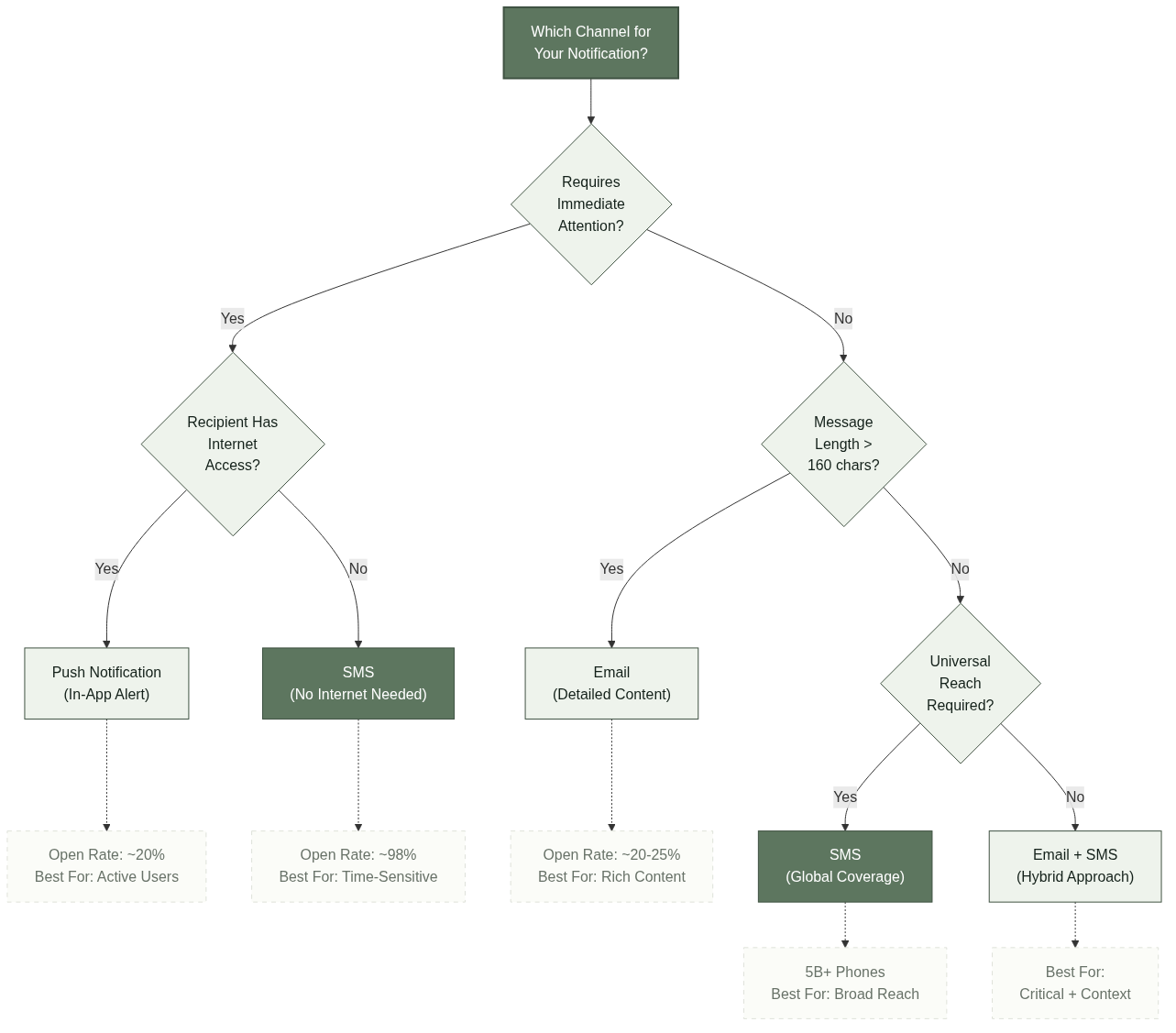
Email, push notifications, and in-app messaging each have strengths, but none match SMS for immediacy, reach, and reliability. Email can be filtered into spam folders or go unread for days. Push notifications require an installed app and an internet connection. In-app messages only reach users who are actively engaged with the application.
The table below summarizes how the major channels compare across key dimensions:
| Criterion | SMS | Push Notification | |
|---|---|---|---|
| Open Rate | ~98% | ~20-25% | ~20% |
| Read Time | Within 3 minutes | Hours to days | Minutes to hours |
| Internet Required | No | Yes | Yes |
| Character Limit | 160 (per segment) | Unlimited | ~120-256 |
| Device Reach | All mobile phones | Internet-connected devices | Smartphones only |
| Opt-In Level | Explicit (TCPA) | Usually implicit | App-level |
For businesses that need to reach customers across all device types and network conditions, SMS provides coverage that other channels cannot replicate. The trade-off is the per-message cost and the character limit, which make SMS best suited for concise, time-sensitive communications rather than long-form content.
Best Practices for SMS Notification Strategies
Building an effective SMS notification program requires more than just sending messages. The most successful implementations follow a set of proven practices that balance operational goals with customer experience.
Obtain Proper Consent. Transactional SMS notifications generally have different consent requirements than marketing messages, but the specific rules vary by jurisdiction. Most countries require businesses to obtain some form of consent before sending any type of commercial SMS [5]. Compliance with regulations like the TCPA in the United States, GDPR in Europe, and local telecom regulations in each target market is non-negotiable.
Respect Timing and Frequency. Notifications should arrive when they are useful, not when they are intrusive. Order confirmations should be immediate. Appointment reminders work best 24 to 48 hours in advance. Late-night delivery updates can wait until morning. Establishing timing rules for each notification type prevents customer fatigue.
Keep Messages Concise. SMS has a 160-character limit per segment. While longer messages can be concatenated, keeping notifications brief improves readability and delivery speed. Every message should answer three questions: what happened, what the customer needs to do, and where to get more information.
Include Clear CTAs. A notification without a clear next step creates confusion. Whether it is a link to track a package, a phone number to confirm an appointment, or instructions to reply STOP to opt out, every message should guide the recipient toward a specific action.
Test Delivery Across Carriers. Not all SMS providers route messages the same way. Testing delivery across major carriers in the markets you serve — from M1 and Singtel in Singapore to Telkomsel in Indonesia and Globe in the Philippines — ensures that your messages actually arrive.
For a deeper examination of routing quality, refer to the SMS Routing Reliability Guide.
Technical Considerations for Building an SMS Notification System
Integrating SMS notifications into a business application is straightforward with modern APIs, but several technical factors affect delivery reliability and cost. Understanding these considerations helps businesses choose the right approach for their scale and requirements.
API Integration. Most SMS providers offer RESTful APIs that accept a recipient number, message text, and optional parameters such as sender ID or delivery callback URL. Integration typically takes a few hours to days depending on the complexity of the application and the notification logic required.
Sender ID Registration. Many countries require businesses to register their sender ID — the name or number that appears as the message sender — with local telecom regulators. Unregistered sender IDs may be blocked or replaced with a generic number, reducing brand recognition and trust.
Delivery Reports. A reliable SMS platform provides delivery reports (DLR) that indicate whether each message was delivered, failed, or is still in transit. Monitoring DLR data helps businesses identify routing problems, carrier issues, or incorrect phone numbers before they affect customer experience.
Scalability and Throughput. SMS volume can vary significantly. An ecommerce platform may send hundreds of messages per day during normal operations and tens of thousands during a flash sale. The SMS provider must handle these peaks without degrading delivery speed or reliability.
Cost Management. Pricing models differ among providers. Some charge a flat per-message rate regardless of destination, while others use tiered pricing based on volume or destination country. For high-volume senders, per-message price differences between providers can be significant. Evaluating the total cost at expected volumes — including any platform fees, setup costs, or overage charges — provides a more accurate comparison than published list prices alone.
For a practical overview of strategies and best practices, refer to the Ecommerce SMS Notifications Guide.
Conclusion
SMS notifications are a practical and reliable communication tool for businesses that need to reach customers quickly across any mobile network. From order confirmations and shipping updates to fraud alerts and appointment reminders, text messaging provides a level of immediacy and near-universal reach that few other channels can match.
The key to using SMS notifications effectively lies in understanding the distinction between notifications, alerts, reminders, and updates — and choosing the right approach for each. Combined with proper opt-in compliance, thoughtful timing, and a reliable SMS provider, businesses can build a notification system that serves both operational needs and customer expectations.
Start by reviewing your current notification use cases and identifying where SMS can improve delivery speed or fill gaps in coverage. Evaluate providers based on their routing capabilities in the markets you serve and their ability to scale with your volume. The technical investment required to integrate SMS notifications is modest, and the operational impact — fewer support inquiries, lower no-show rates, and more reliable customer communication — is measurable.
Frequently Asked Questions
What is an SMS notification?
An SMS notification is a text message sent by a business to deliver time-sensitive information directly to a customer’s mobile phone, such as an order confirmation, payment receipt, or delivery update.
How do SMS notifications differ from marketing SMS?
SMS notifications are transactional or informational messages triggered by a specific event or action. Marketing SMS promotes products or services and is subject to different consent requirements under regulations like the TCPA [5].
What is the open rate for SMS notifications?
SMS messages have an average open rate of approximately 98%, with 90% read within three minutes of delivery [2][3]. This makes SMS one of the most reliable channels for time-sensitive information.
Do SMS notifications require opt-in consent?
Transactional SMS notifications generally have different consent requirements than marketing messages, but the specific rules vary by jurisdiction. Most countries require businesses to obtain some form of consent before sending any type of commercial SMS [5].
Can SMS notifications be sent to international phone numbers?
Yes, SMS notifications can be sent to most countries through providers with global carrier connectivity. The cost and delivery reliability vary by destination, and providers with local routing relationships in the target country typically achieve better results.
How much does it cost to send business SMS notifications?
Pricing varies by provider, destination country, and volume. Most providers charge per message, with lower per-message rates at higher volumes. Total cost should account for platform fees and destination-specific surcharges.
What is the difference between an SMS alert and an SMS notification?
An SMS alert is a subset of SMS notifications that conveys urgency and often requires immediate action — such as a fraud alert or security verification code. SMS notifications is the broader category that includes alerts, reminders, updates, and informational messages.
References
Twilio, “SMS Notifications: A Complete Guide for Developers,” Twilio Docs. https://www.twilio.com/docs/sms/quickstart (accessed July 21, 2026).
Infobip, “SMS Marketing Statistics: Key Figures for 2026,” Infobip Blog. https://www.infobip.com/blog/sms-marketing-statistics (accessed July 21, 2026).
Omnisend, “SMS Marketing Statistics: Key Data for 2026,” Omnisend Blog. https://www.omnisend.com/blog/sms-marketing-statistics/ (accessed July 21, 2026).
Wikipedia, “SMS,” Wikipedia. https://en.wikipedia.org/wiki/SMS (accessed July 21, 2026).
Federal Communications Commission, “TCPA Rules,” FCC Consumer Guides. https://www.fcc.gov/consumers/guides/tcpa (accessed July 21, 2026).
ETSI (3GPP), “Technical Specification 23.040: Technical Realization of the Short Message Service (SMS),” ETSI. https://www.etsi.org/deliver/etsi_ts/123000_123099/123040/ (accessed July 21, 2026).



