
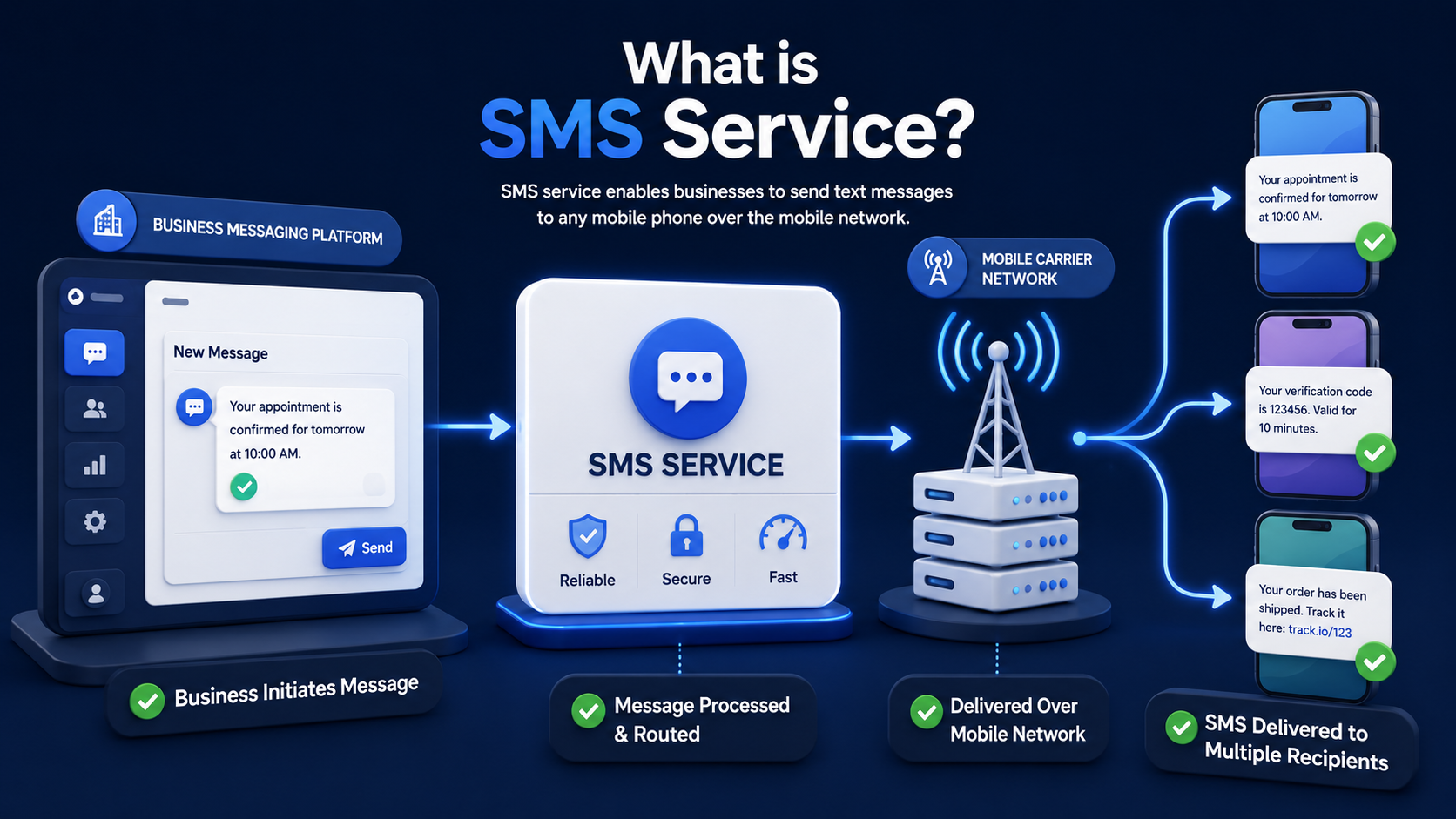
What Is SMS Service? SMS service is the system that lets phones and business platforms send short text messages over mobile carrier networks. It is still one of the most widely used messaging channels because it works on nearly any mobile phone, does not depend on an app install, and fits a long list of real business needs, including alerts, one-time passwords, reminders, and promotions. In this guide, we’ll break down what SMS means, how it works, where it fits today, and how businesses can start using it well.
What Does SMS Stand For?
SMS stands for Short Message Service. It is the standard mobile messaging format used to send brief text messages through carrier networks instead of app-based internet messaging. That basic idea has stayed the same for decades, even though phones, apps, and customer expectations have changed around it.
The Origin of SMS — From 1984 to Today
The story of SMS started in the 1980s, with the concept taking shape in GSM work in 1984 and the first widely recognized text message being sent on December 3, 1992. That first message, “Merry Christmas,” was sent over Vodafone’s network. Since then, SMS has moved from simple person-to-person texting into a major business channel for verification, notifications, logistics updates, and customer communication.
What kept SMS alive is simple: it solved a real communication problem. People needed a fast written message that could reach a phone without requiring both sides to be online in the same app. Businesses later found the same value. A short text could confirm an order, send a login code, flag account activity, or remind a customer about an appointment in seconds. That same logic still drives SMS use today.
SMS as a Service vs. SMS as a Single Message
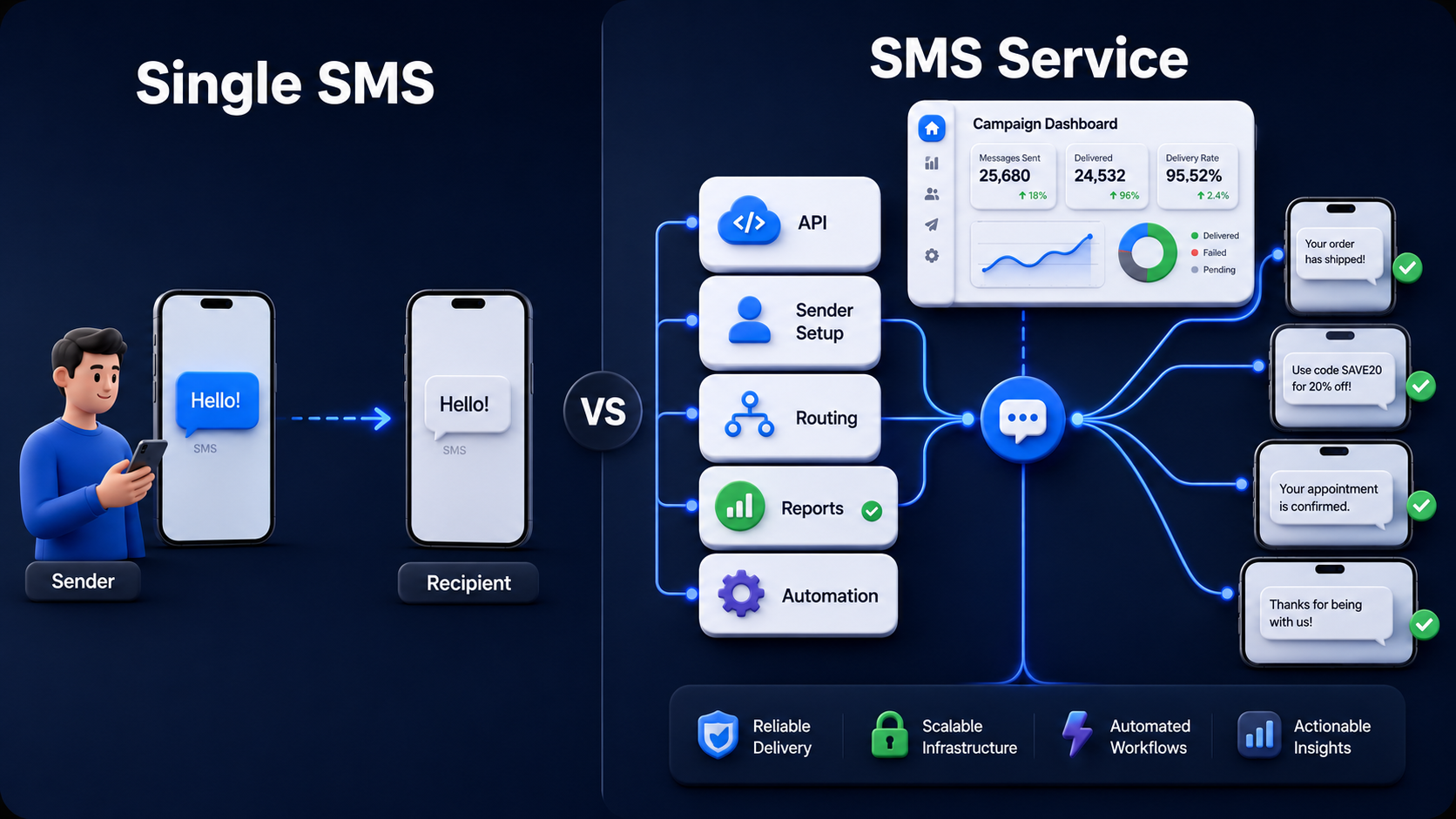
SMS as a single message means the text you send from one phone to another. SMS as a service means the system behind that message: the carrier network, service center, routing, delivery handling, and, in business use, the software layer that lets apps, websites, CRMs, and internal systems send messages at scale.
That difference matters for business buyers. If you are only thinking about texting as a message, you miss the platform side: APIs, delivery reporting, sender setup, compliance, routing, and automation. A company may use SMS service to send 1 password reset, 500 appointment reminders, or 100,000 campaign messages depending on the use case and the platform behind it.
How Does SMS Service Work?
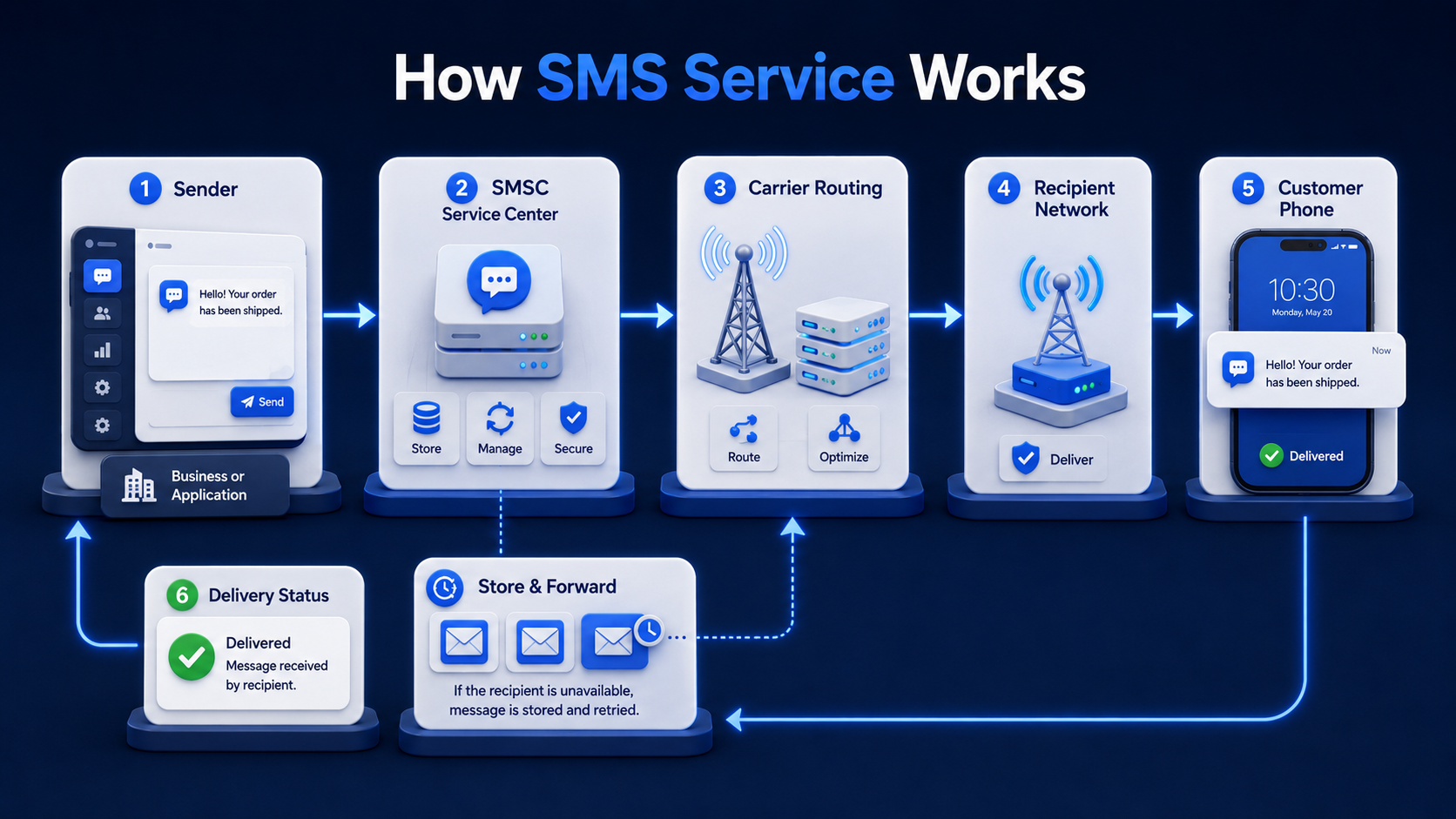
SMS service works by sending your text through a mobile network service center, often called an SMSC, which receives the message, routes it, and forwards it to the recipient’s phone. That system was designed for carrier networks, which is why SMS can still work even when a user does not have WhatsApp, iMessage, or another internet app available.
The Role of SMSC in Message Delivery
The SMSC is the traffic manager behind SMS delivery. When a message is submitted, the service center receives it and handles the next step, including routing, retry attempts, and handoff to the destination network. In technical terms, SMS uses a store-and-forward model, which means the message can be held and retried if the receiving device is temporarily unavailable.
That store-and-forward design is one reason SMS works well for business alerts. A customer’s phone might be off for a few minutes, out of coverage, or switching networks. The platform does not always fail on the first try. It can queue the message, then attempt delivery again when the network path becomes available.
SMS Signaling vs. Mobile Data
SMS travels through carrier signaling systems rather than the same internet-based path used by apps like WhatsApp or iMessage. In plain terms, that means SMS is tied to the mobile network itself, not to a separate chat app or a Wi-Fi-based messaging account. That is why SMS can reach people who only have basic network access and no data-based chat app ready to receive the message.
Message Delivery and Read Confirmation
SMS can support delivery confirmation in some carrier and platform setups, but read confirmation is limited and inconsistent. On Apple devices, read receipts are not supported with SMS messaging, while RCS chats can support read receipts when users enable them. So, plain SMS is better viewed as a send-and-deliver channel than a read-tracking channel.
What Are the Main Types of SMS Services?
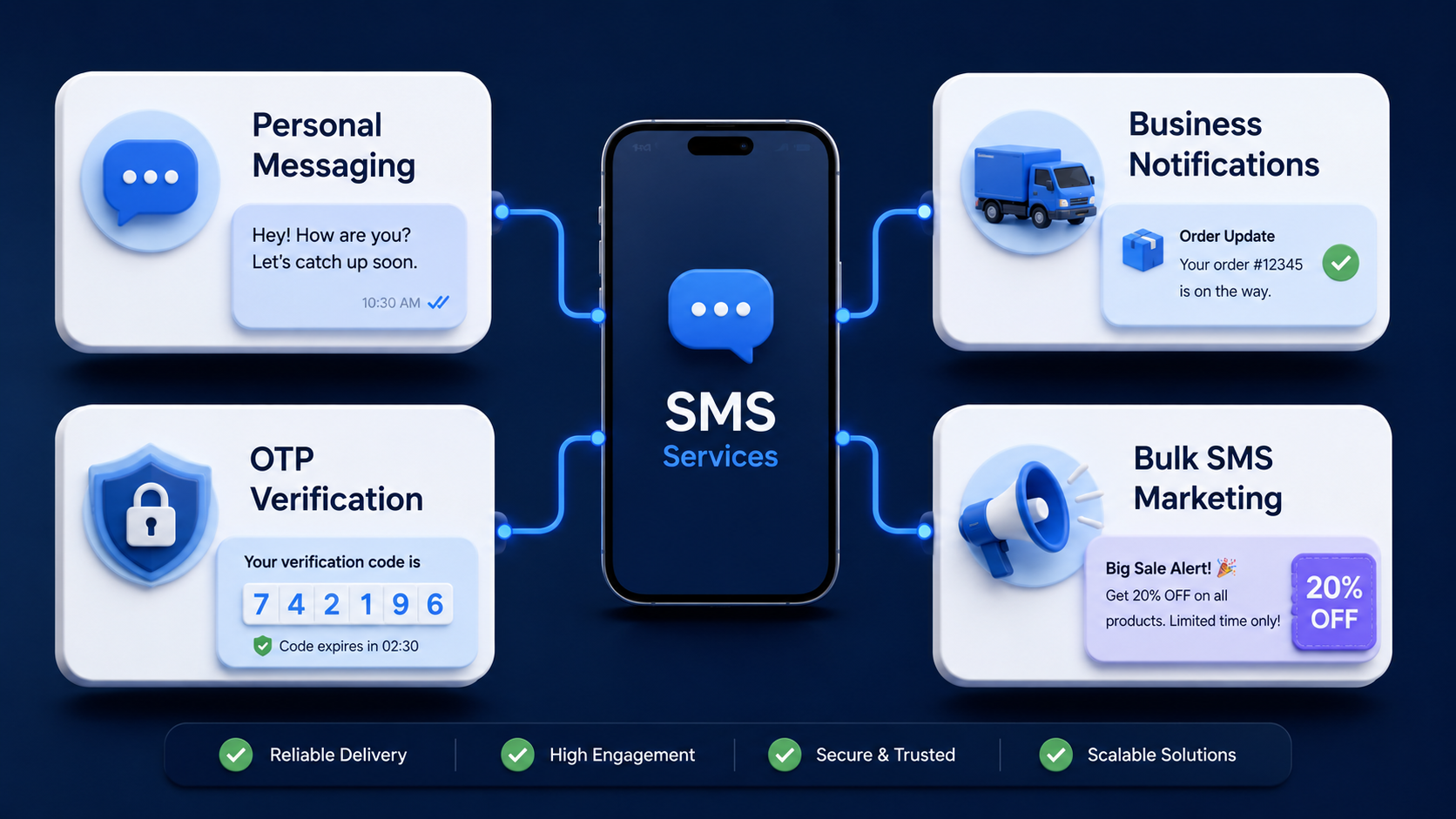
The main types of SMS services are personal texting, business notifications, verification messages, and bulk marketing campaigns. They all use the same base channel, but the purpose, timing, volume, and compliance rules can differ a lot.
Personal Messaging
Personal messaging is the everyday texting most people already know. One person sends a short message to another person using a phone number. It is direct, simple, and still useful when both people may not use the same app.
Business Notification SMS
Business notification SMS covers messages people expect because they relate to an account, order, booking, or service event. Common examples include order confirmations, out-for-delivery updates, appointment reminders, payment confirmations, and account activity alerts. This type of messaging is built for timing and clarity, not hype.
Verification and OTP SMS
Verification and OTP SMS send one-time passwords or short security codes used during login, signup, payment approval, or other sensitive actions. These messages are fast, narrow, and tied to a specific action the user is trying to complete. They are especially common in finance, payments, e-commerce, and account security flows.
Bulk SMS and Marketing Campaigns
Bulk SMS and marketing campaigns send messages to larger groups for commercial goals like promotions, product launches, flash sales, cart recovery, or loyalty outreach. This is where platform features start to matter more: segmentation, templates, automation, reporting, link tracking, consent handling, and regional routing all shape performance. A team that wants growth campaigns may start with a sms marketing service, SMS Boosting for promotional sends, then pair it with a sms notification service for operational alerts and reminders.
How Is SMS Different From MMS, iMessage, and WhatsApp?
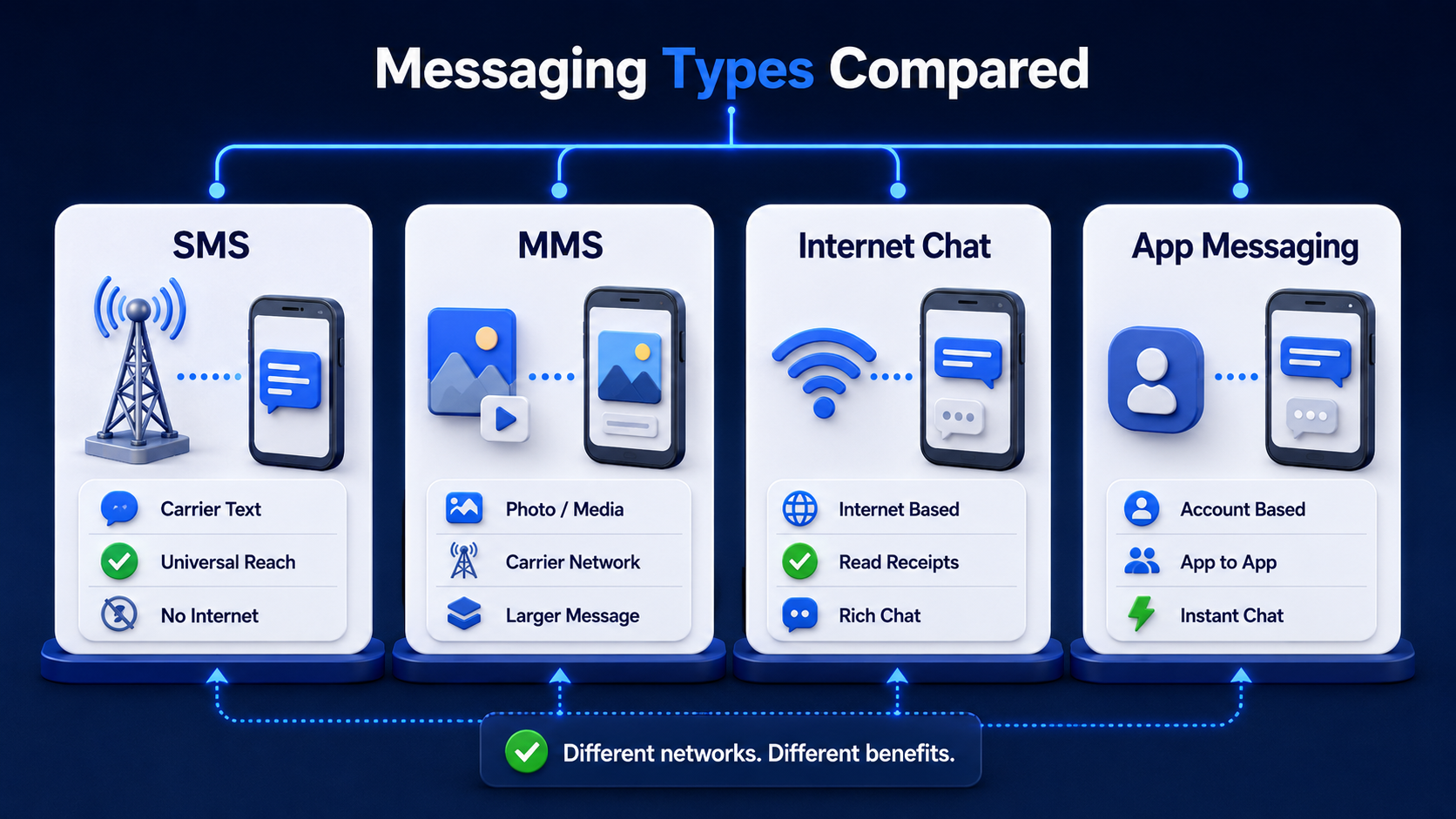
SMS is different because it is carrier-network text messaging. MMS adds multimedia. iMessage and WhatsApp are internet-based messaging systems with richer features, different account models, and stronger app-level experiences. Those channels overlap in daily life, but they are not the same thing.
SMS vs MMS
SMS is built for text. MMS is built for multimedia, including images, audio, video, and other richer message content. If you only need short, clean text delivery, SMS is lighter and more universal. If you need media inside the message, MMS handles that job instead.
SMS vs iMessage and WhatsApp
SMS uses the carrier network and the recipient’s phone number. iMessage and WhatsApp rely mainly on internet connectivity and platform-level messaging systems. Apple’s support pages separate SMS/MMS from iMessage, and Android’s RCS guidance makes a similar distinction between basic SMS and richer data-based messaging.
SMS vs Instant Messaging Apps
SMS is a network-native communication channel. Instant messaging apps are software platforms that ride on the internet. They often support richer conversations, but they also depend on app adoption, device compatibility, and in many cases user account setup. SMS gives up some features, but it wins on reach.
Why SMS Works When Other Apps Don’t
SMS works when other apps do not because it has fewer dependencies. The user does not need your app. The user does not need the same chat platform. The user often does not even need mobile data active at that moment. If the phone number is live on a supported mobile network, SMS has a path to delivery. That is why businesses still rely on it for urgent and time-sensitive communication.
What Is SMS Service Used For?
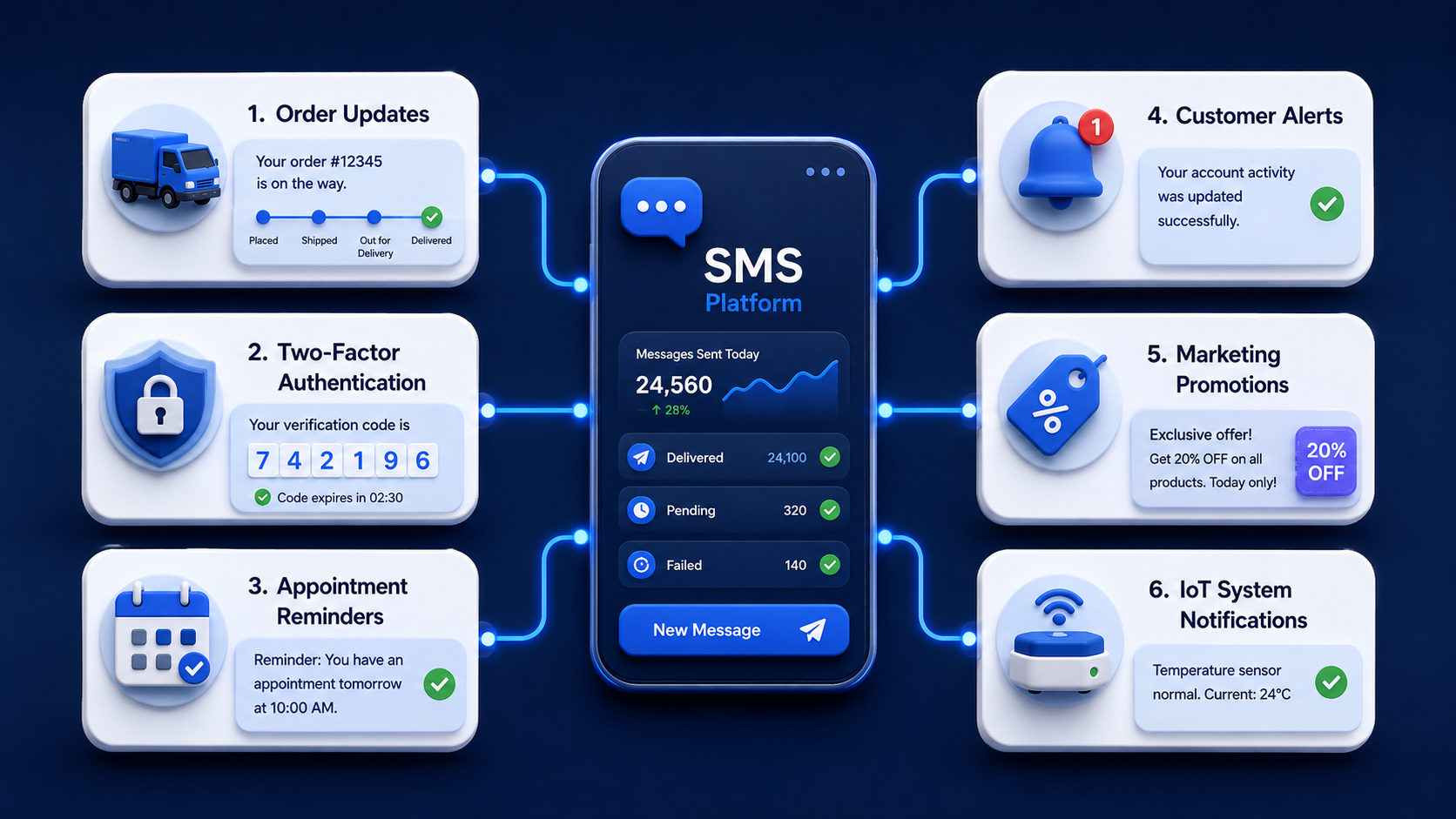
SMS service is used for alerts, authentication, reminders, promotions, and automated machine-to-person communication. The best use cases share one thing: the message needs to be seen fast and the content needs to stay short.
Customer Alerts and Order Updates
Customer alerts and order updates are one of the strongest fits for SMS. Examples include order confirmations, shipping status, out-for-delivery notices, delay alerts, pickup reminders, and failed-delivery exceptions. These messages are useful because they are short, expected, and time-sensitive.
Two-Factor Authentication (2FA)
Two-factor authentication uses SMS to send a one-time code that supports account login or payment approval. It is popular because it is easy to deploy, familiar to users, and reachable across a very large user base. For many teams, SMS is the fastest way to add a second step to an account flow without requiring users to learn a new tool.
Appointment Reminders and Internal Notifications
Appointment reminders and internal notifications work well over SMS because timing matters more than design. Clinics, repair teams, delivery operations, and service businesses use texts to reduce missed appointments, coordinate staff, and keep customers updated. In these cases, the value is not the message length. The value is that the message lands fast and feels hard to miss.
Marketing and Promotional Campaigns
Marketing and promotional campaigns use SMS to reach opted-in customers with short offers, product news, coupon codes, flash sales, loyalty rewards, and abandoned-cart reminders. This works best when the buying decision is quick and the offer is easy to understand in a few seconds. E-commerce brands, payment platforms, and service businesses often use SMS for short-window conversion pushes because the channel reaches people fast.
SMS in IoT and Automated Systems
SMS also appears in automated systems and machine-triggered workflows. Devices, apps, and backend systems can send status alerts, verification steps, dispatch updates, threshold warnings, or service-event messages without human intervention. That matters in logistics, finance, payments, and operations teams where software needs a direct path to the end user’s phone.
Is SMS Service Secure?
SMS service is useful and widely trusted for reach, but it is not end-to-end encrypted like some modern messaging systems. That means you should use it carefully: good for alerts and one-time codes, not ideal for sending highly sensitive content in plain text.
Why SMS Is Not End-to-End Encrypted
SMS is not end-to-end encrypted in the same way iMessage or some RCS chats can be. Apple’s support guidance says SMS and MMS are not end-to-end encrypted, while Google’s support pages explain that end-to-end encryption applies to eligible RCS chats in Google Messages. So, standard SMS should not be treated as a private vault for sensitive message content.
What Is Smishing and How to Spot It
Smishing is phishing by text message. Attackers send fake texts that try to push you into clicking a link, calling a fake number, or sharing account data. The FTC advises people not to click links or respond to unexpected texts and to contact the company through a phone number or website they already know is real.
Some common smishing warning signs include:
- Fake Urgency: The message says your bank account, delivery, or payment needs action right now, even though you were not expecting it.
- Unknown Links: The text pushes you to tap a shortened or strange-looking URL instead of visiting the company site yourself.
- Impersonation: The sender pretends to be a bank, shipping company, government office, or store support team.
- Data Requests: The message asks for passwords, card details, one-time codes, or account confirmation by text. Legitimate companies do not handle sensitive verification that way.
Should You Use SMS for Two-Factor Authentication?
SMS can still be used for two-factor authentication, but it is not the strongest option available. NIST’s guidance says out-of-band authentication is not phishing-resistant, which is a useful reminder that convenience and maximum security are not the same thing.
What Is the Future of SMS Service?
The future of SMS service is not “SMS disappears.” The more likely outcome is that SMS stays in place for universal reach while richer channels handle media-heavy and app-like conversations. In business messaging, that makes SMS less of an old tool and more of a dependable baseline layer.
What Is RCS and How Does It Differ From SMS
RCS stands for Rich Communication Services. It is designed as a richer messaging standard with features like high-resolution media, typing indicators, group chat, read receipts, and, in some supported cases, end-to-end encryption. Android’s official guidance describes RCS as an upgrade over traditional SMS and MMS, though support still depends on device, carrier, app, and region.
Why SMS Is Still Relevant Despite Newer Technologies
SMS is still relevant because reach beats richness in many business workflows. An OTP that arrives is more useful than a fancy message that never reaches the user. The same goes for delivery alerts, payment confirmations, and service reminders. When the job is “send a short message to almost any mobile phone now,” SMS still fits.
How Do You Start Using an SMS Service?
You start using an SMS service by picking a provider that matches your use case, supports the countries you care about, and gives your team the tools to send, track, and manage messages safely. If your needs are simple, you may begin with notification workflows. If your needs are broader, you may need API support, OTP routing, and campaign tools from day one.
Choosing an SMS Service Provider
Choose an SMS service provider based on reach, reliability, use-case fit, and control. A platform built for B2B messaging should help you handle alerts, verification, operational messaging, and promotional sends without forcing you into one narrow workflow. It should also support the markets you serve and the systems you already use.
Key Features to Look For
SMS service platforms should support a few core features before you commit:
- Delivery Visibility: You need message status tracking so your team can see what was sent, delivered, delayed, or failed.
- API Access: You need API support if your app, CRM, store, payment system, or internal tool must send messages automatically.
- Use-Case Coverage: You need support for the kinds of messages you actually send, including notifications, OTP, and campaigns.
- Regional Reach: You need a provider that can support your destination countries with predictable routing and performance.
- Reporting and Control: You need logs, templates, and operational visibility so your team can improve performance over time.
Compliance and Opt-In Requirements
Compliance and opt-in rules matter because SMS is a permission-based channel. People should know what they are signing up for, what kind of texts they will receive, and how to stop them. That matters most in marketing, but it also affects operational messaging in many regions. A serious provider should help your team manage consent, sender rules, and destination-level requirements.
Keep the operational side clean too. Use clear sender identification where supported. Separate promotional flows from transactional flows. Make opt-out handling visible. Keep message timing reasonable. Those steps protect both deliverability and trust.
Final Thought
SMS service is still one of the clearest ways to reach people on mobile. It is simple, widely supported, and built for fast communication. If your business needs to send OTP codes, order updates, reminders, account alerts, or short promotional offers, SMS still earns its place. Start with your main use case, pick a provider that supports the regions and systems you care about, and build from there. For many B2B teams, that means combining campaign messaging, notifications, and API-driven workflows under one platform that can scale with the business.
Frequently Asked Questions About SMS Service
Can I send SMS messages from a computer or web browser?
Yes, you can send SMS messages from a computer or web browser if you use an SMS platform or messaging dashboard.
Why do some SMS messages fail to deliver?
SMS messages can fail because of invalid numbers, device issues, carrier filtering, destination restrictions, routing problems, content problems, or temporary network unavailability.
Is the SMS service free, or does it cost money?
SMS service usually costs money for businesses. Pricing depends on country, route, sender type, message classification, and volume. Longer messages can also increase cost because they may be split into multiple message parts.
What is the difference between SMS and a text message?
A text message is the everyday term people use for short phone-based messaging. SMS is the technical service name behind many of those text messages. In casual speech, people often mean the same thing.
How many characters can a single SMS message contain?
A single SMS message can contain up to 160 characters when it uses the GSM 7-bit character set. If it uses characters outside that set, the single-message limit often drops to 70.



