
If you want to learn how to use SMS Marketing Software, the basic process is simple: choose your setup, import opted-in contacts, write one clear message, test it, send it, and then review the results. Once you understand that workflow, SMS becomes much easier to manage. For businesses that need a global sms marketing service, this guide will walk you through the main steps in a practical way. We will cover setup, contact building, first campaigns, simple automations, reporting, and the mistakes beginners should avoid.

What Can SMS Marketing Software Help You Do?
SMS marketing software helps you send the right text message to the right people at the right time. It also helps you manage contacts, automate campaigns, track results, and keep your SMS marketing more organized.
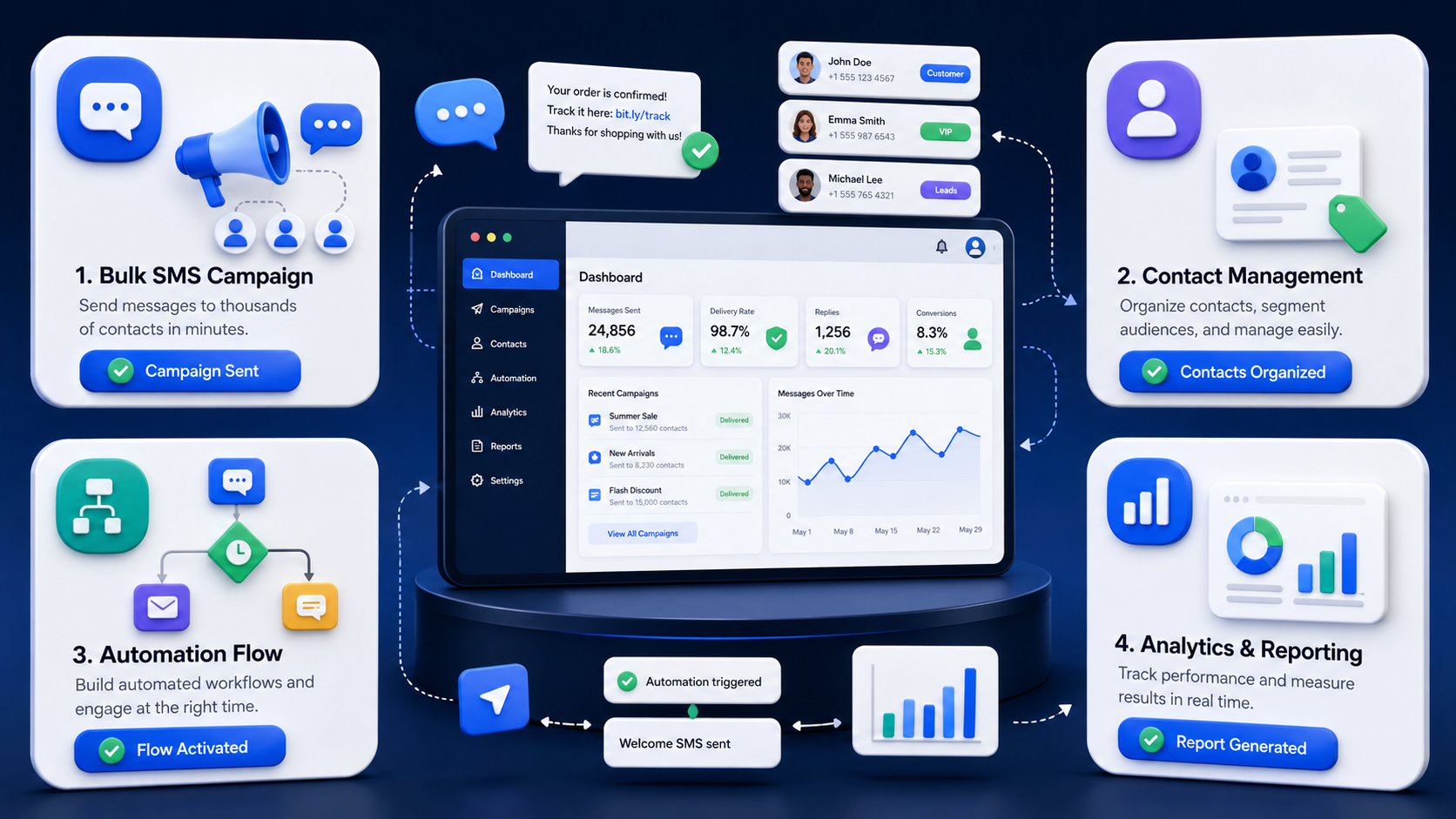
Send One-Time Campaigns and Bulk SMS
SMS marketing software helps you send one-time campaigns and bulk SMS from one dashboard. You can use it to promote a sale, announce a launch, remind customers about an event, or share a limited-time offer with a large audience in minutes. That speed is one reason businesses use sms marketing when they need direct communication.
For a beginner, one-time campaigns are the easiest place to start. You build one message, choose one audience, set a send time, and monitor what happens next. Bulk sending also saves time because you do not need to text each contact by hand.
Organize Contacts with Lists, Tags, and Segments
SMS marketing software helps you keep your audience organized so each message goes to the right people. Most platforms let you separate contacts into lists, apply tags, and build segments based on behavior or business needs.
Lists are broad groups. Tags are short labels. Segments are filtered audiences. For example, you may have one master list, then tags like “new lead,” “repeat buyer,” or “VIP.” After that, you can create segments like recent buyers, inactive customers, or people interested in a specific product line.
Automate Simple Replies and Scheduled Messages
SMS marketing software helps you automate basic communication without making the setup too complicated. Beginners often start with scheduled sends and simple reply flows.
A scheduled send lets you prepare a message in advance and choose when it should go out. A simple reply flow can send an instant text after someone subscribes, asks for store hours, or texts a keyword.
Track Delivery, Clicks, Replies, and Opt-Outs
SMS marketing software helps you track what happened after a campaign goes out. That includes delivery results, clicks, replies, and opt-outs.
This matters because sending a campaign is only the first step. You also need to know if the message reached people, if they interacted with it, and if the campaign created a useful result for your business.
How Do You Set Up SMS Marketing Software for the First Time?
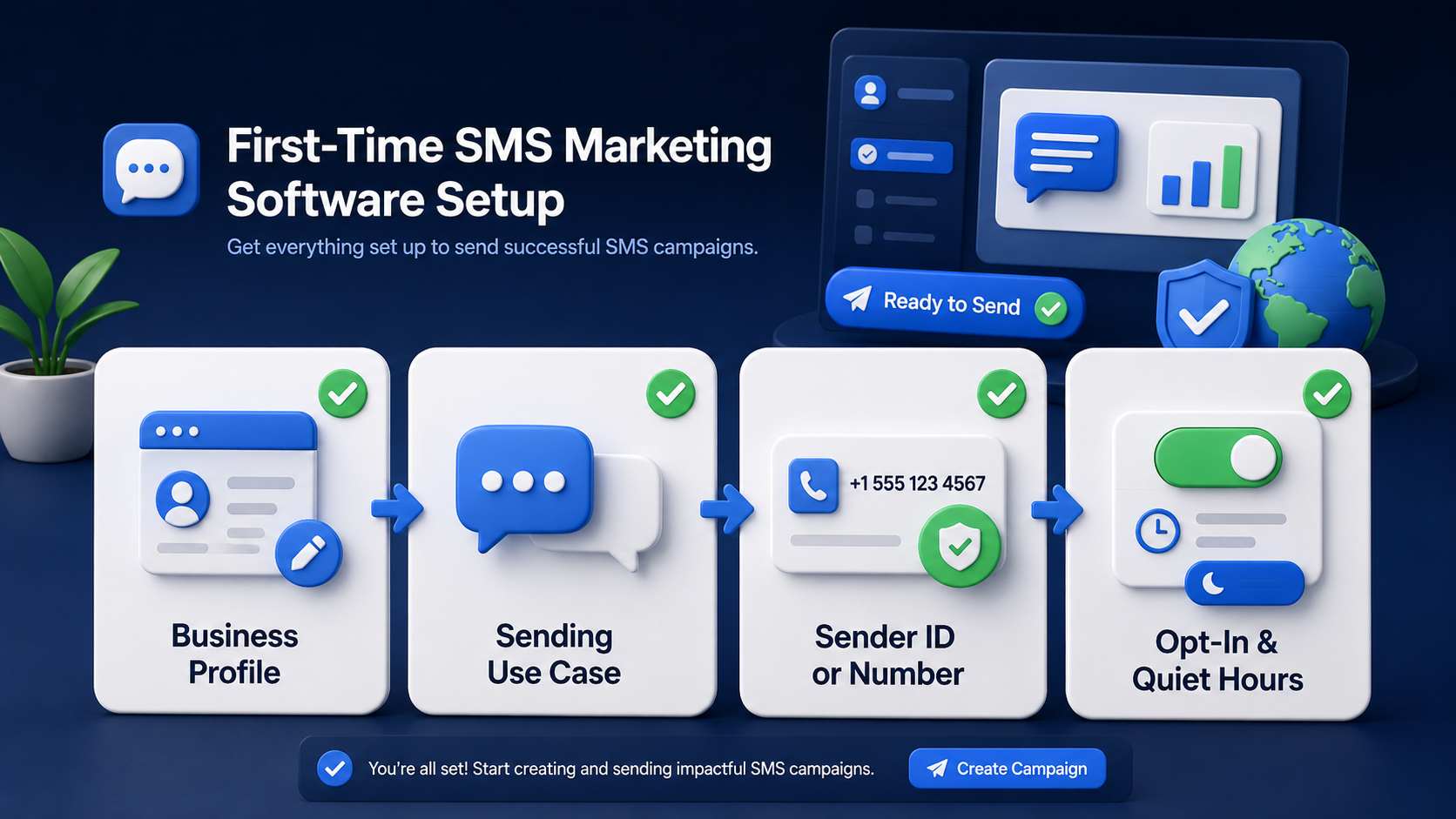
Setting up SMS marketing software for the first time means building a clean contact list, choosing your sender settings, and creating simple automated campaigns.
Verify Your Business Profile and Sending Use Case
You should verify your business profile and sending use case before you launch your first campaign. Start by being clear about what kind of messages you plan to send.
Some businesses send promotional offers. Others send verification codes, order alerts, reminders, or account notifications. Each use case has different goals, and that affects how you set up your sending flow.
Choose the Right Sender ID, Number, or Route
You should choose the right sender setup before sending because delivery quality depends on it. Your sender may be a number, an approved sender name, or another route based on country and use case.
The right choice depends on where you are sending, whether you need replies, and what type of message you are delivering. Businesses that need two-way communication often need a setup that supports replies. Businesses focused on brand visibility may prefer a sender name where allowed.
Turn On Opt-In, Unsubscribe, and Quiet Hour Settings
You should turn on opt-in, unsubscribe, and quiet hour settings before you send your first campaign. These settings protect both your brand and your audience.
Opt-in means the contact agreed to receive messages from you. Unsubscribe settings give them a clear way to stop receiving texts. Quiet hours help prevent sending messages too early or too late.
How Do You Build and Import Your SMS Contact List?
Building and importing your SMS contact list starts with gathering permission-based customer data in a clean, organized format.
Import Contacts Who Already Gave Consent
You should only import contacts who already gave consent to receive SMS from your business. A clean list is always better than a large list with weak permission.
This means the contact should have signed up through a form, agreed during checkout, subscribed through a campaign, or given permission through another clear method. Do not treat an old phone list as an SMS list just because you already have the numbers.
Collect New Subscribers with Forms, Popups, or Keywords
You should collect new subscribers through forms, popups, or keywords if you want to grow your list the right way. These methods make the sign-up process clear and easy.
A website form can collect phone numbers from people who want offers or updates. A popup can invite visitors to subscribe in exchange for a discount or early access. A keyword can let someone text a word like JOIN, DEAL, or START to begin the process.
Organize Your Audience with Lists, Tags, and Segments
You should organize your audience before sending your first campaign so your messages stay relevant. Even a basic structure can make a major improvement in campaign quality.
A strong beginner setup may look like this:
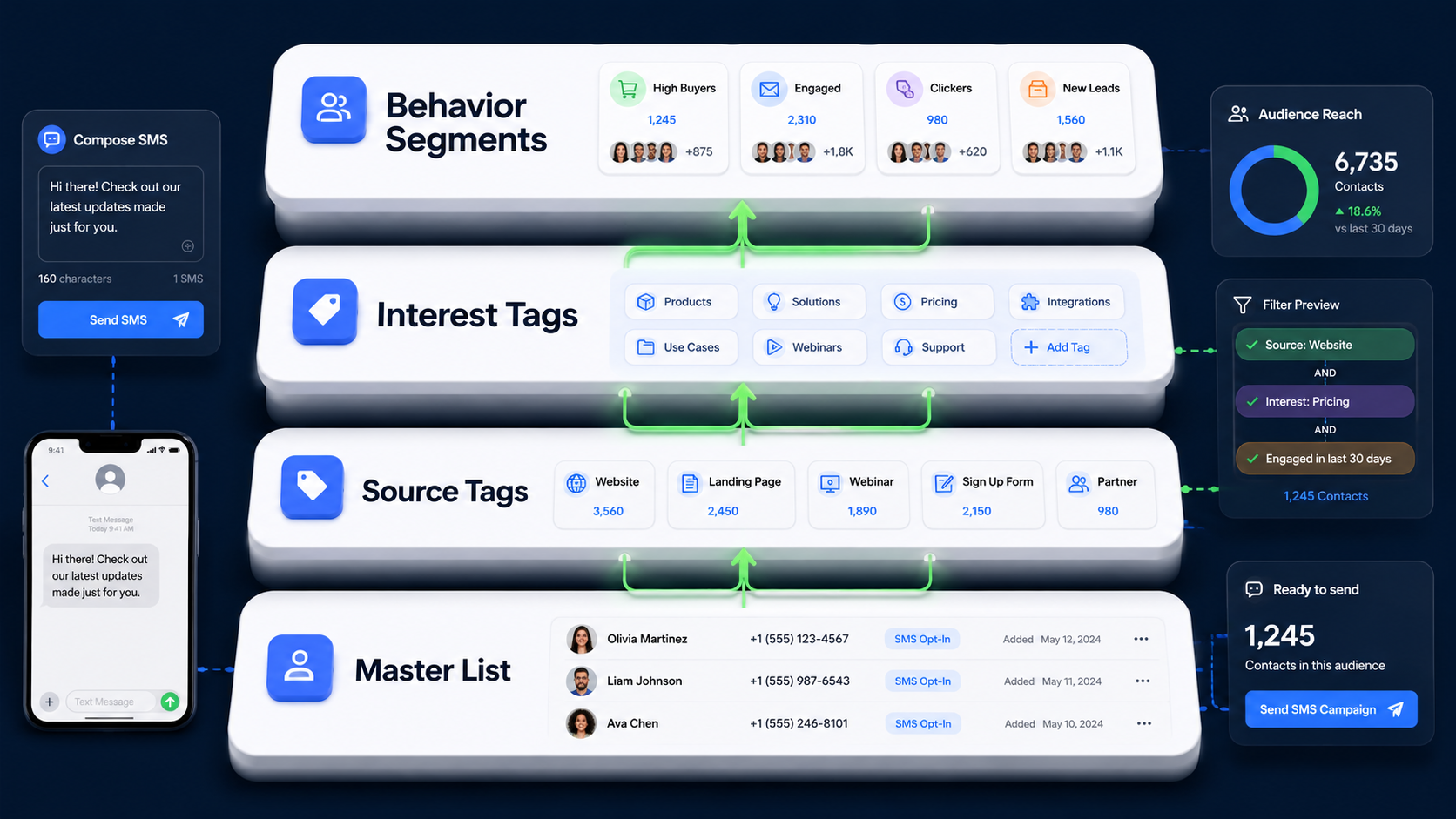
SMS contact organization usually works best with these 4 simple layers:
- Master List: Keep all subscribed contacts in one main database so you have one clean place to manage your audience.
- Source Tags: Add labels like website form, popup, checkout, webinar, or event signup so you know where each contact came from.
- Interest Tags: Mark contacts by interest, such as shoes, electronics, skincare, or logistics updates, so you can send more relevant texts.
- Behavior Segments: Build filtered groups like recent buyers, inactive customers, VIP customers, or first-time leads for campaign targeting.
How Do You Send Your First SMS Campaign?
Sending your first SMS campaign starts with choosing the right audience, writing a clear message, and setting the best time to send it.
Choose One Goal Before You Build the Campaign
You should choose one goal before building the campaign because it keeps everything else clear. A beginner campaign works best when it has one purpose.
That goal might be getting clicks to a product page, driving sales for one offer, bringing back inactive customers, or collecting replies from new leads. Once you know the goal, the rest becomes easier. You can write the message faster, choose the audience better, and review the results more clearly.
Write a Short SMS with One Clear Offer or CTA
You should write a short SMS with one clear offer or CTA because long messages usually perform worse. SMS works best when the message is easy to scan in a few seconds.
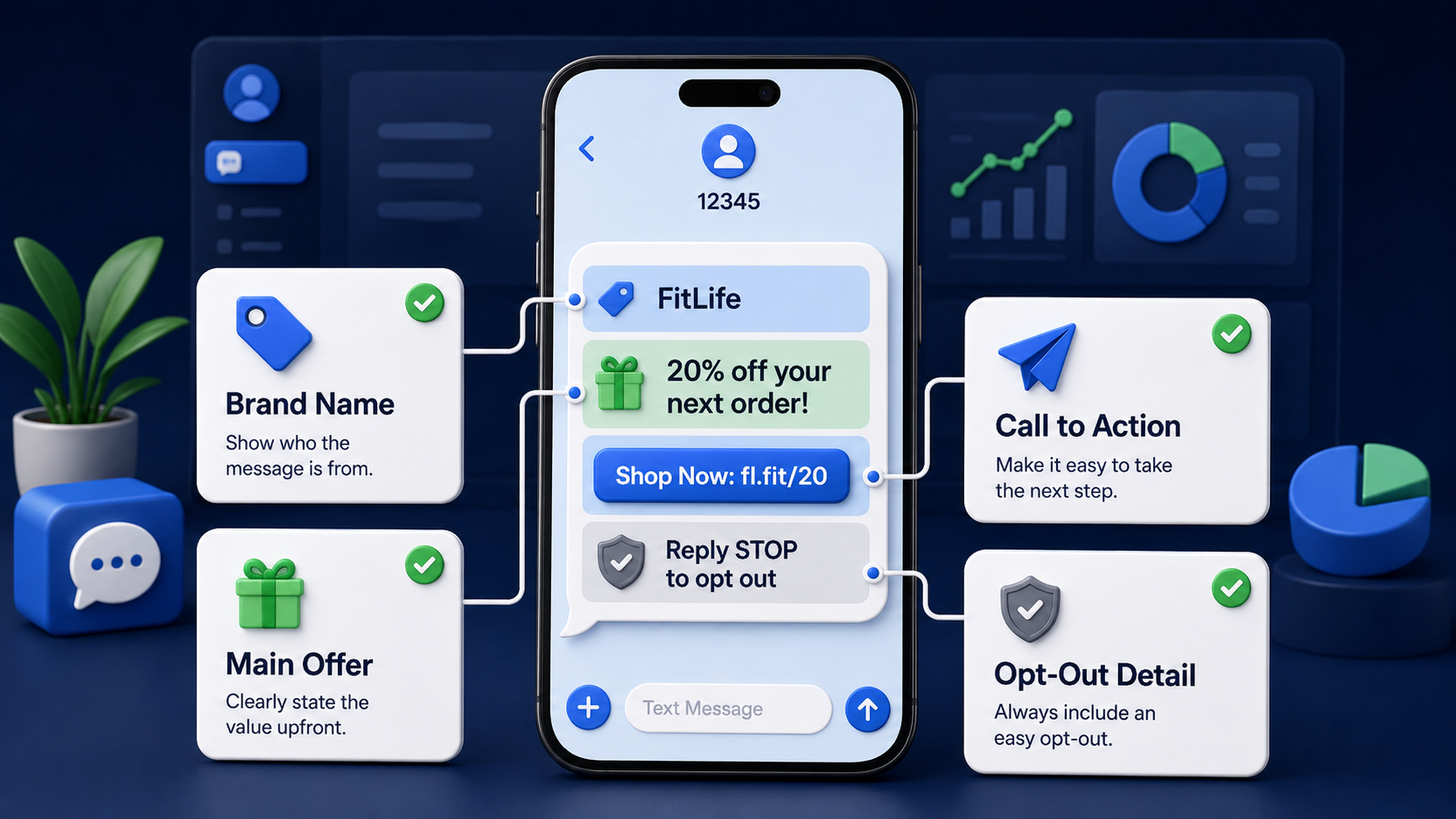
A good beginner message often includes 4 parts:
- Brand Name: Tell the reader who the message is from right away.
- Main Offer: Give one clear reason to pay attention, such as a discount, reminder, update, or limited-time benefit.
- Action Step: Ask the reader to do one thing, like click, reply, shop, confirm, or register.
- Opt-Out Detail: Include a clear unsubscribe option when needed.
Pick the Right Audience, Time Zone, and Send Time
You should pick the right audience, time zone, and send time before launching the campaign. Even a strong message can underperform if it reaches the wrong people or arrives at the wrong hour.
Start with one segment, not your whole database. Then choose a send time that fits the audience’s local day. If your contacts are spread across multiple countries, separate them by time zone before sending.
Test Number Format, Message Content, Links, and Opt-Out Details Before Sending
You should test number format, message content, links, and opt-out details before sending the full campaign. Testing helps you catch small errors before they affect a large audience.
Check the country code first. Then review the copy, make sure the link works, and confirm that your opt-out wording appears correctly. Also send a few test messages to real devices so you can see how the text looks in practice.
How Do You Set Up Your First SMS Automation?
Setting up your first SMS automation means creating messages that send automatically based on customer actions or timing.
Build a Simple Welcome Text for New Subscribers
You should build a simple welcome text first because it is the easiest automation for beginners. A welcome text confirms the subscription and sets expectations.
It should tell the subscriber who you are, what kind of messages they will receive, and what to do next. You can also include a first offer if it fits your brand.
Here is a simple structure:
- Greeting: Welcome the subscriber and confirm the signup.
- Brand Identification: State your business name clearly.
- Expectation Setting: Explain what type of texts they will receive.
- Next Step: Share a discount, link, reply option, or short action.
- Unsubscribe Info: Tell them how to opt out if needed.
Set Up a Keyword Auto-Reply for Common Requests
You should set up a keyword auto-reply for common requests after your welcome message is live. Keyword replies are one of the easiest ways to make SMS feel more useful without building a large automation system.
Common starter keywords include JOIN, HELP, HOURS, TRACK, DEAL, and START. Each keyword should lead to one short and useful reply.
For example:
- JOIN: Confirm subscription and explain what messages the user will receive.
- HELP: Share support details, working hours, or a support link.
- HOURS: Send business opening hours and location info.
- TRACK: Explain how customers can check an order or shipment.
- DEAL: Share the latest offer or landing page.
How Do You Track SMS Campaign Results?
Tracking SMS campaign results helps you see what is working and where you need to improve. Most SMS marketing software lets you monitor key data like delivery rates, click rates, conversions, and customer responses in one place.
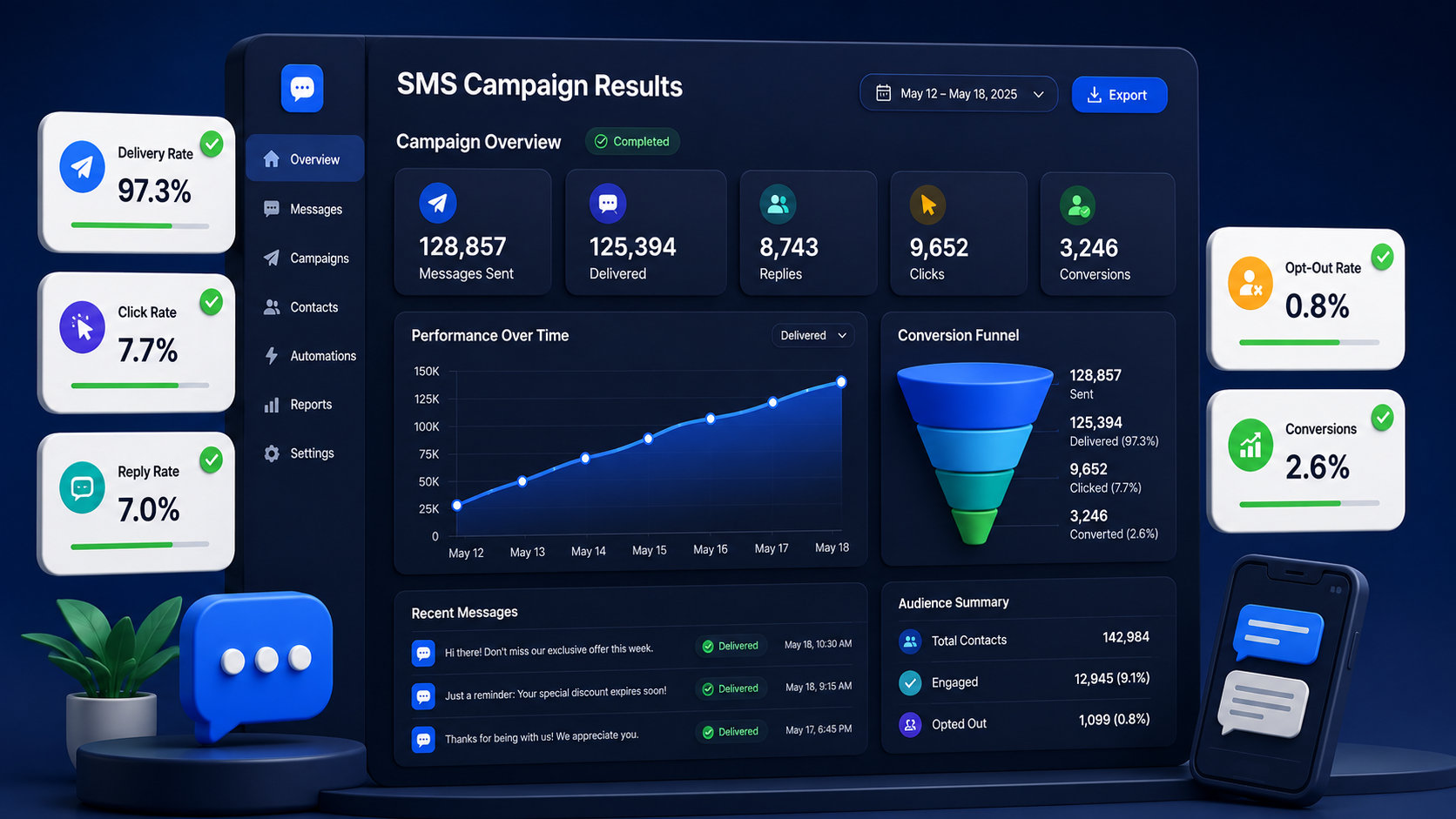
Watch Delivery Rate, Click Rate, Reply Rate, and Opt-Out Rate
You should watch delivery rate, click rate, reply rate, and opt-out rate after every campaign. These numbers show whether the campaign was healthy and whether people cared about the message.
Delivery rate shows how many messages reached the destination. Click rate shows how many people interacted with your link. Reply rate shows conversation interest. Opt-out rate shows whether the message felt unwanted or too broad.
Learn What a Good First Campaign Report Looks Like
A good first campaign report should be easy to read and easy to use. You do not need a complicated spreadsheet to learn from your first send.
A simple report should include:
- Audience Size: Show how many contacts were targeted in the campaign.
- Send Time: Record the date, time, and time zone used for the campaign.
- Message Version: Keep the exact text that was sent for future comparison.
- Delivery Result: Note how many messages were delivered or failed.
- Engagement Result: Track clicks, replies, and opt-outs in one place.
- Business Outcome: Measure one real outcome, such as leads, sales, or bookings.
What Mistakes Should Beginners Avoid?
Beginners should avoid common SMS marketing mistakes like sending without consent, targeting the wrong audience, or writing unclear messages.
Using Contacts Without Clear Opt-In
Using contacts without clear opt-in is one of the biggest beginner mistakes in SMS marketing. It weakens trust and often leads to poor engagement.
Sending Long Messages with Too Many Links
Sending long messages with too many links is another common mistake. It makes the text harder to read and can lower response quality.
Blasting the Same Message to Everyone
Blasting the same message to everyone usually reduces relevance. A broad campaign may feel easier to send, but it often performs worse than a targeted one.
Frequently Asked Questions
How much does SMS marketing software cost?
SMS marketing software cost depends on message volume, destination country, sender setup, route quality, and business needs. Some businesses only need occasional campaigns. Others send large-scale messages across multiple regions.
Do I need technical skills to use SMS marketing software?
No, you do not need strong technical skills for a basic SMS campaign setup. Most beginners can learn the main workflow quickly: import contacts, write a message, schedule or send it, and check the results.
Why isn’t my test SMS being received?
A test SMS may not be received because of number formatting errors, content restrictions, sender setup issues, or temporary device and signal problems.
Can I connect SMS marketing software with my CRM or Shopify store?
Yes, SMS marketing software can often connect with a CRM, e-commerce setup, or other business systems. The exact method depends on the platform and integration options available.
Final Thought
Learning How to Use SMS Marketing Software does not need to feel complicated. Start with the basics: choose the right setup, collect consent, build a clean list, write one focused message, test it carefully, and track the result. Once that process feels easy, you can expand into automation, deeper segmentation, and better campaign reporting.
If you want a business-focused platform for global messaging, SMS Boosting gives you a practical place to start. A good sms marketing service should help you send with more control, better organization, and clearer reporting. Start small, keep the workflow clean, and build from there.



