

A transactional SMS API helps teams send automated service messages reliably only when the workflow covers more than the send request. The reliable path runs from business trigger and payload design to delivery receipts, status callbacks, logs, monitoring, and failure handling.
One technical mistake creates many later problems: treating a successful API response as proof that the message reached the user. In most production systems, that is too early to stop watching. The API may have accepted the request, queued the message, or passed it into the next part of the delivery chain, but the message still has to move through routing, carrier handoff, and device-level delivery conditions.
For developers, product engineers, and technical operators, the task is not only to “send SMS through an API.” It is to build a transactional SMS API workflow that can be triggered automatically, tracked after sending, diagnosed when something breaks, and monitored after launch.

Why a Transactional SMS API Request Success Does Not Mean Delivery
A transactional SMS API request can succeed before the message is actually delivered, so teams need delivery receipts, callbacks, or logs to confirm what happened after sending. Vonage’s delivery receipt documentation makes this distinction directly: a successful SMS API request means the message has been queued for sending, not that it has reached the recipient. [1]
That difference matters in production. If your application treats the first successful response as the end of the workflow, the system may mark an order alert, account warning, or verification message as complete before the user ever receives it. The real delivery result may arrive later through a delivery receipt, a status callback, or a log entry.
We’ve seen teams treat a successful API response as the finish line, then discover the real issue later in missing callbacks, delayed carrier handoff, or failure reasons that were never logged. The code “worked.” The operation did not.
What API Acceptance Means in the Message Lifecycle
API acceptance usually means the provider has received the request and can start processing it. It does not always mean the downstream network accepted the message, the carrier delivered it, or the user’s device received it.
A basic lifecycle may include several layers:
- Accepted by the API
- Queued for processing
- Sent toward the carrier
- Delivered, failed, rejected, expired, or left without a final signal
This is why transactional SMS API reliability has to be measured after the initial request. The send call starts the process. It does not close the loop.
Where SMS Delivery Receipt, Status Callback, and DLR Signals Enter the Workflow
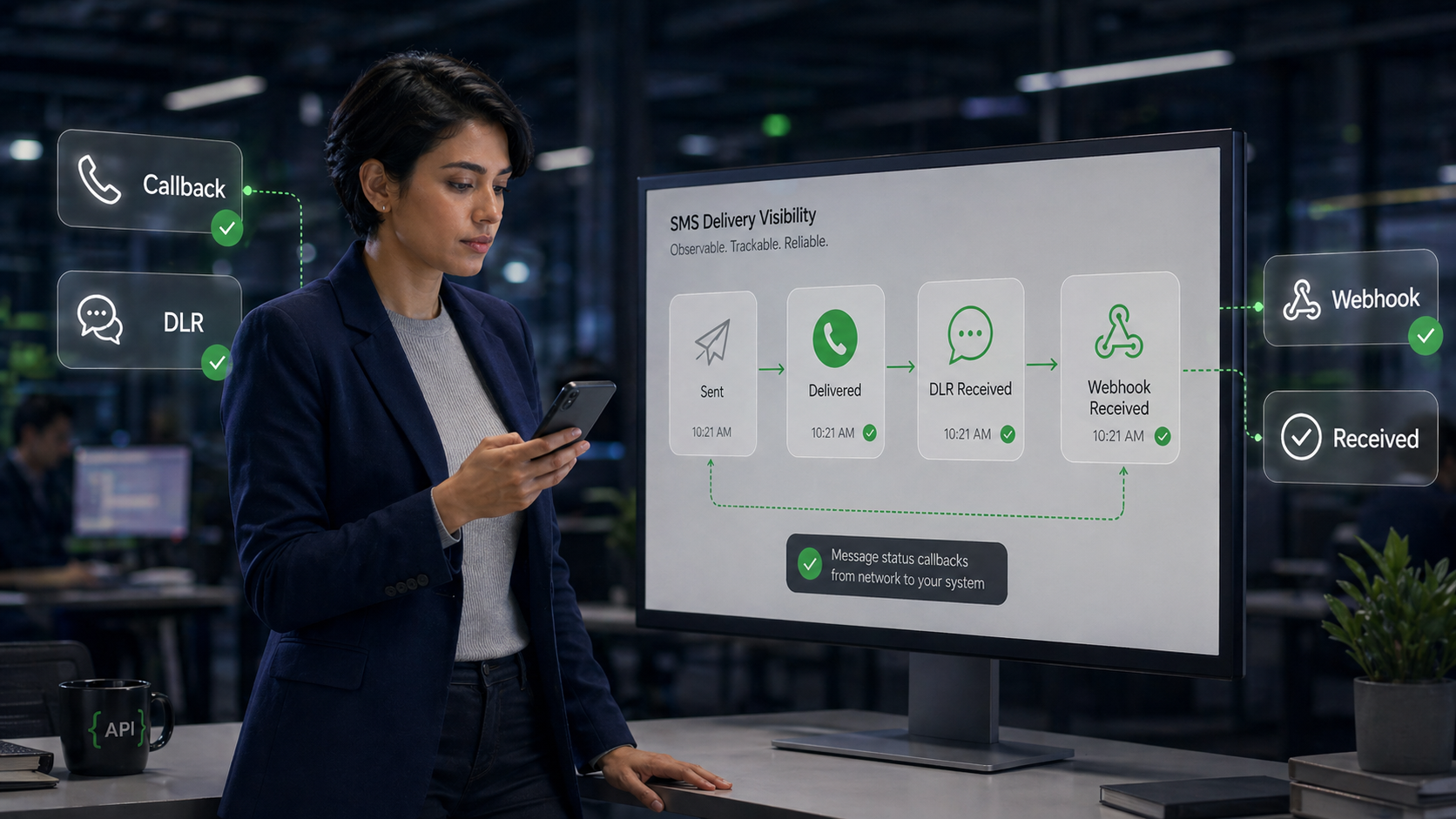
SMS delivery receipt, status callback, and DLR signals enter after the send request. They help your system understand whether the message moved forward, failed, or reached a final delivery state.
Twilio’s status callback documentation explains that outbound message status changes occur through the message lifecycle and can be tracked programmatically through status callbacks. [2] In practice, this means your application should not only send a message. It should also receive, store, and interpret the later status signals.
How a Transactional SMS API Workflow Moves From Trigger to Carrier Handoff
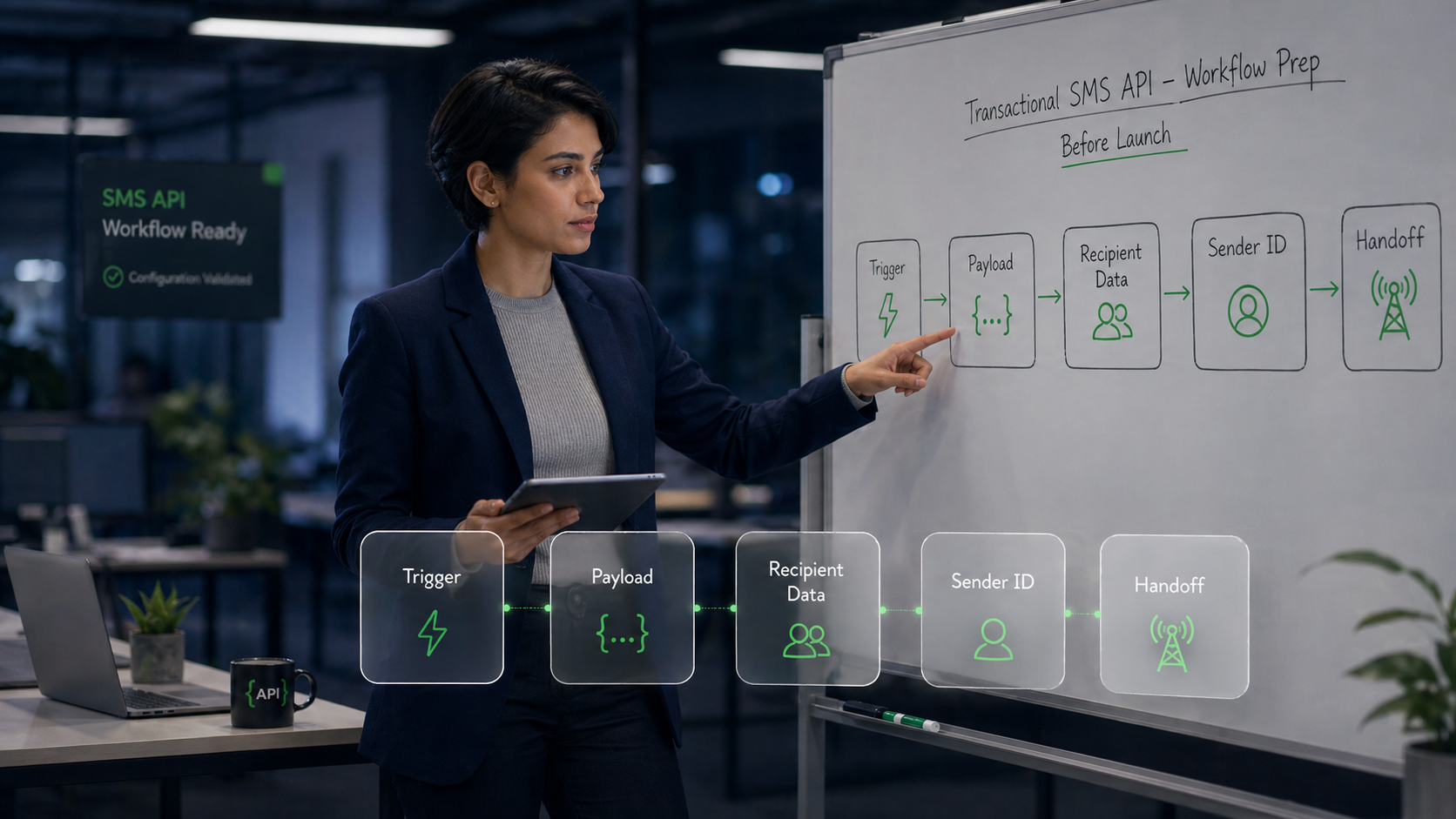
A reliable transactional SMS API workflow connects the business trigger, message payload, send request, routing path, and delivery feedback into one traceable chain. The more important the message is, the less acceptable it is to leave any part of that chain invisible.
For this article, “transactional” does not mean a full overview of transactional SMS use cases. If you need that broader foundation first, read Transactional SMS: What It Is, How It Works, and Why Businesses Use It. Here, the focus is narrower: system-triggered messages tied to a service event, such as an order update, account alert, payment notice, or verification message. Those examples are only triggers here. The main subject is the API workflow behind them.
Business Trigger and Message Condition
The workflow starts with a business trigger. A user requests a password reset. A payment status changes. A shipment is delayed. An account risk rule fires.
That trigger should also include a condition. Not every event should send a message. A strong transactional SMS API integration checks whether the message is needed, whether the user has a reachable phone number, whether the message type is appropriate for SMS, and whether sending is allowed under the relevant consent and classification rules.
A simple question helps: what event must happen before this message is allowed to send?
Payload, Recipient Data, and Sender Setup
After the trigger, the system prepares the payload. This usually includes recipient number, sender identity, message content, template variables, callback URL, and any internal message ID used for logging.
For SMS API integration, three payload details deserve special care:
- Validate recipient numbers in the expected format.
- Keep template variables predictable and safe.
- Attach an internal message ID so later callbacks can be matched to the original event.
Sender setup also affects reliability. A sender identity that works in one market may not behave the same way in another. A transactional SMS API workflow should treat sender configuration as part of implementation readiness, not as an afterthought.
Send Request, Queueing, and Carrier Handoff
The send request moves the message from your application into the SMS delivery chain. From there, the message may be queued, processed, routed, and handed off toward a carrier.
This is the point where many teams lose visibility. They know the request was accepted, but they do not know whether the message was delayed, rejected, expired, or delivered. That is why the next part of the workflow matters as much as the send call itself.
How SMS Status Callback, DLR, and SMS Webhook Signals Track Delivery
SMS status callbacks, DLRs, and webhooks help teams track whether a message was queued, sent, delivered, failed, expired, or delayed. They turn transactional SMS API sending from blind automation into measurable operations.
These signals are not cosmetic reporting fields. They are the feedback layer that lets a technical operator decide whether the workflow is healthy.
SMS Status Callback for Message Lifecycle Changes
An SMS status callback is usually an HTTP request sent to your application when the message changes status. It may report events such as queued, sent, delivered, failed, or undelivered, depending on the provider and message path.
Twilio describes status callbacks as a way to track outbound message status changes throughout the lifecycle of a message sent with Programmable Messaging. [2] For a transactional SMS API, this is useful because the application can update internal records after the send request, rather than assuming success too early.
A good callback handler should:
- Accept the callback reliably.
- Validate that the callback matches a known message.
- Store the status change with a timestamp.
- Preserve the provider message ID and internal event ID.
- Avoid breaking if the same status is received more than once.
SMS Delivery Receipt and DLR Interpretation
A delivery receipt, often called a DLR, provides a delivery status update after the message is processed downstream. It may confirm delivery, show failure, or indicate another final state depending on the carrier and provider.
DLRs are valuable, but they should not be treated as perfect truth in every market and every route. Delivery reporting can vary by carrier, country, message type, and route behavior. That does not make DLRs useless. It means teams should interpret them as operational signals, not as a complete observability system by themselves.
The stronger approach is to combine DLR data with request logs, callback health, failure reasons, latency trends, and customer-facing symptoms.
SMS Webhook Endpoint Reliability
An SMS webhook endpoint is only useful if it is reliable. If the endpoint times out, rejects provider requests, loses events, or cannot match callbacks to internal records, the delivery tracking layer becomes weak.
Webhook reliability checks should include:
- Response status behavior
- Timeout handling
- Signature or request validation where supported
- Idempotency for repeated callbacks
- Logging for malformed or unmatched events
- Alerting when callback volume drops unexpectedly
In short: a webhook is not just a URL. It is part of the production path.
Which Reliability Factors Affect Automated SMS Messaging After the API Call
Automated SMS messaging reliability depends on routing, sender setup, throughput, latency, retry logic, duplicate control, expiry rules, and message classification. The API call is only one layer.
This is where teams should avoid a narrow engineering view. Reliability is not only whether the request syntax is correct. It is whether the message can move through the operational environment under real traffic, real regions, and real edge cases.
| Reliability factor | Why it matters | What to check |
|---|---|---|
| Routing | Different routes and regions can behave differently. | Check delivery behavior by country, carrier, and message type. |
| Sender identity | Sender setup affects trust, filtering, and delivery behavior. | Validate sender ID, long code, short code, or other sender options before launch. |
| Throughput | High-volume bursts can create queueing or delays. | Confirm rate limits, queue behavior, and expected peak traffic. |
| Latency | Transactional messages often lose value when delayed. | Monitor request-to-callback time and dwell time where available. |
| Retry logic | Poor retries can create duplicate or late messages. | Retry only when the failure type justifies it. |
| Duplicate prevention | A repeated trigger may send the same alert twice. | Use idempotency keys or internal event IDs. |
| Message expiry | Old messages can become harmful or confusing. | Set expiry rules for time-sensitive messages where supported. |
| Classification | Mixed-purpose content can create filtering or compliance risk. | Keep transactional messages tied to service events, not promotional action. |
Routing, Sender Identity, and Regional Delivery Behavior
Routing and sender identity are not provider-selection topics in this article. They are implementation factors that affect whether an API-based workflow behaves reliably after launch.
A team sending account alerts across multiple countries may see different delivery patterns by region. A sender that performs well for one traffic type may not be appropriate for another. Technical operators should record these differences instead of treating global SMS delivery as one uniform path.
Throughput, Rate Limits, and Latency
Throughput planning matters when transactional volume spikes. Password reset requests, payment notices, logistics updates, or security alerts may arrive in bursts. If the workflow cannot handle burst traffic, messages may queue or arrive too late to be useful.
Latency should be measured as a workflow metric, not only as an API response time. A fast API response paired with slow downstream delivery is still a poor user experience.
Retry Logic, Duplicate Prevention, and Message Expiry
Retry logic needs discipline. Retrying every uncertain status can create duplicate messages. Never retrying can leave users without important notices.
The safer pattern is to make retry decisions based on failure type, time sensitivity, and user impact. For example, a verification message may need a short expiry window, while a non-urgent account notice may tolerate a different handling path.
Duplicate prevention is just as important. Use internal event IDs, message IDs, or idempotency logic so the same business trigger does not create repeated sends.
Message Classification and A2P Boundary Control
A transactional SMS API workflow should keep message classification clean. CTIA’s Messaging Principles and Best Practices explain that messages are categorized as Consumer or Non-Consumer depending on the message sender, and that messaging by a business, organization, or someone acting on its behalf is considered Non-Consumer messaging. [4]
For technical teams, the practical point is simple: keep transactional messages tied to expected service events. Do not mix account alerts with promotional copy. Do not turn a shipping update into an upsell. That kind of drift can create filtering, trust, and compliance problems.
If your team is still clarifying the content boundary, Promotional vs Transactional SMS: Key Differences and When to Use Each explains how message purpose affects classification.
How SMS API Monitoring Turns Delivery Logs Into Operational Decisions
SMS API monitoring turns delivery logs and error signals into operational decisions that help teams detect failures before users report them. Without monitoring, the team may only learn about delivery problems from support tickets.
AWS SNS documentation states that CloudWatch Logs can collect information about successful and unsuccessful SMS deliveries, including message price, success or failure status, failure reason, dwell time, and other information. [3] That kind of visibility helps teams move from “messages were sent” to “we know how the delivery workflow is behaving.”
Delivery Logs and Error Reasons
Delivery logs help technical operators inspect what happened after the send request. At minimum, logs should preserve message ID, recipient region, sender identity, request time, status changes, error reason, callback time, and final known state.
The goal is not to store logs for decoration. The goal is to answer real questions quickly:
- Did the message fail before or after carrier handoff?
- Is the issue limited to one region?
- Did callback volume suddenly drop?
- Are failures tied to one sender identity?
- Did latency increase during a traffic spike?
Latency, Callback Gaps, and Regional Changes
Monitoring should include more than delivery rate. Delivery rate alone can hide operational problems.
Technical operators should watch latency, callback gaps, failure reasons, and regional changes. A stable delivery rate with slower delivery may still hurt verification, payment, or security workflows. A sudden callback drop may mean the webhook endpoint is failing, not that message delivery improved.
Not every signal will explain everything. That is normal. The point is to have enough signals to investigate without guessing.
Alerting and Escalation Rules for Technical Operators
Monitoring becomes useful when it creates action. If delivery failures rise in one country, someone should know. If callback volume drops, someone should inspect the webhook. If latency crosses an agreed threshold, the team should check queueing, routing, or provider-side status.
Define alerting around operational impact:
- Failure rate by region or sender
- Delivery latency above expected range
- Missing or delayed callbacks
- Webhook error rate
- Repeated unknown or expired statuses
- Sudden change in message volume
Escalation rules should also be clear. A developer may own webhook errors. A technical operator may own monitoring review. A support lead may need visibility when user-facing incidents begin. Reliability is shared, but ownership cannot be vague.
Transactional SMS API Implementation Checklist Before Production
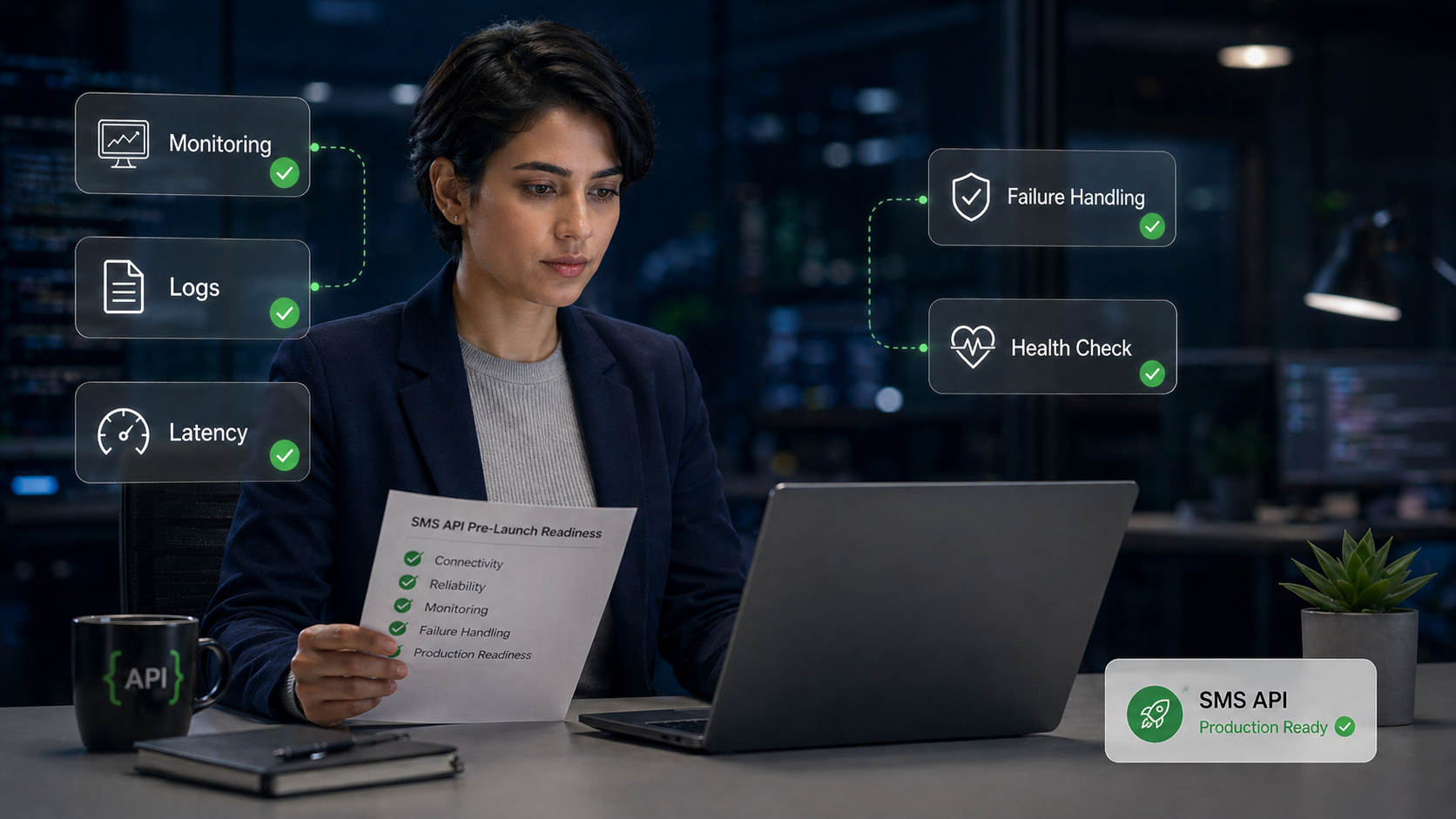
A transactional SMS API should be tested across triggers, payloads, sender setup, webhook responses, logs, monitoring, and failure handling before production. The checklist should prove that the workflow can be operated, not only that one message can be sent.
Use this transactional SMS API implementation checklist before scaling automated sending:
- Validate the business trigger and confirm when a message should not be sent.
- Validate recipient number format, sender setup, and message template variables.
- Test the API send request with realistic payloads, not only sample text.
- Test status callback, DLR, and SMS webhook handling from end to end.
- Confirm internal message IDs can connect trigger, request, callback, and log records.
- Confirm logs include status, timestamps, failure reasons, and region-level context.
- Monitor delivery latency, callback gaps, webhook errors, and failure categories.
- Review retry logic, duplicate prevention, and message expiry rules.
- Review message classification so transactional content does not become promotional.
- Confirm who owns investigation when delivery behavior changes.
Test the Trigger-to-Callback Path
Do not test only the send endpoint. Test the full trigger-to-callback path.
That means creating a real business event, generating the message payload, sending through the API, receiving the callback or DLR, updating internal records, and confirming the final status appears in logs or dashboards.
Validate Sender Setup, Payload Rules, and Webhook Responses
Sender setup, payload rules, and webhook behavior should be validated before launch. These are common points of failure because they sit between product logic, engineering implementation, and delivery operations.
A payload that looks acceptable in a test environment may fail in a specific country. A webhook that works during one manual test may fail under burst traffic. A sender setup that looks complete may not be ready for the message type or region.
Confirm Logs, Monitoring, and Failure Handling
Before production, confirm that the team can answer one uncomfortable question: if messages fail tomorrow, how will we know why?
If the answer depends on manually searching scattered systems, the integration is not ready. Logs, monitoring, and failure handling should be part of the transactional SMS API launch plan.
FAQ About Transactional SMS API Reliability
What is a transactional SMS API used for?
A transactional SMS API is used to send automated service messages triggered by user or system events. Common examples include order updates, account alerts, payment notices, and verification messages. The API lets a business system send these messages programmatically instead of manually. For reliability, the same workflow should also track delivery status and failure signals.
How does a transactional SMS API send automated messages?
A transactional SMS API sends automated messages by connecting a business trigger to a message payload and an API request. For example, a password reset request can trigger a verification message with a recipient number, sender identity, template text, and callback URL. After the request is accepted, the message moves through queueing, routing, and carrier handoff. The workflow should then capture status callbacks, DLRs, or logs.
Does a successful SMS API request mean the message was delivered?
A successful SMS API request does not always mean the message was delivered. It may mean the request was accepted or queued for sending, while the delivery result arrives later through a delivery receipt, callback, or log entry. That is why transactional SMS API reliability should not stop at the send response. Teams need post-send tracking to confirm the final known state.
What is the difference between an SMS status callback and a delivery receipt?
An SMS status callback is the mechanism that sends message status updates to your application, often through a webhook URL. A delivery receipt, or DLR, is a delivery status signal that reports what happened after the message moved through the delivery path. In many implementations, DLR information may be delivered to your system through a callback or webhook. The exact fields and status values depend on the provider and route.
What should developers monitor after a transactional SMS API goes live?
Developers and technical operators should monitor delivery status, failure reasons, delivery latency, callback gaps, webhook errors, and regional delivery changes after a transactional SMS API goes live. For example, a sudden drop in callbacks may indicate a webhook issue, while rising failures in one country may point to a routing or sender problem. Monitoring should also include duplicate sends, expired messages, and retry behavior. These signals help the team detect delivery problems before users report them.
How can teams reduce failed or delayed transactional SMS messages?
Teams can reduce failed or delayed transactional SMS messages by testing the full workflow before production and monitoring delivery behavior after launch. They should validate triggers, recipient formatting, sender setup, payload rules, callback handling, logs, retry logic, and message expiry. They should also keep transactional content focused on expected service events instead of mixing it with promotional copy. Reliability improves when sending, tracking, and monitoring are treated as one production workflow.
Review Your Transactional SMS API Integration Readiness Before Scaling
Teams should reassess transactional SMS API readiness before scaling if routing, delivery tracking, webhook health, or monitoring is difficult to verify. A workflow that sends a few test messages successfully may still fail under higher volume, more regions, or more complex business triggers.
When Routing, Delivery Tracking, and Monitoring Need a Second Look
Your transactional SMS API integration needs a second look if the team cannot answer these questions with evidence:
- Which business event triggered the message?
- Which payload was sent?
- Which sender identity was used?
- What was the latest delivery status?
- Did the callback arrive?
- What failure reason was logged?
- Which region or route changed?
- Who owns the next investigation step?
If those answers are unclear, scaling traffic will usually make the problem harder to diagnose.
How a Soft API Readiness Review Supports Reliable Automated Messaging
A soft API readiness review does not need to become a vendor replacement project. It can simply check whether your transactional SMS API workflow is ready for production: routing expectations, delivery tracking, webhook handling, monitoring, failure response, and integration ownership.
If your team is preparing to scale automated transactional messages across regions, SMSBoosting can help review the delivery and monitoring side of the workflow. The goal is practical: make sure the API path can be tracked, operated, and improved before message failures affect users.
References
[1] Vonage Developer Documentation — SMS Delivery Receipts API Guide.
[2] Twilio Documentation — Track the Message Status of Outbound Messages / Outbound Message Status in Status Callbacks.
[3] AWS Documentation — Amazon SNS SMS Delivery Monitoring with Amazon CloudWatch Logs.
[4] CTIA — Messaging Principles and Best Practices, May 2023.



